EasyManua.ls Logo

Lear Siegler ADM 3A - Page 34

Default Icon
54 pages
Print Icon
To Next Page IconTo Next Page
To Previous Page IconTo Previous Page
Loading...
____
LEAR SIEGLER, tHC.
DATA PRODUCTS DIVISION
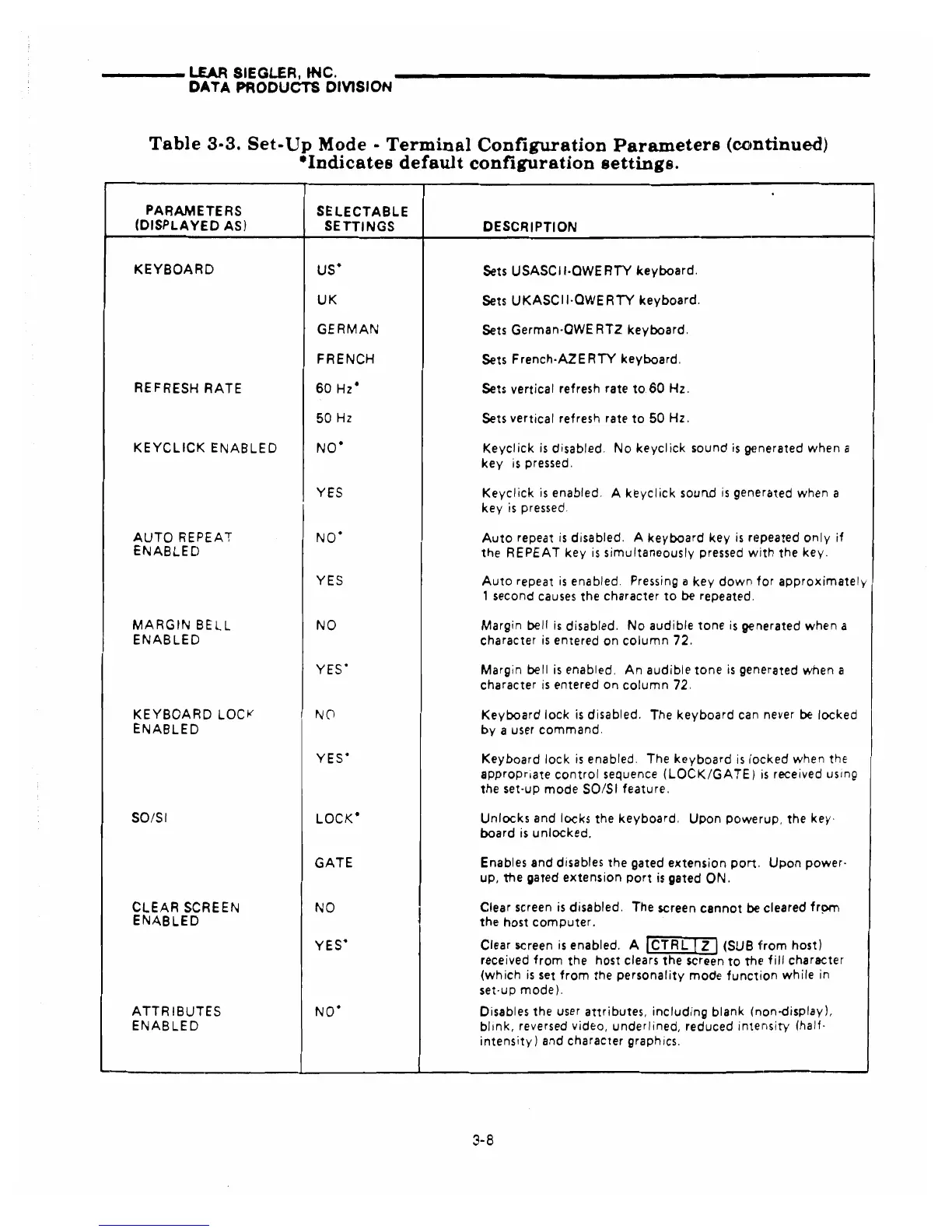
Table
3-3.
Set-
Up
Mode -
Terminal
Configuration
Parameters
(continued)
-Indicates
default
configuration
settings.
PARAMETERS
SELECTABLE
(DISPLAYED
AS)
SETTINGS
DESCRIPTION
KEYBOARD
us· Sets USASC
II·OWE
RTY
keyboard.
UK
Sets
UKASCII·OWERTY
keyboard.
GERMAN
Sets
German·OWERTZ
keyboard.
FRENCH
Sets
French·AZERTY
keyboard.
REFRESH
RATE
60
Hz·
Sets vertical refresh rate
to
60
Hz.
50
Hz
Sets vertical refresh rate
to
50
Hz.
KEYCLICK
ENABLED
NO·
Keyclick
is
disabled.
No
keyclick
sound
is
gEmerated when a
key
is
pressed.
YES
Keyclick
is
enabled. A
keyclick
sound
is
generated when a
key
is
pressed.
AUTO
REPEAT
NO·
Auto
repeat
is
disabled. A
keyboard
key
is
rt~peated
only
if
ENABLED
the
REPEAT
key
is
simultaneously
pressed
with
the
key.
YES
Auto
repeat
is
enabled. Pressing a
key
down
for
approximately
, second
causes
the character
to
be repeated.
MARGIN
BELL
NO
Margin bell
is
disabled.
No
audible
tone
is
generated when a
ENABLED
character
is
entered on
column
72.
YES·
Margin bell
is
enabled.
An
audible
tone
is
generated when a
character
is
entered on
column
72.
KEYBOARD
LOCI<'
NO
Keyboard
lock
is
disabled. The
keyboard
can never
be
locked
ENABLED
by
a user
command.
YES·
Keyboard
lock
is
enabled. The
keyboard
is
IOlcked when the
appropriate
control
sequence
(LOCK/G
ATE)
is
received using
the
set-up
mode
50/51 feature.
SOISI
LOCK·
Unlocks
and locks the
keyboard.
Upon
powerup,
the key·
board
is
unlocked.
GATE
Enables and disables the gated
extension
port.
Upon
power·
up,
the
gated
extension
port
is
gated
ON.
CLEAR
SCREEN
NO
J
Clear screen
is
disabled. The screen
cannot
be
cleared
frprn
ENABLED
the host
computer.
YES·
Clear screen
is
enabled. A
ICTRL
I]]
(SUB
1:rom
host)
received
from
the
host
clears
the
screen
to
thE~
fill
character
(which
is
set
from
the
personality
mode
function
while
in
set·up
mode).
ATTR
IBUTES
NO·
Disables the user
attributes,
including
blank (non-display),
ENABLED
blink,
reversed video,
underl
ined, reduced
intensity
(half-
intensity)
and character graphics.
3-8