EasyManua.ls Logo

Lear Siegler ADM 3A - Page 35

Default Icon
54 pages
Print Icon
To Next Page IconTo Next Page
To Previous Page IconTo Previous Page
Loading...
____
LEAR
S'EGLER,
INC.
DATA PRODUCTS DIVISION
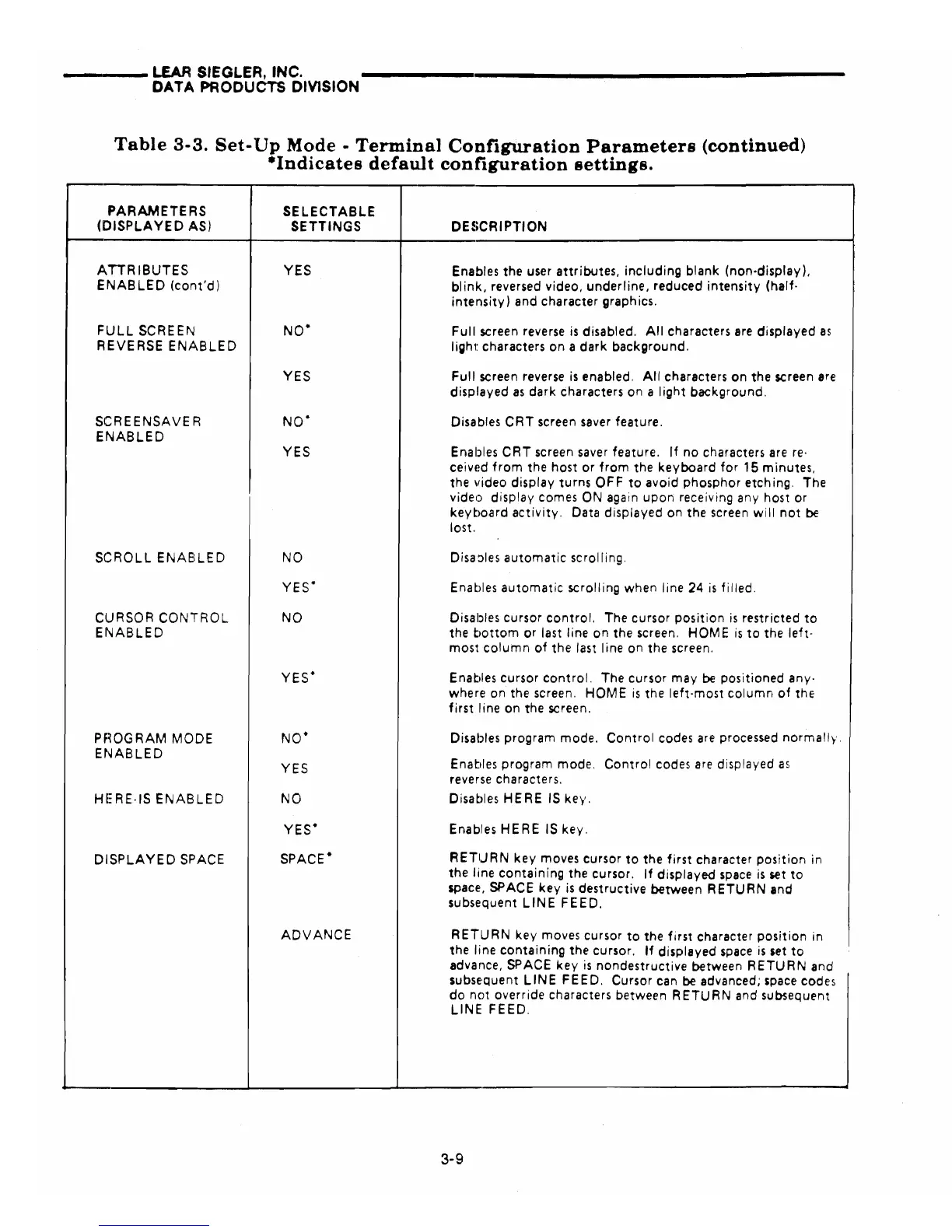
Table
3-3.
Set-
Up
Mode·
Terminal
Configuration
Parameters
(continued)
-Indicates
default
configuration
settings.
PARAMETERS
(DISPLAYED
AS)
ATTRIBUTES
ENABLED
(cont'd)
FULL
SCREEN
REVERSE
ENABLED
seR
E
ENSAVE
R
ENABLED
SCROLL
ENAB
LE D
CURSOR
CONTROL
ENABLED
PHOGRAM
MODE
ENABLED
HERE·IS
ENABLED
DISPLAYED
SPACE
SELECTABLE
SETTINGS
YES
NO·
YES
NO·
YES
NO
YES·
NO
YES·
NO·
YES
NO
YES·
SPACE·
ADVANCE
DESCRIPTION
Enables the user
attributes,
including
blank
(non-display),
blink,
reversed video,
underline,
reduced
intensity
(half·
intensity)
and character graphics.
Full
screen reverse
is
disabled.
All
characters are
displayed
as
light
characters
on
a
dark
background.
Full
screen reverse
is
enabled.
All
characters
on
the
screen
are
displayed
as
dark
characters on a
light
background.
Disables
CRT
screen saver feature.
Enables
CRT
screen saver feature.
If
no
characters are
reo
ceivt!d
from
the host
or
from
the
keyboard
for
15
minutes,
the video
display
turns
OFF
to
avoid
phosphor
etching. The
video display comes ON again
upon
receiving any host
or
keyboard
activity.
Data displayed
on
the
screen
will
not
be
lost.
Disa::>les
automatic
scrolling.
Enables
automatic
scrolling when line
24
is
filled.
Disables cursor
control.
The cursor
position
is
restricted
to
the
bottom
or
last line
on
the screen.
HOME
is
to
the
left-
most
column
of
the
last line on
the
screen.
Enables cursor
control.
The cursor
may
be
positioned
any-
where on the screen.
HOME
is
the
left-most
column
of
the
first
line on the screen.
Disables program mode.
Control
codes
are
processed
normall~·.
Enables program mode.
Control
codes
are
displayed
as
reverse characters.
Disables
HERE
IS
key.
Enables
HER
E IS key.
RETURN
key
moves cursor
to
the
first
character
position
in
the
line
containing
the cursor.
If
displayed
space
is
set
to
space, SPACE
key
is
destructive
between
RETURN
and
subsequent
LINE
FEED.
RETURN
key
moves cursor
to
the
first
character
position
in
the line
containing
the
cursor.
If
displayed
space
is
set
to
advance, SPACE
key
is
nondestructive
between
RETURN
and
subse'quent
LINE
FEED.
Cursor can be advanced; space codes
do
nc)t
override characters between
RETURN
and subsequent
LINE
FEED.
3-9