p.35 MyWay+ User Manual
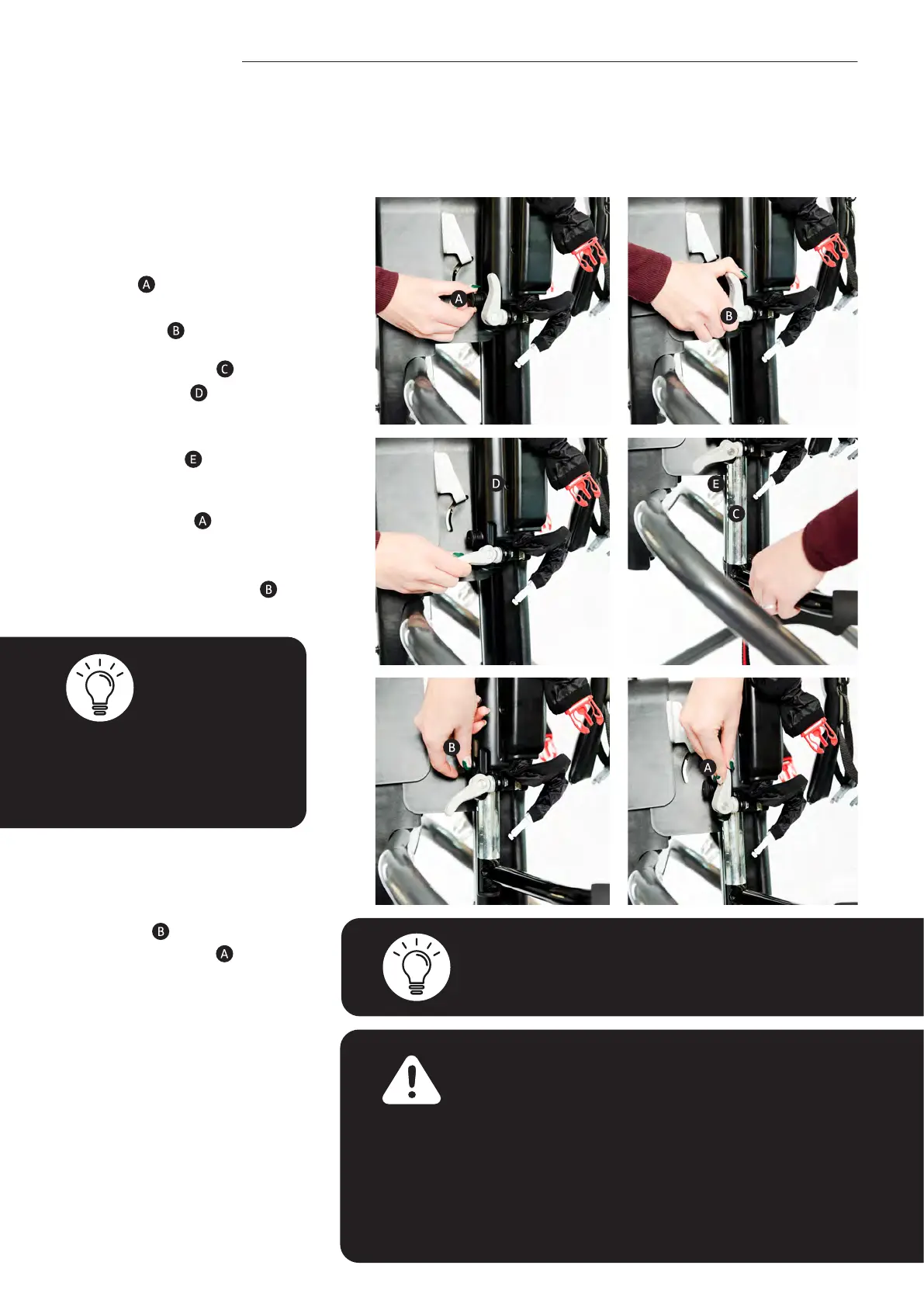
• To attach the basic user
handles, ensure the safety
button
is in the out
position and release the
grey lever.
•
Slide the handle
into the
receiver tube
and feed it
upwards. Position handle
to desired height using
guide marks
.
• Once located, ensure
safety button
is in the
inwards position with
no red markings visible.
Then move grey lever
upwards.
11.4 User Handles
Note – if a user continually seeks out the frame in
order to hold onto the tubing, it is recommended that
the user handles are ordered and used.
Warning – be aware of nger placement when
attaching/detaching the user handles to avoid
potential for nger nipping.
User handles should be removed for transfers in
and out of the product and should not be used to
assist with transfers.
Be aware of others within the environment where
the device is being used and avoid the user handles
making contact with them.
Note – the safety button may
need to be rotated to allow
it to return to its inward
position.
To remove the user handles
rmly grip the user handles
with one hand. Release the
grey lever
and pull out
the safety button (red
indicator will be displayed).
Lower the user handles
and remove from the main
frame.



 To Next Page