Operator's Manual
308 ISSUED: October 2003 WR6K-OM-E Rev A
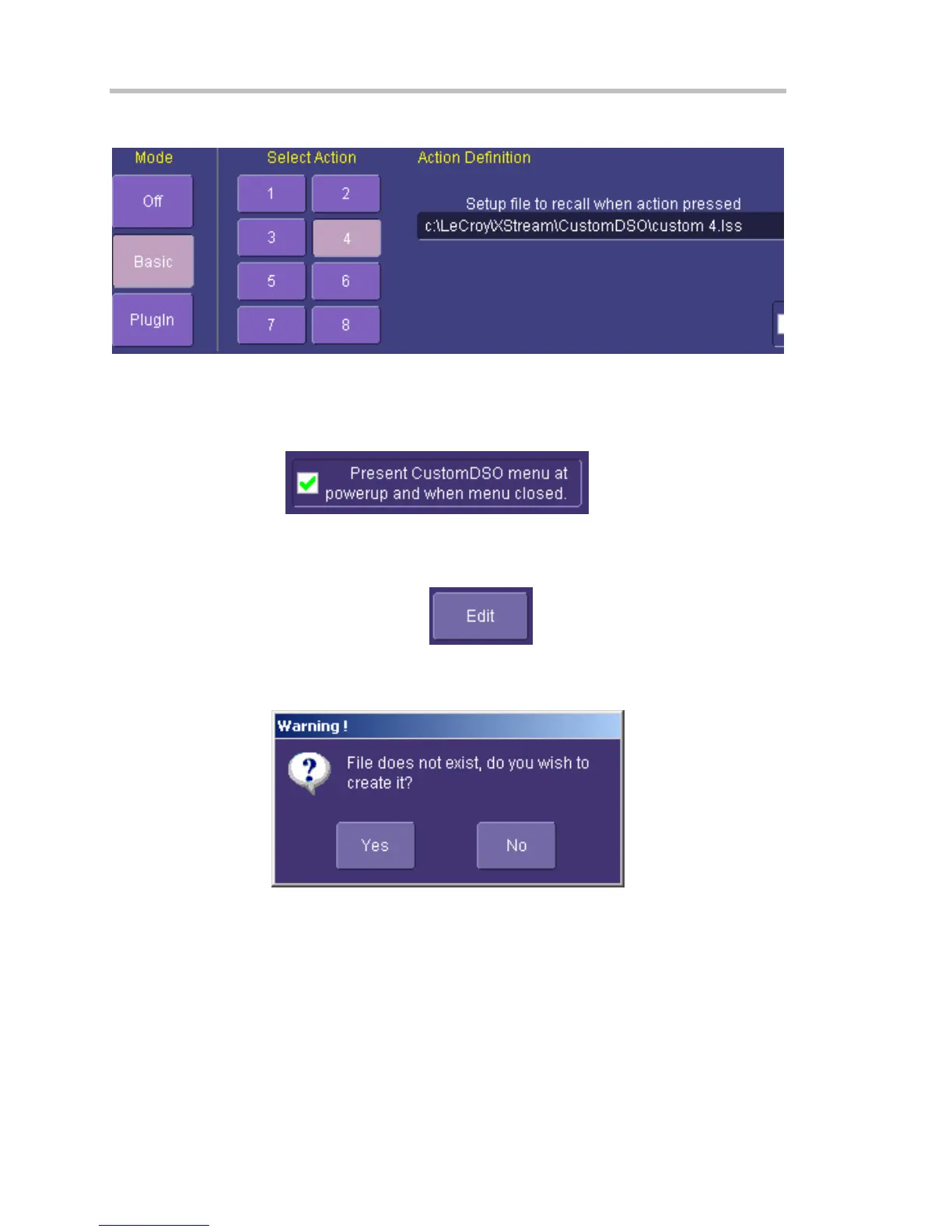
If CustomDSO is already in Basic mode, the following dialog will be displayed:
CustomDSO Basic Mode
The Basic CustomDSO mode offers eight Action buttons, each of which can call a different setup
when touched. The "Action Definition" dialog is used to enter a CustomDSO setup file name by
means of the pop-up keyboard.
By clicking the checkbox
, the eight CustomDSO
buttons will continue to be available at the bottom of the screen after you close the CustomDSO
dialog. Furthermore, they will appear automatically each time the DSO is powered up.
Editing a CustomDSO Setup File
If the file does not exist, touch the Edit button
; a dialog will appear for you to
create the file. If the file does already exist, the Edit button enables you to modify it. The Edit
button allows you to edit the file that is named in the Setup file to recall field, and not the file of
the setup that the instrument is currently in, unless these happen to be the same.




 To Next Page