17
Commissioning
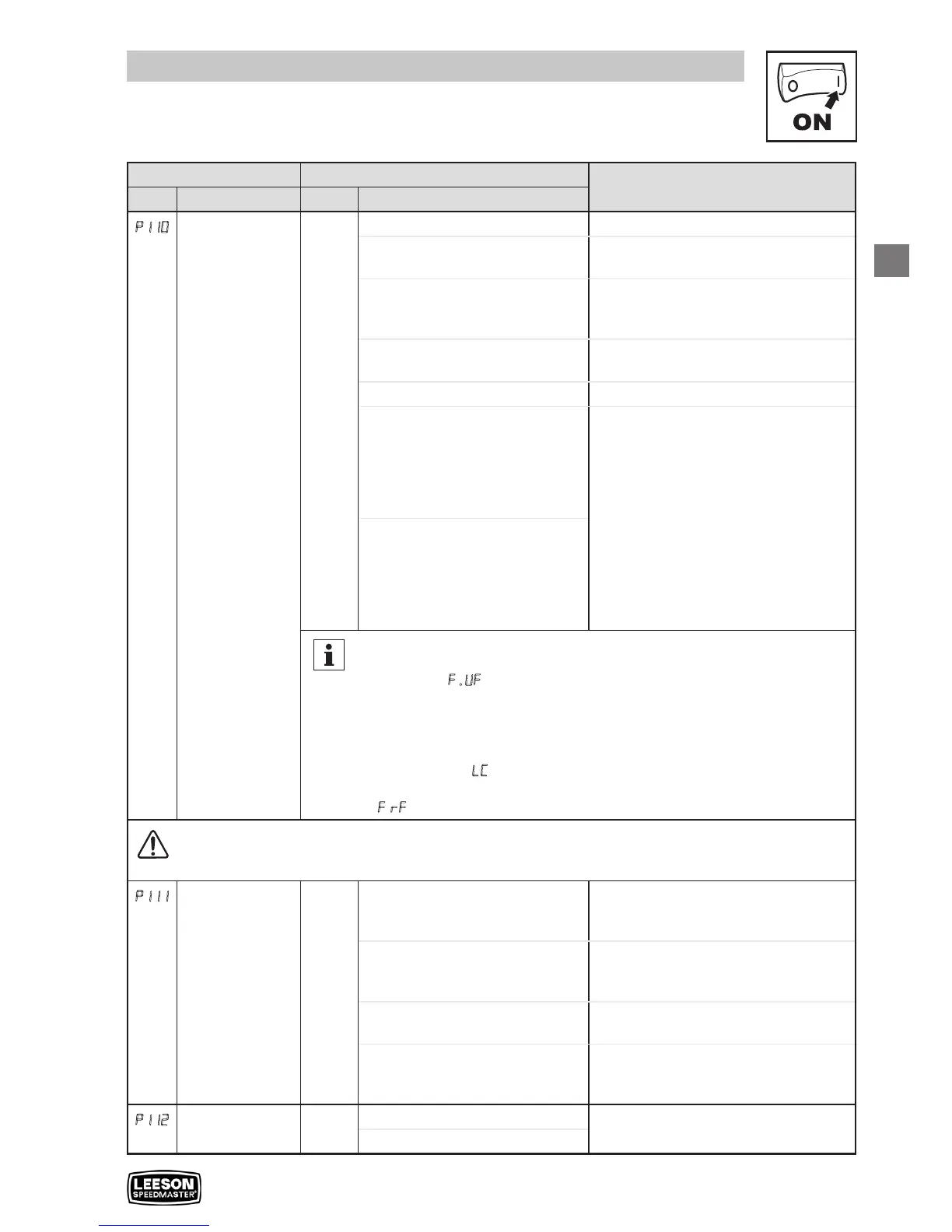
Code Possible Settings
IMPORTANT
No. Name Default Selection
P110
Start Method 0 0 Normal
1 Start on Power-up Drive will automatically start when
power is applied.
2 Start with DC Brake
When start command is applied, drive
will apply DC braking according to
P174, P175 prior to starting the motor
3 Auto Restart
Drive will automatically restart after
faults, or when power is applied.
4 Auto Restart with DC Brake
Combines settings 2 and 3
5 Flying Start/Restart #1 • Drive will automatically restart after
faults, or when power is applied.
• After 3 failed attempts, drive will
Auto Restart with DC brake.
• P110 = 5: Performs speed search,
starting at Max Frequency (P103)
• P110 = 6: Performs speed search,
starting at the last output frequency
prior to faulting or power loss
• If P111 = 0, a flying START is
performed when a start command is
applied.
6 Flying Start/Restart #2
Note
• P110 = 0, 2: Start command must be applied at least 2 seconds after
power-up; F.UF fault will occur if start command is applied too soon.
• P110 = 1, 3…6: For automatic start/restart, the start source must be
the terminal strip and the start command must be present.
• P110 = 2, 4…6: If P175=999.9, dc braking will be applied for 15s.
• P110 = 3…6: Drive will attempt 5 restarts; if all restart attempts fail,
drive displays LC (fault lockout) and requires manual reset.
• P110 = 5, 6: If drive cannot catch the spinning motor, drive will trip into
F.rF fault.
WARNING!
Automatic starting/restarting may cause damage to equipment and/or injury to personnel! Automatic
starting/restarting should only be used on equipment that is inaccessible to personnel.
P111
Stop Method 0 0 Coast Drive’s output will shut off immediately
upon a stop command, allowing the
motor to coast to a stop
1 Coast with DC Brake
The drive’s output will shut off and then
the DC Brake will activate (see P174,
P175)
2 Ramp
The drive will ramp the motor to a stop
according to P105 or P126.
3 Ramp with DC Brake
The drive will ramp the motor to 0 Hz
and then the DC Brake will activate
(see P174, P175)
P112
Rotation 0 0 Forward Only If PID mode is enabled, reverse
direction is disabled (except for Jog).
1 Forward and Reverse



 To Next Page