28
Commissioning
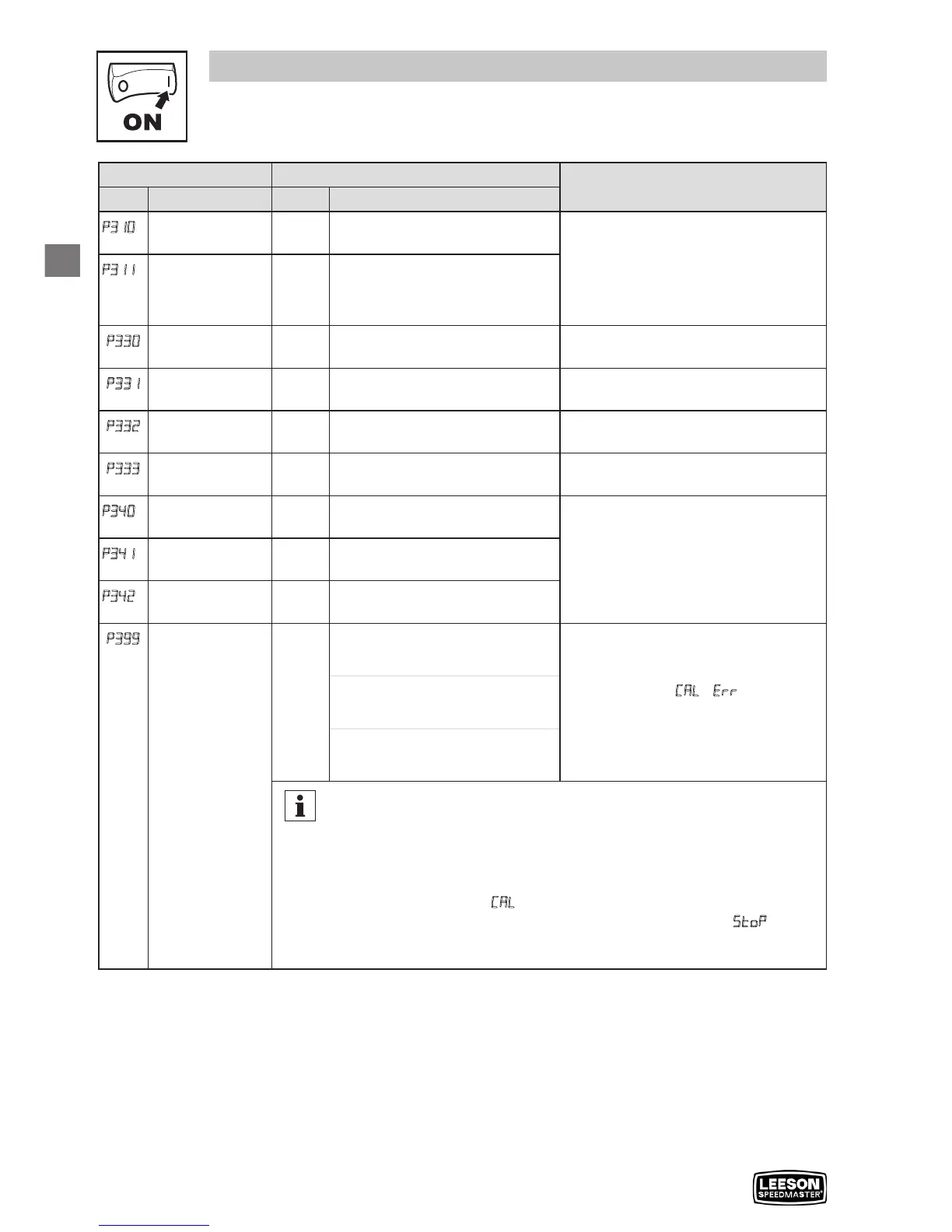
Code Possible Settings
IMPORTANT
No. Name Default Selection
P310
(1)
Motor Stator
Resistance
0.00
0.00 {
Ω} 64.00
• Will be automatically programmed by
P399
• Changing these settings can
adversely affect performance.
Contact factory technical support
prior to changing
p311
(1)
Motor Stator
Inductance
0.0 0.0 {mH} 2000
P330
Torque Limit 100 0 {%} 400 When P300 = 5, sets the maximum
output torque.
P331
Preset Torque
Setpoint #1
100 0 {%} 400 TB-13A activated; P121 = 3 and
P300 = 5
P332
Preset Torque
Setpoint #2
100 0 {%} 400 TB-13B activated; P122 = 3 and
P300 = 5
P333
Preset Torque
Setpoint #3
100 0 {%} 400 TB-13C activated; P123 = 3 and
P300 = 5
P340
(1)
Current Loop P
Gain
0.25 0.00 16.0
Changing these settings can adversely
affect performance. Contact factory
technical support prior to changing.
P341
(1)
Current Loop I
Gain
65 12 {ms} 9990
P342
(1)
Speed Loop
Adjustment
0.0 0.0 {%} 20.0
P399
Motor Auto-
calibration
0 0 Calibration Not Done • If P300 = 2...5, motor calibration
must be performed, but motor data
must be programmed first
• An alternating
CAL / Err will occur if:
- motor calibration is attempted with
P300 = 0 or 1
- motor calibration is attempted
before programming motor data
1 Calibration Enabled
2 Calibration Complete
Note
To run the Auto Calibration:
- Set P302...P306 according to motor nameplate
- Set P399 = 1
- Make sure motor is cold (20° - 25° C)
- Apply a Start command
- Display will indicate CAL for about 40 seconds
- Once the calibration is complete, the display will indicate
Stop; apply
another Start command to actually start the motor
- Parameter P399 will now be set to 2.
(1) Any changes to this parameter will not take effect until the drive is stopped



 To Next Page