144 /
Review mode
Displays after deleting
Deleting individual pictures
After deleting, the preceding picture appears.
If there are no more pictures saved on the card, the
following message appears:
No image data available.
Deleting all pictures on the memory card
After deleting, the following message appears:
No image data available.
However, if one or more pictures were protected, that
picture or the first of those pictures then appears.
Note:
When a picture is deleted, the subsequent pictures in
the frame counter (4.1.2/4.2.5) are re-numbered as
follows: For example, if you delete picture no. 3, what
was previously picture no. 4 then becomes no. 3, the
previous no. 5 becomes no. 4 etc. However, this does
not apply to the file numbering on the memory card
(in the
INFO
display, see p. 93) for the remaining
image files in the folder (4.2.6j), which remains
unchanged.
D. Protecting pictures / Clearing delete protection
The pictures stored on the memory card can be pro -
tec ted against accidental deletion. This protection can
then be cleared at any time.
Notes:
• Applying or removing picture protection can be per-
formed only in review mode, irrespective of whether
a picture is shown in normal size or as one of several
reduced pictures (not however if the 9-block review
is shown with a red frame round the entire block,
see p. 141).
• For details of the different procedures/responses
when you attempt to delete protected pictures,
refer to the previous section.
• If you decide you want to delete them, clear the
protection as described below.
• Protection is only effective for the LEICA M8.
2.
• Even protected pictures are deleted if the memory
card is reformatted (see next section for details).
• On SD/SDHC memory cards, you can prevent
accidental deletion by sliding the write protection
switch on the card (see p. 101) to the position
marked
LOCK
.
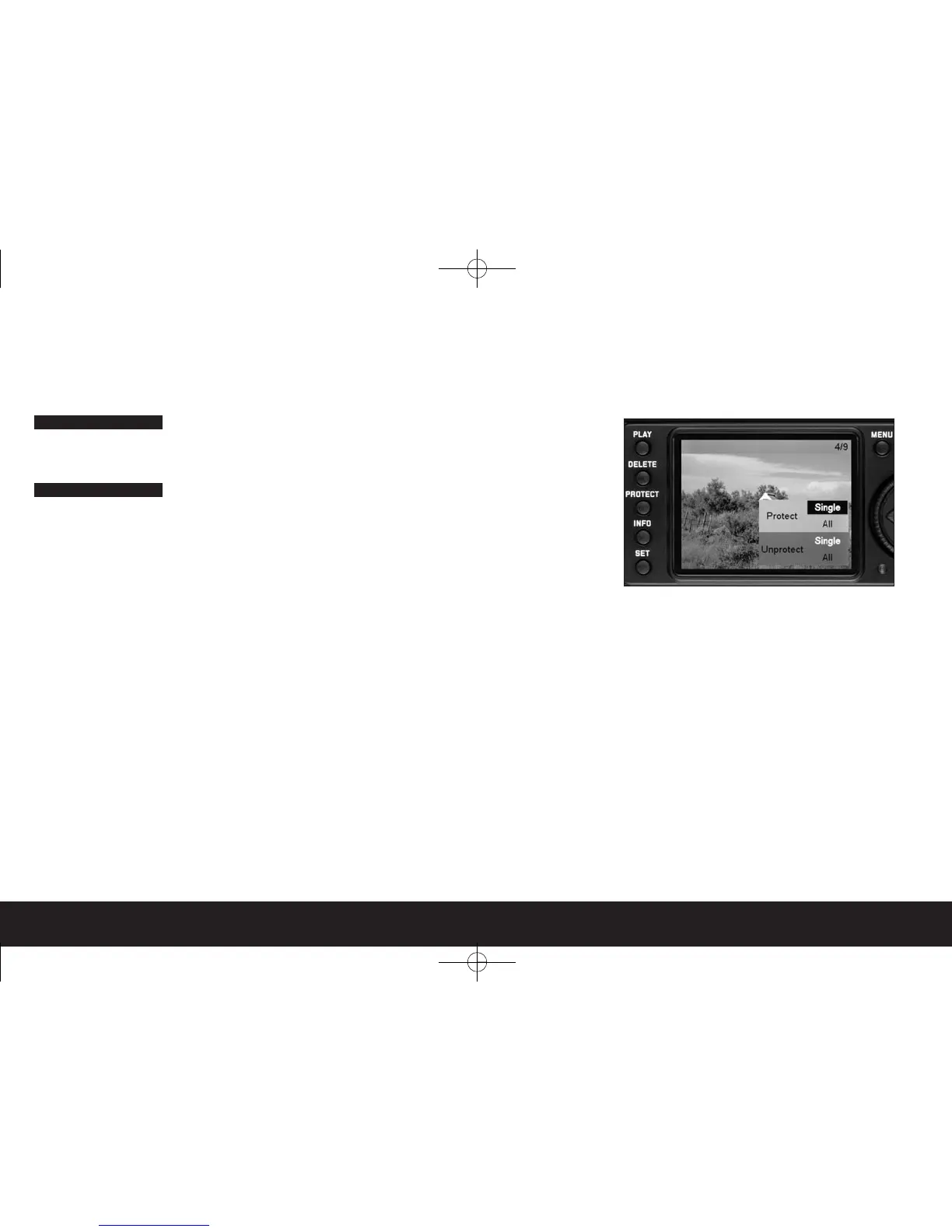
Procedure
Press the
PROTECT
button (1.24).
• The corresponding sub-menu appears in the moni-
tor display (1.33).
Notes:
• The setting process can be cancelled at any time by
pressing the
PROTECT
button again.
• The following controls and their functions are not
available during the entire setting process: the
MENU
(1.29),
DELETE
(1.25) and
INFO
(1.23)
buttons
The subsequent procedure is controlled by the menu,
i.e. essentially as described in the “Menu control”
section (on p. 113). After specifying the relevant menu
display, this is done using the shutter speed setting
dial (1.30), direction buttons (1.31) and the
SET
but-
ton (1.22).


 To Next Page