MS60/TS60, User Interface
35
3User Interface
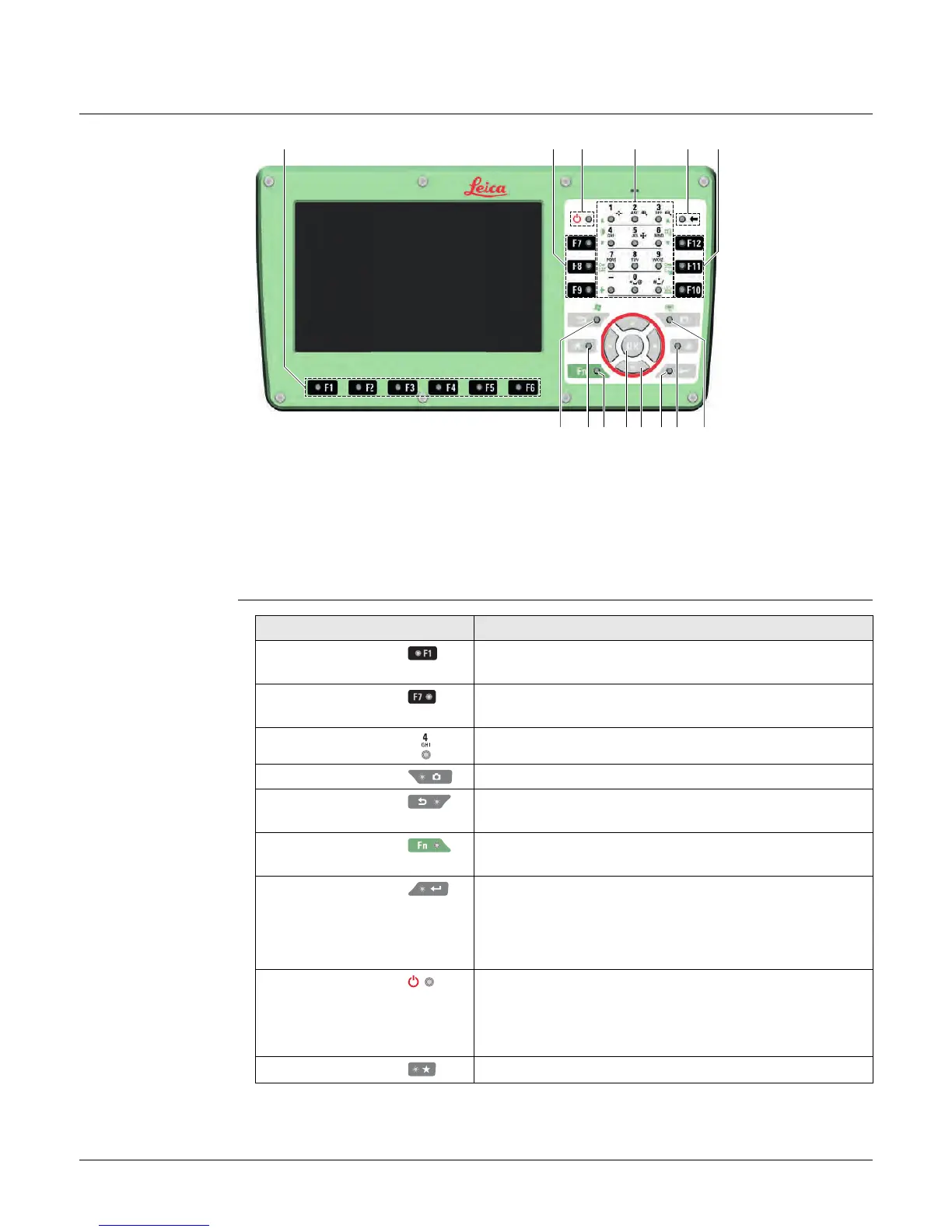
3.1 Keyboard
Keyboard
MS60/TS60
Keys
a) Function keys F1-F6
b) Function keys F7-F12
c) ON/OFF
d) Alphanumeric keys
e) Backspace
f) Esc
g) Home
h) Fn
i) OK
j) Arrow keys
k) Enter
l) Favourites
m) Camera
008626_001
abbce
f
d
gh i j k lm
Key Function
Function keys
F1-F6
Correspond to six softkeys that appear on the bottom
of the screen when the screen is activated.
Function keys
F7-F12
User definable keys to execute chosen commands or
access chosen screens.
Alphanumeric keys To type letters and numbers.
Camera To capture an image with the camera.
Esc Leaves the current screen without storing any
changes.
Fn Switches between the first and second level of func-
tion keys.
Enter Selects the highlighted line and leads to the next
logical menu / dialog.
Starts the edit mode for editable fields.
Opens a selectable list.
ON/OFF If the instrument is already off: Turns on the instru-
ment when held for 2 s.
If the instrument is already on: Turns to Power Options
menu when held for 2 s.
Favourites Goes to a favourites menu.


 To Next Page