MS60/TS60, Operation
41
4.5 Setting up for Remote Control (with the TCPS29/30)
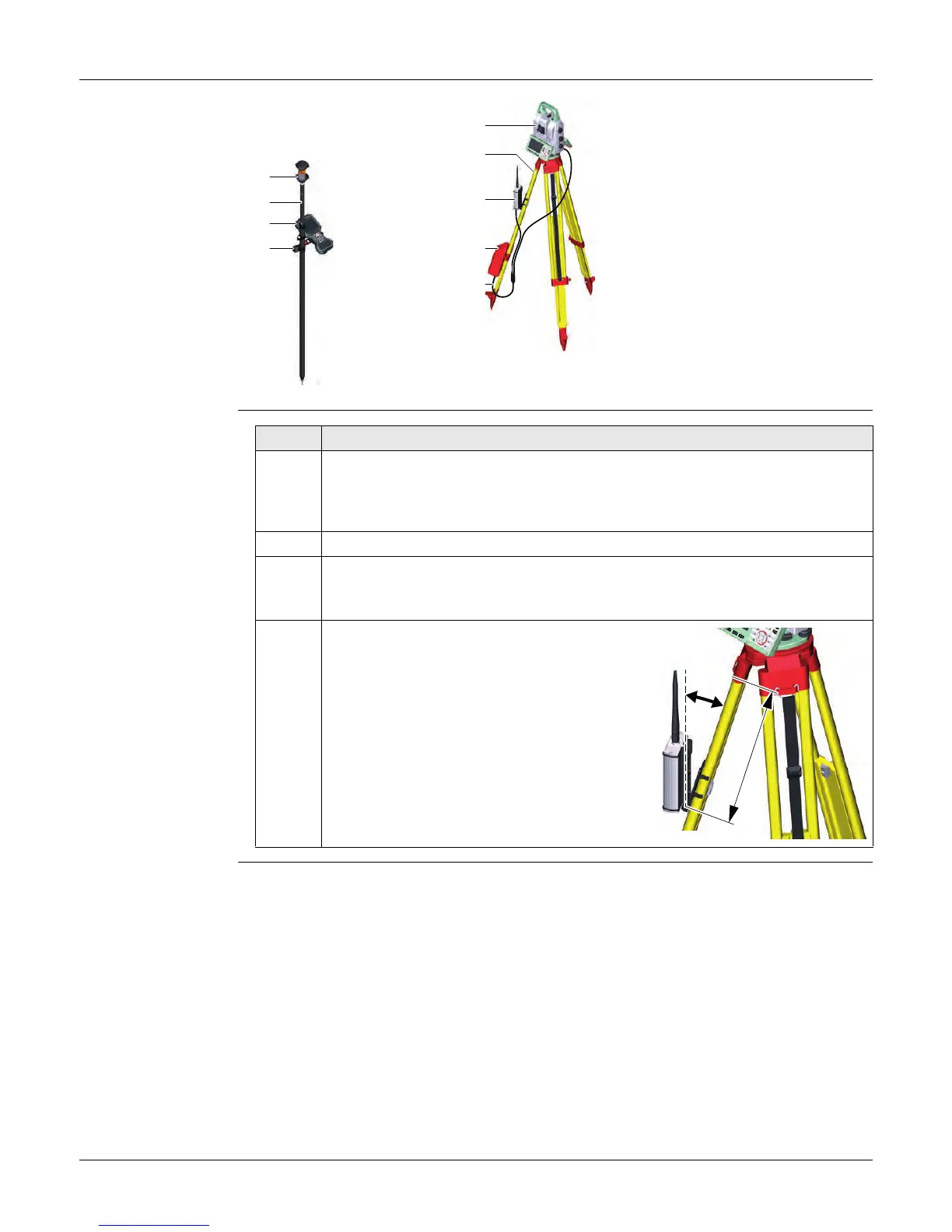
Setup for Remote
Control with
TCPS29/30
Mounting Base
Radio to Tripod
Step-by-Step
a) 360° prism
b) Prism pole
c) Field controller on
GHT66 holder (Alternative, not
illustrated: tablet on
GHT78 holder)
d) GHT63 clamp
e) Instrument
f) Tripod
g) TCPS29/30
h) External battery GEB371
i) Y-cable
008695_001
a
b
c
d
e
f
g
h
i
Step Description
1. The GHT43 tripod adapter is used to mount the TCPS29/30 to all Leica
standard tripods, and to optimise the radio transmission performance.
Attach the TCPS29/30 to the adapter and then attach the adapter to the
tripod leg.
2. Adjust the angle of TCPS29/30 until it is vertical.
3. Adjust the location of the adapter on the tripod leg so that there are no
metallic objects in the horizontal plane around the antenna.
Metallic objects near the antenna disturb radio transmissions.
4.
To achieve the best performance
from the TCPS29/30, mount it in a
vertical position on the tripod leg,
approximately 30 cm from the top.
If the adapter is no longer able to
retain its angle position, the adjust-
ment bolt at the hinge can be tight-
ened slightly.
~ 30 cm
008645_001


 To Next Page