MS60/TS60, Check & Adjust
56
5.3 Combined Adjustment (l, t, i, c, ATRplus and Telescope Camera)
Description The combined adjustment procedure determines the following instrument errors in
one process:
Combined
Adjustment
Procedure Step-by-
Step
The following table explains the most common settings.
l, t Compensator longitudinal and transversal index errors
i Vertical index error, related to the standing axis
c Horizontal collimation error, also called line of sight error
ATRplus Hz ATRplus zero point error for horizontal angle
ATRplus V ATRplus zero point error for vertical angle
Telescope camera Hz Telescope camera zero point error for horizontal angle -
option
Telescope camera V Telescope camera zero point error for vertical angle - option
Step Description
1. Leica Captivate - Home: Settings\TS instrument\Check & adjust
2. Check & Adjust
Select the option: Check & adjust the compensator, index error, line of
sight error, automatic target aiming & telescope camera
3. Next
4. Face I measurement
If Calibrate the automatic target aiming is checked and an ATRplus is avail-
able, the adjustment will include the determination of the ATRplus Hz and V
adjustment errors.
Use a clean Leica standard prism as the target. Do not use a 360°
prism.
If Calibrate the telescope camera is checked and a telescope camera is
available, the adjustment includes the determination of the telescope
camera zero point.
Use a clean Leica standard prism as the target. Do not use a 360°
prism.
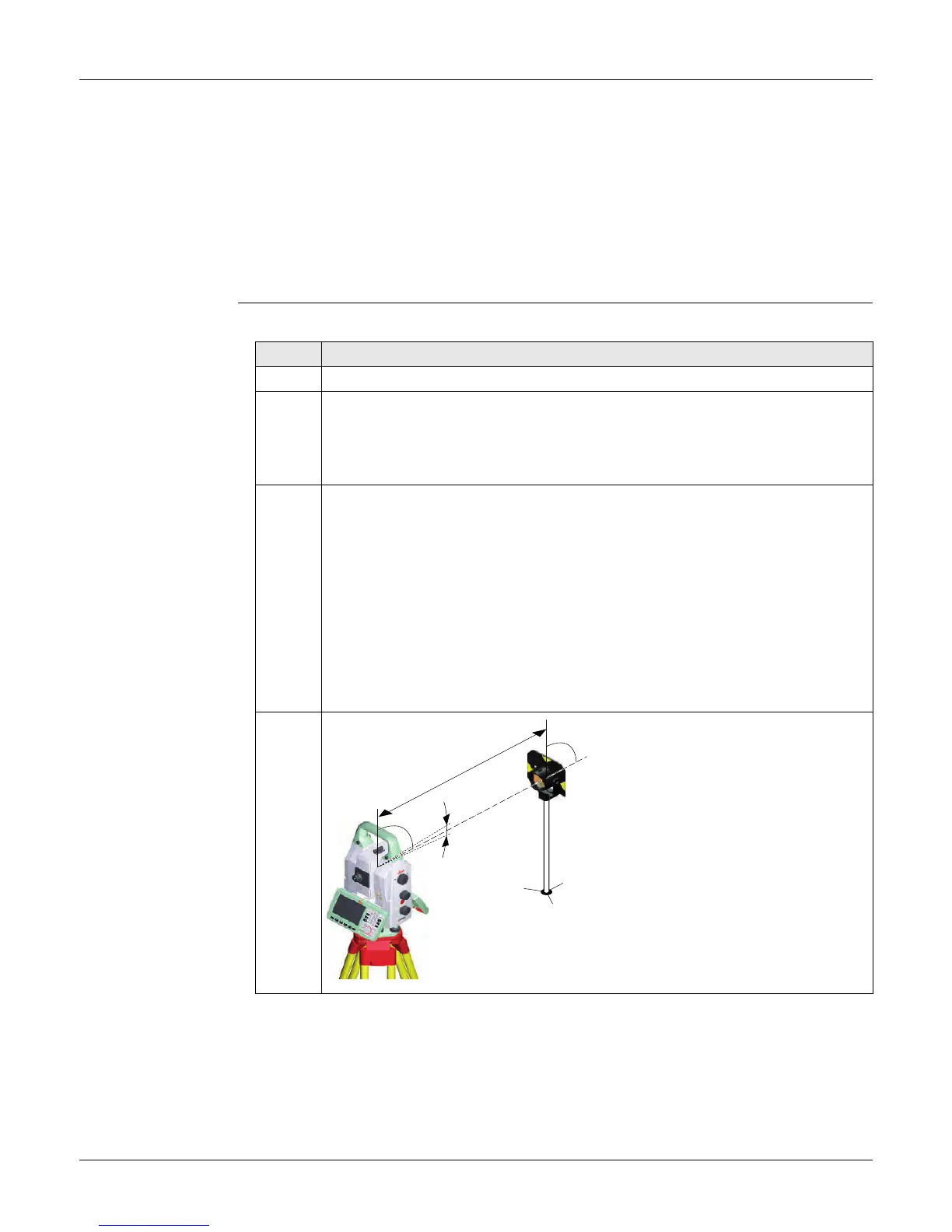
5. Aim the telescope accurately at a
target at about 100 m distance. The
target must be positioned within
±9°/±10 gon of the horizontal plane.
The procedure can be started in any
face.
008701_001
± 9°
~ 100 m


 To Next Page