7
User Interface
Sprinter 150/150M/250M - 1.0.0en
EN
DE
FR
ES
NO
SV
FI
DA
IT
PT
NL
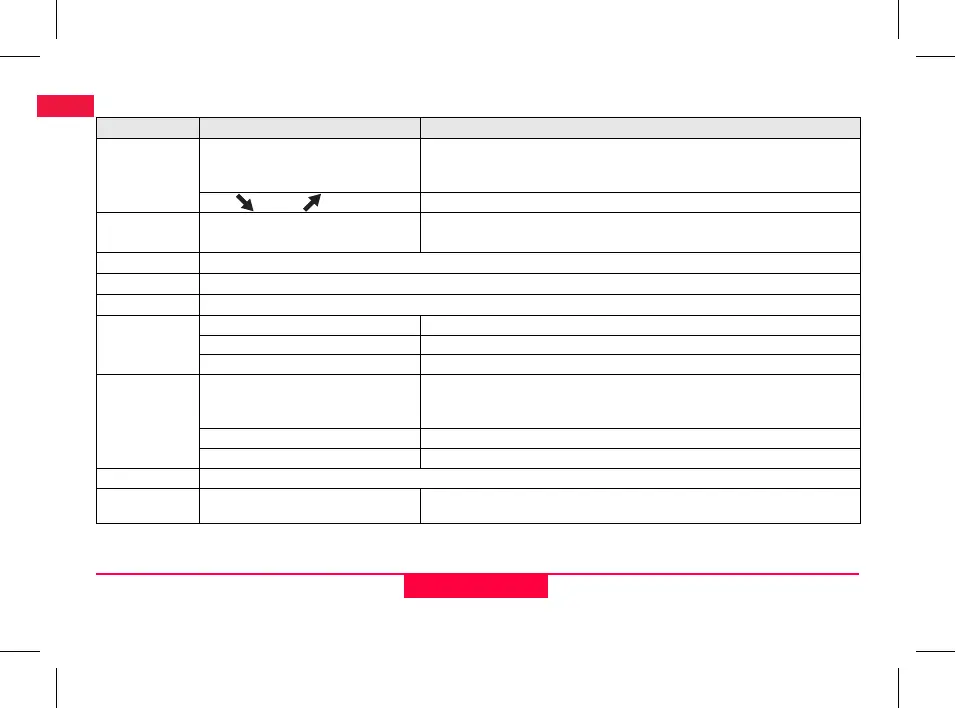
Menu Setting
Menus Selections (sub-selections) Descriptions
1. Program*
Line Levelling (BIF, BF, BFFB) Select line levelling method.
)
Sighting and measurement sequence in line levelling is indicated with
highlighted 'alphabet' of the respective line levelling icons.
Cut & Fill Cut & Fill application.
2. Intermediate
Sight*
ON / OFF Enable / disable Intermediate Sight in BIF line levelling.
3. Input PtID*
Input user point ID.
4. Input BM
Input Reference Benchmark elevation.
5. Input D.ELV*
Input design elevation in Cut & Fill application.
6. Data
Manager*
View Data Viewing recorded data / deleting of a recorded data by pressing ENTER key.
Download Data (GSI / ASCII) Transferring of recorded data to PC via RS232, in GSI-8 or ASCII format.
Delete All Data Deleting of all recorded data in the on-board / internal memory.
7. Recording*
Memory Measurement recorded to on-board / internal memory.
)
In line levelling application, recording mode has to be set prior to first
backsight measurement.
Off Measurement not stored.
Ext Measurement recorded to external device in GSI-8 format via RS232 cable.
8. Adjustment
Adjustment program.
9. Inverse Staff
ON [Inverted], OFF [Upright], AUTO
[Auto recognition of staff orientation]
Recognition mode setting of staff orientation.


 To Next Page