16
5 sec
1 ×
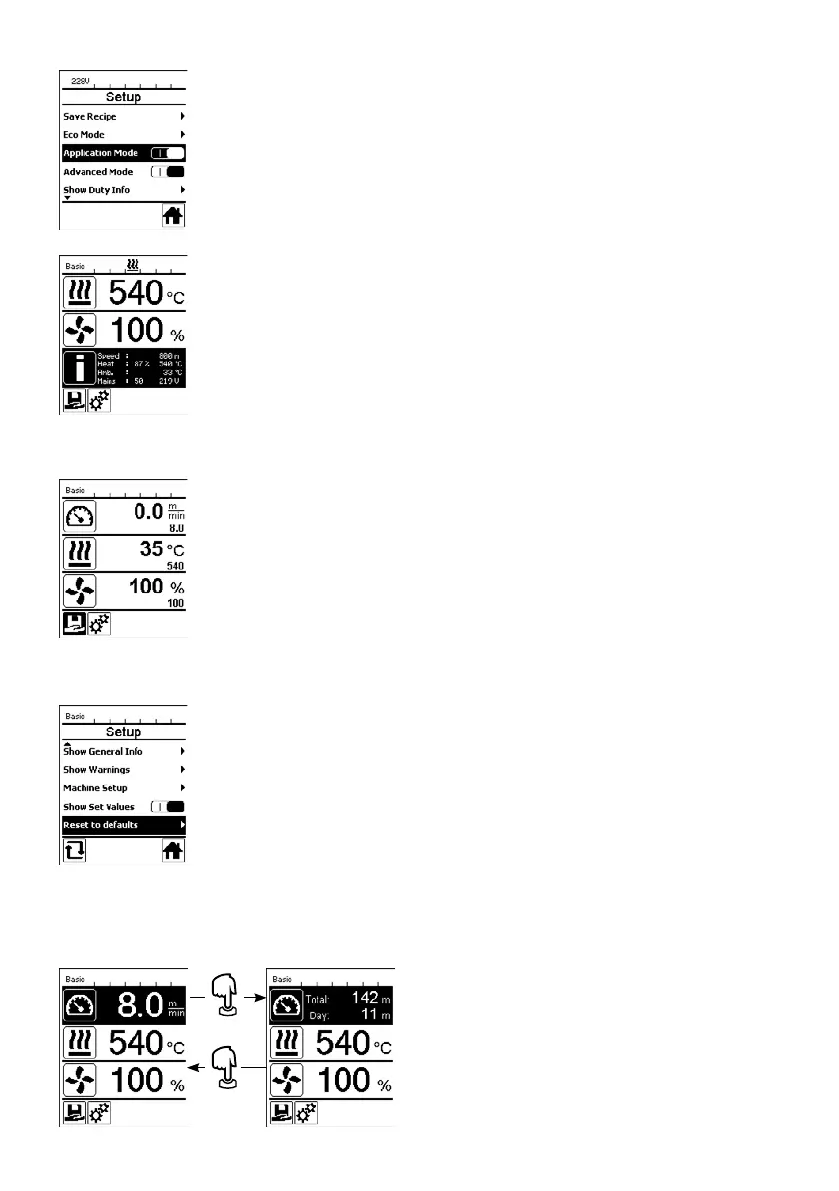
If you wish to have an overview of relevant information, e.g., supply voltage, capacity utili-
zation of the heating, select the "Settings" menu and confirm your selection. Now activate
the "Application Mode".
All available information (symbol i) is now displayed in the working display (33) (see
Display symbols on the working display).
Displaying current values – Application Mode (only in Advanced Mode)
If you have activated the "Set Values" function, then the actual values are shown in large
font and the setpoint values are shown in small font in the working display (33). This
applies to both speed and temperature. If the function has been deactivated, only the
setpoint values are displayed.
The "Set Values" function is deactivated by the factory.
Use the "e-Drive" (31) to access the "Settings" menu and confirm your selection. Now
set the "Advanced Mode" to "On" and then select "Reset to defaults".
This function can be used to reset all of the individually set values back to the factory
settings. The reset aects not only the settings, (Setup) but also the recipes.
Confirm your selection with the button on the lower left (Reset to factory settings/Reset).
Set Values (only in Advanced Mode)
Reset to defaults (only in Advanced Mode)
Day distance display
As soon as the drive is running, the distance is displayed. The day distance can be retrieved as follows:
Use the "Up" (26) and "Down" (27) arrow keys to posi-
tion the cursor on the speed in the working display (33).
Hold the "e-Drive" (31) down for five seconds.
The values of the day distance and the total distance are
now shown in the speed display.
Briefly pressing on the "e-Drive" (31) causes the speed to
be shown again in the working display (33).







 To Next Page