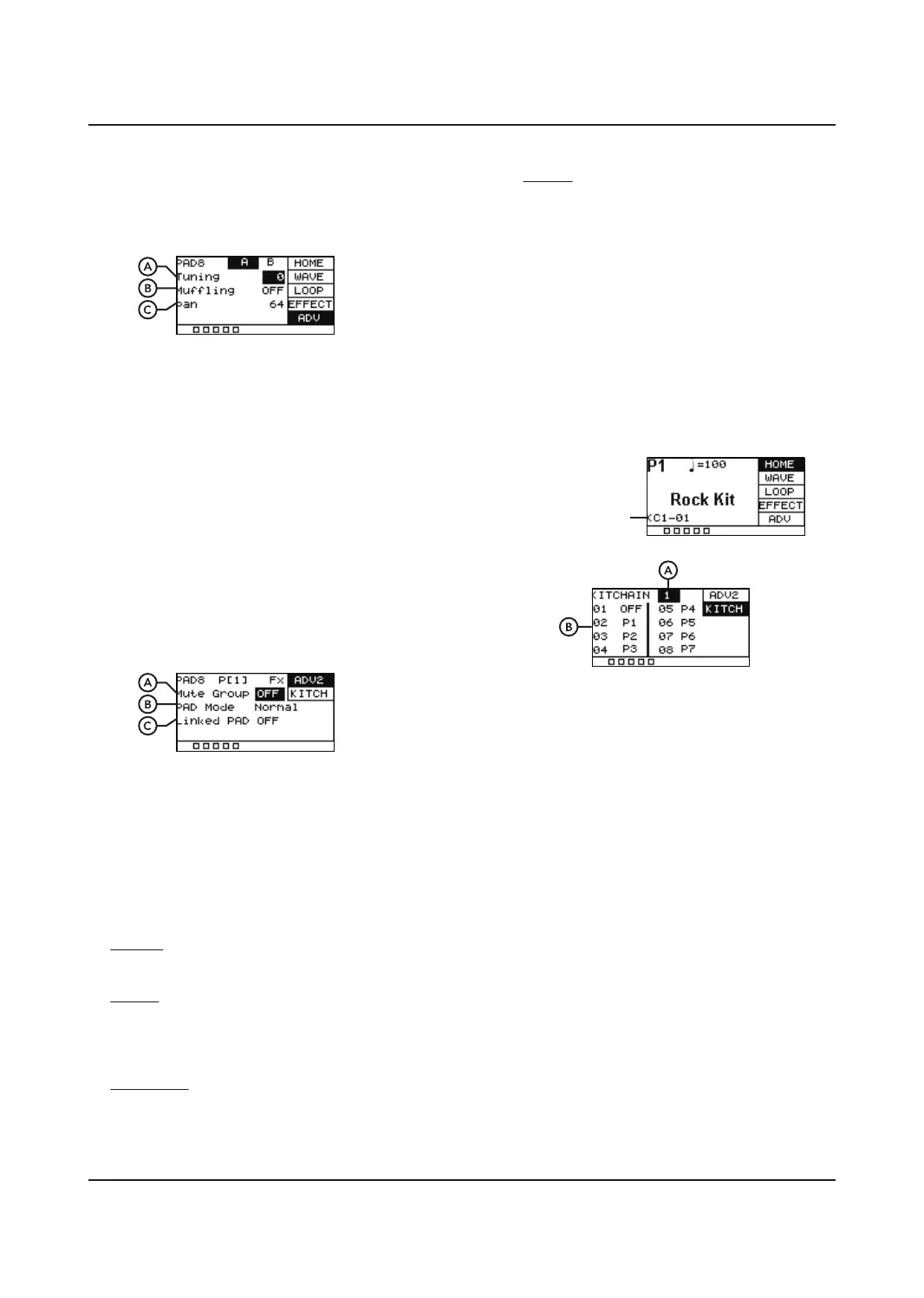
ADV
Gives you access to advanced editing features.
A. Tuning
Tune a sample up or down, the range is +/-
12.
B. Muing
Adjusts the amount of muing eect on an
individual sample. The range is 1-4. This only
works on some of the sounds.
C. Pan
Controls the pan of output, 0 =Fully Left,
64 = Centre, 127 Fully Right.
ADV2
Gives you access to advanced editing features.
A. Mute Group
Build a Mute Group from 1 - 9. Hitting a pad
then hitting another pad from the Mute
Group will mute the first pad, ensuring
there is no crossover.
B. PAD Mode
Changes the behaviour of a pad.
Normal
Normal plays the sound of the pad once.
Switch
Switch starts the sound when hit the first
time, you hit again to stop the sound. Ideal
for backing tracks and other sound eects.
Loop*2,4,8
Repeats the loop the same amount of times
shown on the option. For example, Loop*4
will loop a sound 4 times.
Infinite
Repeats the loop continuously.
C. Linked PAD
Link the sound of another pad with this pad.
Allows you to trigger two pads at the same
time.
KITCH
Used for creating a custom order of drum
presets according to your preferences. The
UNIT can support 5 kit chains, allowing you to
have 8 dierent kits in each KIT CHAIN. After
it has been activated it will be shown in the
home screen.
A. KITCHAIN
Used to select which KIT CHAIN you are
editing. Select between 1-5 or OFF.
Selecting OFF will disable all kit chains and
the presets will be in their original order.
B. 01-08
Selects which order the preset kit will go in,
01 is first – 08 is last. Once highlighted you
can choose which preset you want using
the [+]/[-] button or SCROLL WHEEL.
7
KIT CHAIN ON


 To Next Page