LOOP
Adjust built-in and user recorded loops within
the UNIT.
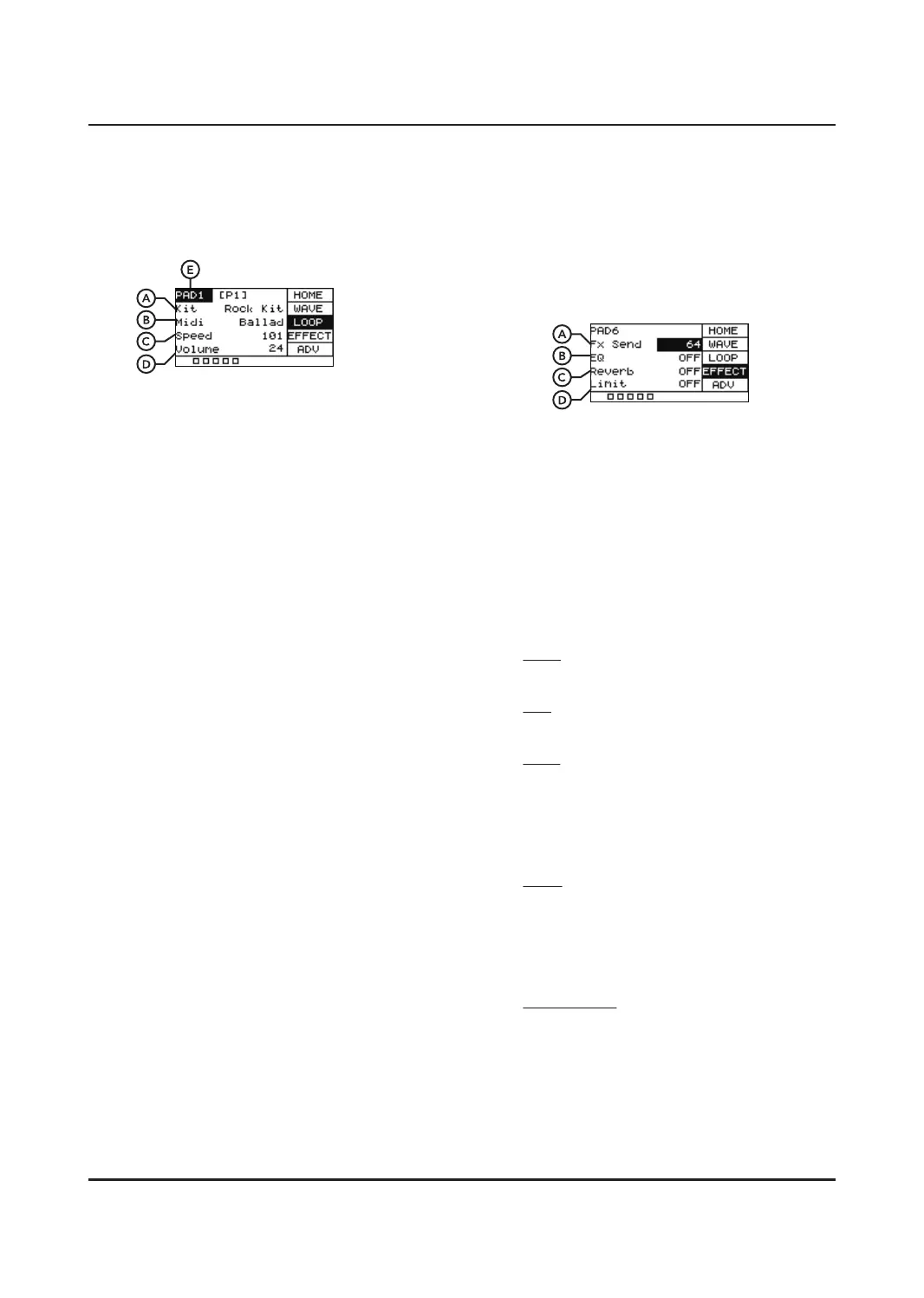
A. Kit
The name of the preset kit sound being
used by the MIDI.
B. Midi
Name of MIDI pattern or loop select. Press
[OK] to play and press again to pause.
C. Speed
Controls the playback tempo of the loop,
from 20 - 240 bpm.
D. Volume
Controls the overall volume of the loop.
E. PAD+number
You can select a pad to play a MIDI loop
once hit. Hit the pad you want to select
(be sure the cursor is displaying PAD+
number), then press [OK], You will see a *
that indicates this pad will trigger a loop
rather than play sound. Pressing [OK]
again will revert the pad back to its original
state. Only one pad can be selected for one
preset to play MIDI.
6
EFFECT
Allows you to have control over the master
eects on the UNIT. Each drum kit can be set
up with dierent eects.
Use [SELECT] to scroll between Fx Send, EQ,
Reverb and Limit.
A. FX Send
Controls the signal that goes from the pad
to the FX channel. The value ranges from
0-127. A low value will have some of the
eect blended in. A high value will aect
the sound entirely.
B. EQ
Disable or Engage the EQ. A built-in
3-band EQwhich can shape the overall
sound of the preset.
HIGH
Adjust the treble frequencies +/- 12dB.
MID
Adjust the mid-range frequencies +/- 12dB.
LOW
Adjust the bass frequencies +/- 12dB.
C. Reverb
Disable or Engage the Reverb. Built-in
Reverb Providing ambience for the preset.
TYPE
Choose between room, stage and studio.
D. Limit
Disable or Engage the Limiter feature.
Built-in limiting feature.
THRESHOLD
When set to 0, input and output are the
same, when set to -12 the output is ¼ of the
maximum output.


 To Next Page