8
BLUES
MASTER section
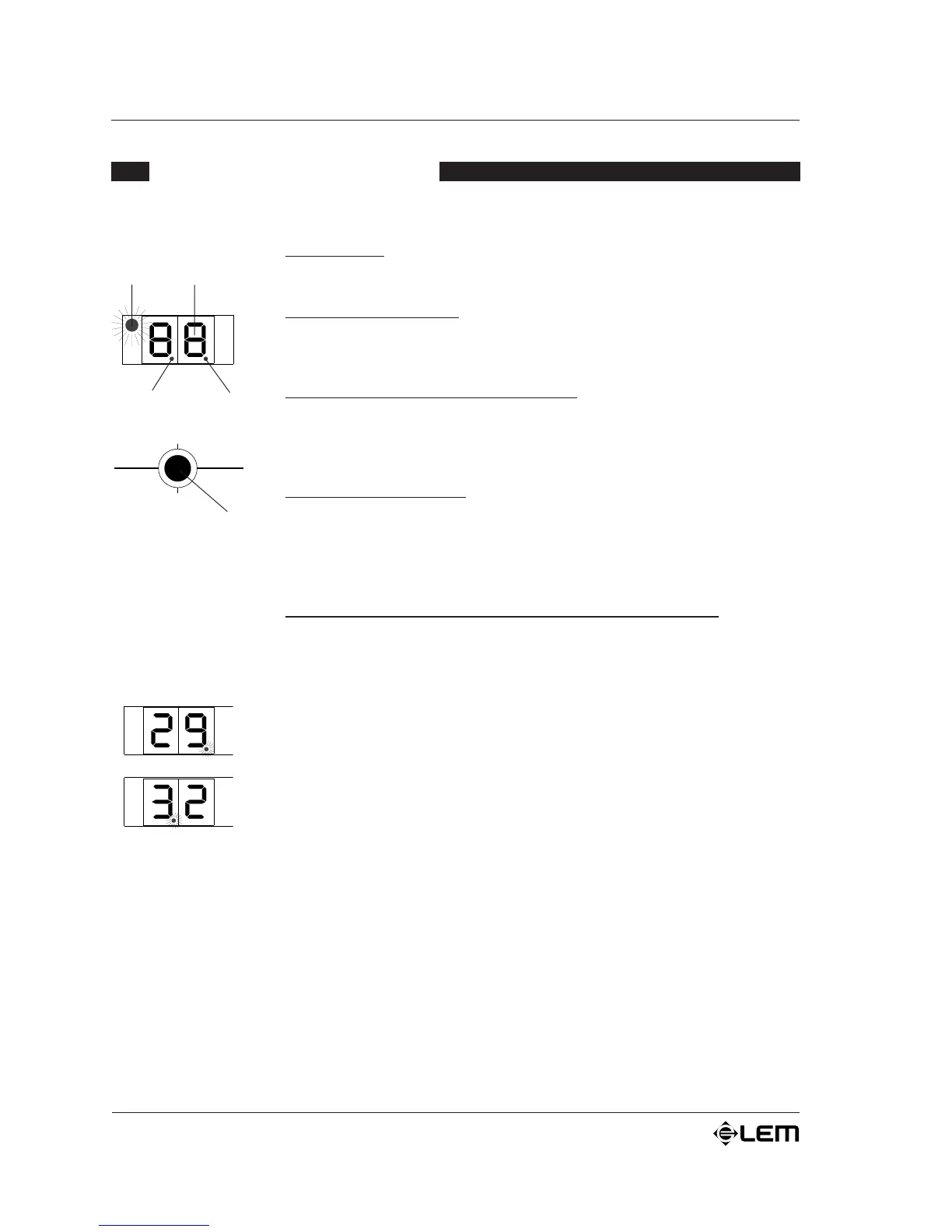
1. DISPLAY
2-digit display: this displays the PRESET number.
2. PEAK
Luminous peak indicator: lights up when the input signal on the corresponding
section reaches a level of 6dB below distortion point (CLIP).
3. TAP ON LED
Central luminous BPM indicator (TAP ON): flashes when the joystick is moved
to the left and procedure for acquiring the tempo is enabled (only with PRESET 32
TAP DELAY).
4. EDIT
Luminous EDIT indicator: flashes when the value of the first parameter for
PRESETS 29, 30. 31 and 32 is changed and lights up when the joystick is pressed
to change the second parameter for PRESETS 29 and 30 (see é PARAMETER
TABLE).
5. JOYSTICK
Joystick selector for selecting PRESETS and parameter editing. Operates in
four alternative directions é
é UPWARDS raises the PRESET number (Pgr+)
ê
DOWNWARDS lowers the PRESET number (Pgr-)
ç to the LEFT gives three different functions:
a) reduces the value of the first parameter for PRESETS 29, 30 and 31 (the EDIT
LED flashes);
b) if moved just once after PRESET 32 has been selected (TAP DELAY), enables
the function for acquiring the tempo (the TAP ON LED flashes and the DSP goes
off);
c) again in PRESET 32 (TAP DELAY), after the delay time has been set, stores the
time and turns the DSP on again (the TAP ON LED goes off).
è to the RIGHT gives two different functions:
a) increases the value of the first parameter for PRESETS 29, 30 and 31 (the EDIT
LED flashes);
b) in PRESET 32 (TAP DELAY), if the joystick is moved several times with the
tempo of a piece of music (after having started the procedure for acquiring the
tempo), sets a delay time which is the same as that of the reference piece of music
(BEAT COUNTER).
In PRESETS 30 and 31, if it is pressed vertically, enables to modify the second
parameter (the EDIT LED flashes slowly).
The joystick can also be used to set the DSP in MUTE by pressing it vertically and
moving it either up or down.
DIGITAL SIGNAL PROCESSOR
DLY Time -
Start/Stop
DLY Time +
Beat counter
Pgr -
Pgr +
DSP CONTROL PANEL
2
34
5
1


 To Next Page