10
MASTER section
MONITOR SEND 1&2
Pots for controlling the level of the MONITOR SENDS 1&2: using these pots is possible to control
the overall level of the MONITOR sends.
EFX1 SEND & EFX2/DSP SEND
Pots for controlling the level of the AUX/EFX SENDS: using these pots is possible to control the overall
level of the EFFECT sends. The EFX2/DSP pot controls both the signal sent to the AUX 2 output and
the signal sent to the built-in DSP.
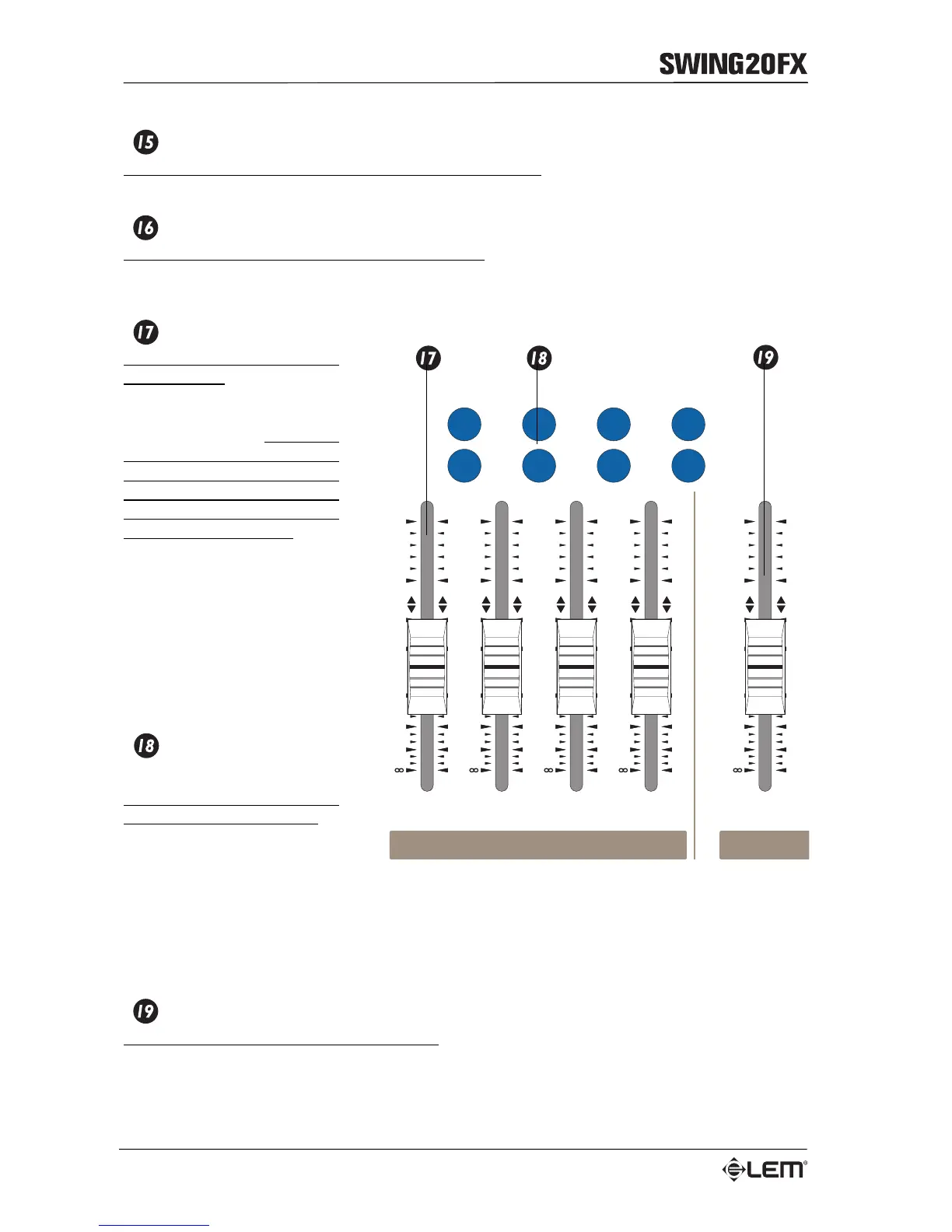
GROUP FADERS 1-4
60mm sliders for control of the
GROUPS level: control the level
of the signal from the INPUT
CHANNELS assigned to the
different GROUPS.
Remember
that, in order to listen the channel
signal from the MIX L&R outputs,
the channel should be assigned
to the GROUPS and the group
level should be turned up.
In LIVE APPLICATIONS the
GROUPS can be used to group
together different signal (all the
drums channel or all the voices,
for instance) and to control them
simultaneously. In STUDIO
APPLICATIONS the 4 GROUP
OUTPUTS can be used to feed 4
tracks of a multitrack recorder
LEFT/RIGHT GROUP
ASSIGNMENT
Buttons for the GROUPS
assignment to the MIX L&R.
NOTE: if you assign the even
groups to the MIX LEFT and the
odd groups to the MIX RIGHT,
the channel PAN control will ‘pan’
the signal between the MIX LEFT
and RIGHT. If you assign one group both to the LEFT and RIGHT, the group signal will be heard in
mono form the main MIX and the channel PAN control will act only on the assignment to the even group
or the odd group.
MIX L&R
60mm slider for control of the general volume: control the level of the signal arriving from the GROUPS
and sent to the main MIX L&R output, to the MIB output and to the TAPE OUT output.
1010
1010
2020
3030
4040
55
55
00
1010
1010
2020
3030
4040
55
55
00
1010
1010
2020
3030
4040
55
55
00
1010
1010
2020
3030
4040
55
55
00
1010
1010
2020
3030
4040
55
55
00
MIXGROUP
1
2
4
3
LEFT LEFT LEFT LEFT
RIGHT RIGHT RIGHT RIGHT
OFF
ON



 To Next Page