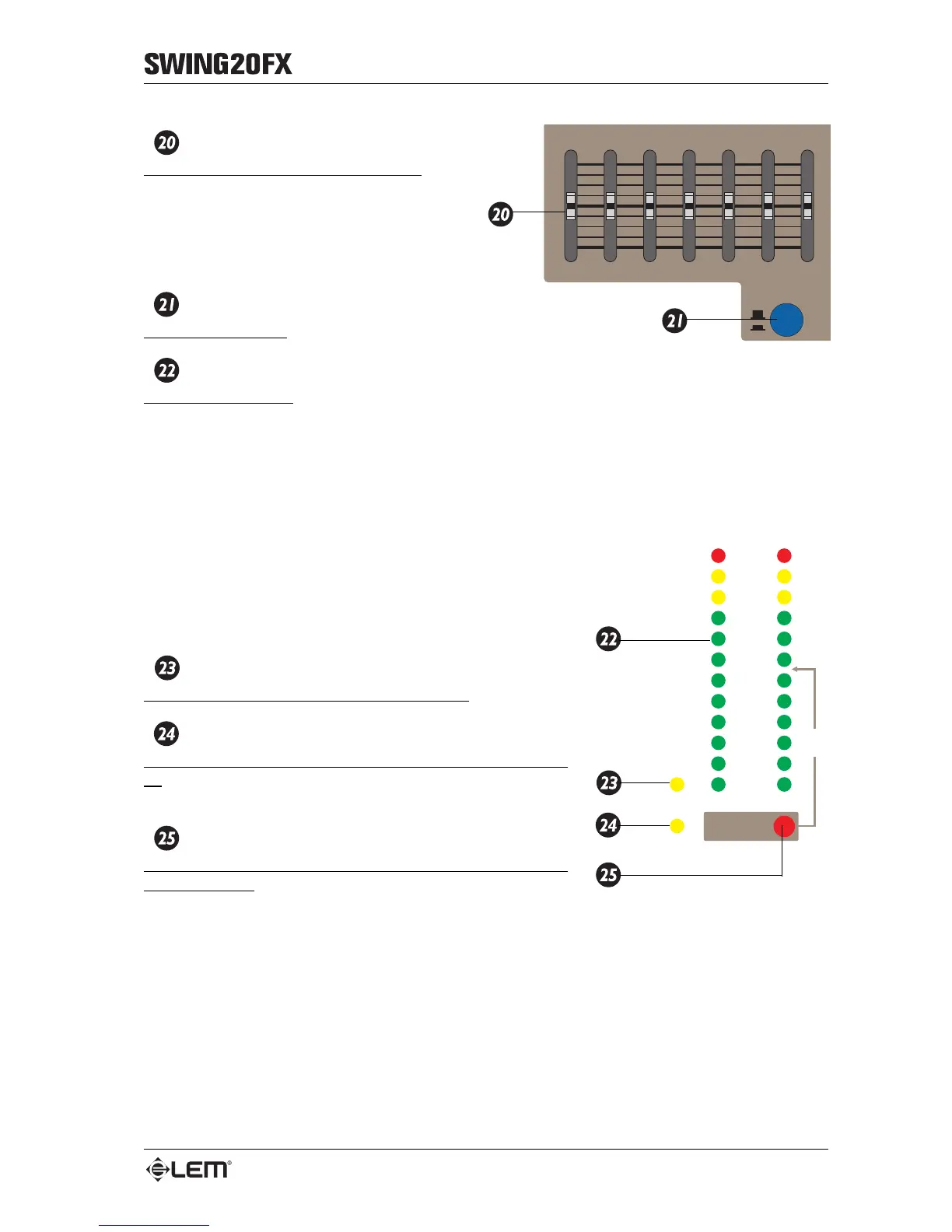
STEREO 7 BAND GRAPHIC EQ
Seven mini-slider GRAPHIC EQ control.
The GRAPHIC EQ can be used to regulate the
overall mixer frequency response, in order to
control the tone of the main sound system and/
or the recording. The seven mini-sliders give
12dB boost or cut.
EQ ON/OFF
EQ ON/OFF SWITCH.
OUTPUT/PFL LEVEL
12-LED BARGRAPHS.
Allows the visualization of the signal assigned to the MIX L&R outputs or the signal of the channels
selected by the PFL buttons.
The LEDs are of three different colors:
• green = show the normal operative level of the signal (from -30
to +4 dB);
• yellow = show a high operative level of the signal (from +7 to
+10 dB);
• red (CLIP) = show a too high signal level, near to the overload
of the mixer output stage.
To ensure clean, distortion-free signals and to avoid damaging
the components of your sound system, try to avoid making the
red LEDs lighting up repeatedly.
POWER
LED indicating when the mixer is switched on.
PHANTOM
LED indicating when the +48V phantom power is switched
on: this LED lights up when the buttons on the connector panel
on the rear of the mixer are pressed.
PFL ACTIVE
Indicates when at least one PFL button is pressed on the
input channels: when this LED is lighted up the BARGRAPHS
show the input signal of the selected channel.
125 250 8k
+1



 To Next Page