b. VOLUME: Turn to the button to adjust the volume up or down when playback.
c. MUTE: Press to the button to mute the music when playing.
d. SNOOZE: Press the button to snooze a set time when alarm sounding.
e. Power on | off the unit: Press and hold to standby the unit.Press briefly to turn on
2
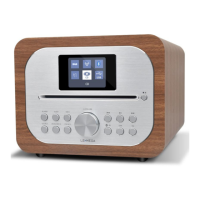
SRC : Press to Source to select different modes Internet radio, Spotify, DAB, FM,
Bluetooth, and Aux
3
Sleep: Press to set the sleep
4
Alarm: Press to set the alarm
5
TUNE-/Previous: Press to select the previous track under Spotify/FM/DAB / Bluetooth
mode; Press and hold the TUNE- button to auto-scan the stations under the FM mode.
6
Presets button
7 Bluetooth mode is Bluetooth pairing;
8
DIM: Adjust the display backlight
9
SUB:Short press to get the subwoofer off or subwoofer on
1
0 EQ:Adjust the EQ setting
1
1 INFO: View more information about the station or track playing. Press again to cycle
through further information screens then return to the normal Now playing screen
1
2 TUNE+/Next: Press to select the next track under Spotify/FM/DAB/Bluetooth
Mode; Press and hold the Tune+ button to auto-scan the stations under the FM mode
1
3 MENU: press the MENU to show the MENU for the current mode. Press again to
show now playing screen
1
4 BACK: press the BACK to return to the previous screen.
1
5 Press to select Play/Pause under internet radio, Spotify, and BT mode. In FM mode,
press to do auto scans the stations
7
the unit.


 To Next Page