10CH TXT Essential Instructions v1.docx 2024-09-05 13
Using Telemetry
Telemetry is independent of stabilization and can be used with the receiver in stabilized or unstabilized
configuration.
The document “Telemetry with the Lemon Rx 7- and 10-Channel Receivers” explains in detail how to setup and
calibrate the Telemetry function:
https://www.rcgroups.com/forums/showatt.php?attachmentid=17299439&d=1685095406
This section just mentions some highlights.
The Lemon Telemetry Receivers send data on receiver voltage, temperature and RSSI (signal strength)
3
, plus
altitude and vertical speed (vario) information from a built-in barometric sensor. Flight battery data can be
provided by a voltage sensing wire or the optional V/I (voltage and current) sensor; the latter enables the
transmitter to calculate battery capacity-used (mAh). Lemon telemetry is displayed using the existing display
screens and, where available, the transmitter’s voice capability.
The transmitter can set alarms, in some cases just tones but often voice announcements. For example, an alarm
tone and warning can sound when the flight pack voltage drops to a preset value or if the model exceeds a
certain height above ground.
4
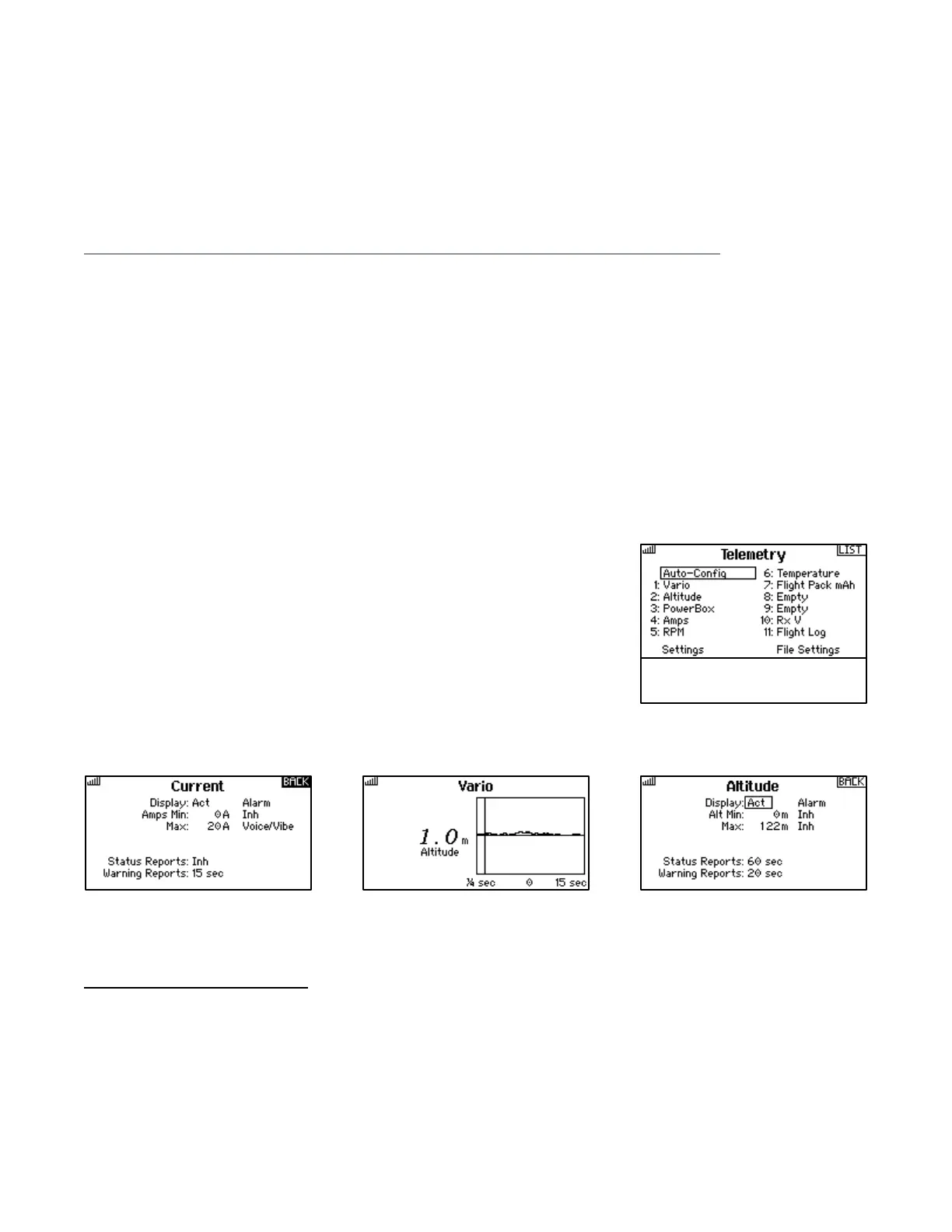
To utilize this capability on a telemetry-enabled Spektrum™ transmitter, turn on the radio and power ON the
receiver. Go to Telemetry. You will see a display of parameters potentially available from the installed sensors.
Run “Auto-Config” if they do not appear.
The Settings item allows selection of either metric or US units.
To determine how the various parameters are used by the transmitter, go to
any one of the items and double click. You will then see a screen offering
several options, which vary from one item to another. Typically, the choices
allow maximum and minimum values to be set for purposes of triggering
alarms and voice reports to be made at regular intervals or when a switch is
flipped. Note that not all the parameters displayed on the Telemetry screen
will turn out on inspection to be functional and useful.
Examples of the options available are shown in the pictures below.
3
Note that the Lemon RSSI value cannot be directly compared to other signal indicators, such as Spektrum™ or FrSky™ RSSI
numbers. Lemon RSSI will read at or close to 100 with the transmitter beside the model and fall as the model moves away.
Even at the minimum reading approaching 20, the signal should be adequate for control.
4
Users of Spektrum transmitters may occasionally see warning screens relating to such Spektrum-specific parameters as
fades, frames or holds. Lemon telemetry receivers do not report these parameters; any such warnings are generally
meaningless and can be turned off.



 To Next Page