10CH TXT Essential Instructions v1.docx 2024-09-05 3
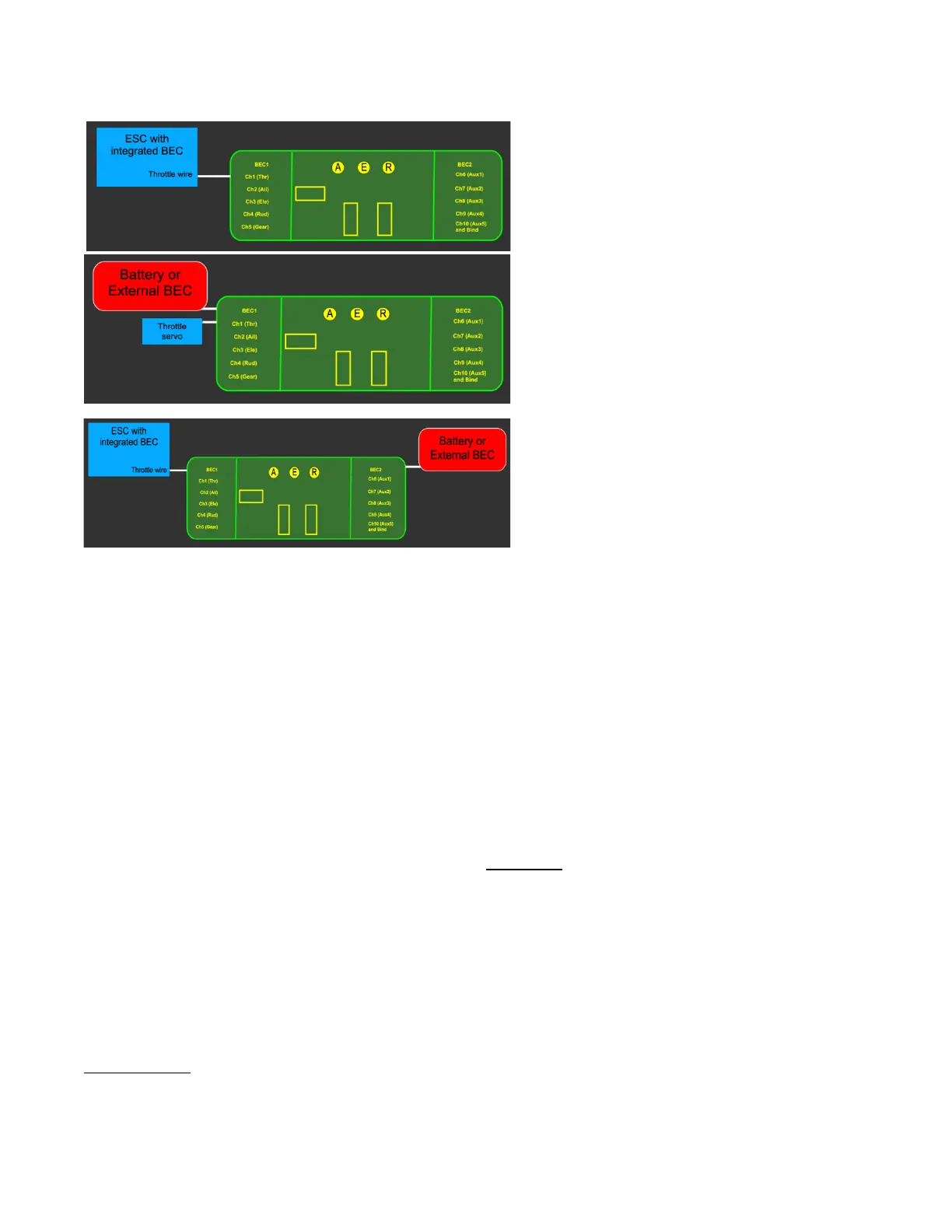
Via the Throttle Connector
Using an electronic speed controller (ESC) with
inbuilt battery eliminator circuit (BEC). This is the
most common method used for electric powered
models. Connected to channel 1.
Via BEC1
Using an external battery or external BEC. The
Channel 1 connector is used to control throttle
via a servo (for IC power) or an ESC that does not
have an integrated BEC. The power source
is connected to BEC1
Via
BEC1 and
BEC2
Both BEC1 and BEC2 can be used simultaneously
without the usual concerns about conflicting
voltages. An ESC with integrated BEC feeds
power through BEC1 while a supplementary
power supply is connected to BEC2. Note that no
connection to channel 1 is needed as the throttle
signal is routed automatically from BEC1.
Step 2: Binding the Receiver
To bind the receiver to a specific model memory in the transmitter, use either of these two methods:
Binding Using the Bind Button
1. Power ON the receiver (with satellite receiver connected, if used).
2. Hold down the Bind button B for about 3 seconds.
3. Release button B when the red Receiver Status light starts to flash.
4. If a satellite receiver is used, power cycle the receiver at this point by removing power and applying it
again. Both the receiver status light and the satellite light will then flash.
5. Proceed to bind to the transmitter in the normal way (see transmitter instructions).
6. Bind is complete when the red Receiver Status light (and satellite light, if connected) are solid.
Binding Using a Bind Plug
(The traditional Spektrum™ method)
1. With receiver power OFF, place a bind plug on the channel 10 pins.
2. Power ON the receiver (with satellite receiver connected, if used).
3. The red Receiver Status light and satellite, if connected, will start to flash.
4. Proceed to bind the transmitter in the normal way (see transmitter instructions).
5. Bind is complete when the red Receiver Status light (and satellite light, if connected) are solid.
6. Don’t forget to remove the bind plug.
The receiver is now ready for use with stabilization inactive; however, adding User-set failsafe is recommended.
Step 3: Setting Failsafe
No-pulse mode is the default response of the receiver as supplied if signal is lost for approximately 1 second or
more. The receiver then ceases to send pulses on any channel. Servos stay in their current positions, while the



 To Next Page