10
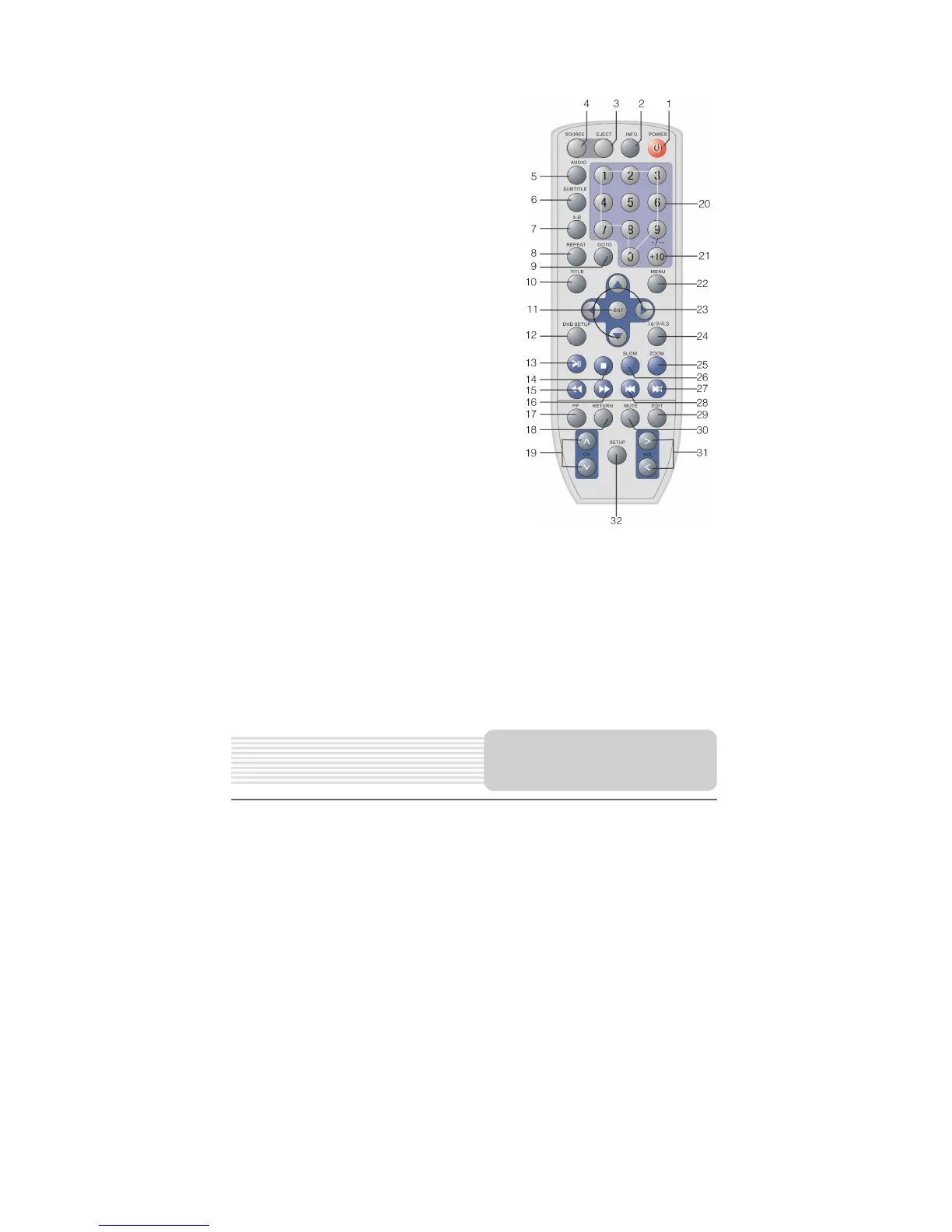
21. +10/ -/-- button
Press this button and the additional number
buttons to select channel or item numbers
which are greater than 9.
22. MENU button
In DVD mode, press to enter or exit the
system setup menu.
23. Direction buttons (▲▼◄►)
Used to select different items in the DVD
setup menu.
24. 16:9/4:3 button
Press to select the aspect ratio of the screen
between 16:9 and 4:3.
25. ZOOM button
In DVD mode, press to realize various zoom
effects.
26. SLOW button
In DVD mode, press to activate slow
playback during normal playback.
27.
button
In DVD or SD/MS/MMC mode, press to
forward to the next list/track/chapter.
28.
button
In DVD or SD/MS/MMC mode, press to
return to the previous list/track/chapter.
29. EDIT button
Press to edit the channels in TV mode.
30. MUTE button
Press to turn off or on the speaker output.
31. VOL/ button
Press to adjust the volume or select different items in the system setup menu.
32. SETUP button
Press to enter or exit the system setup menu.
Remote Control



 To Next Page