8
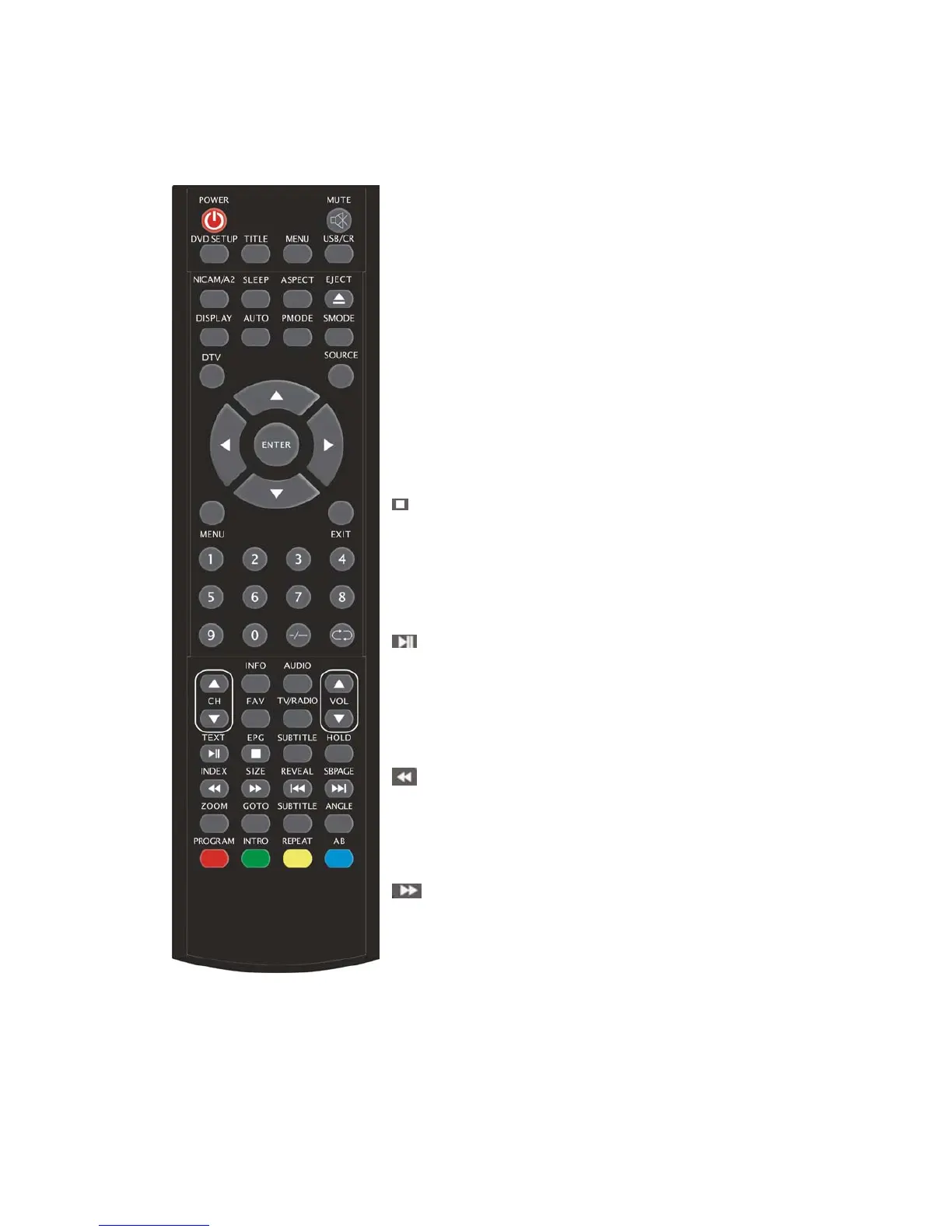
CH+/CH-: Change the channel up and down.
VOL+/VOL-: Adjust the volume.
INFO: Display some information of current program in DTV
mode.
(Used for models with DTV function only)
AUDIO: Press to select the DTV audio or DVD audio.
(Used for models with DTV or DVD function only)
FAV: Switch between custom set “Favourite List”.
(Used for models with DTV function only)
TV/RADIO: Switch between DTV program and radio
program (only audio but not image).
(Used for models with DTV function only)
EPG: Enter electronic program guide.
(Used for models with DTV function only)
:Stop playing the disc.
(Used for models with DVD function only)
SUBTITLE(GREEN): Open or close subtitle.
(Used for models with DTV function only)
TEXT: Press to enter the Teletext mode.
(Used for European region only)
:Press to start playing the disc to pause playing.
(Used for models with DVD function only)
HOLD: Freeze a multi-page passage on screen in Teletext
mode. (Used for European region only) .
INDEX: Press this button to go to the index page in Teletext.
(Used for European region only)
:Press to play backward.
(Used for models with DVD function only)
SIZE: Display the top, bottom or all of page to read easily in
Teletext mode.
(Used for European region only)
:Press to play forward.
(Used for models with DVD function only)



 To Next Page