
 Need help?
Do you have a question about the Lennox ComfortSense 7500 Series and is the answer not in the manual?
Explains the temperature dial feature on the home screen.
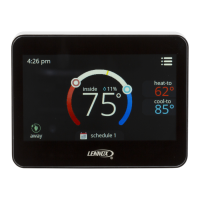
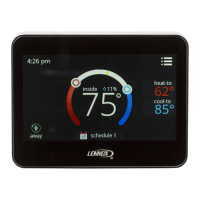
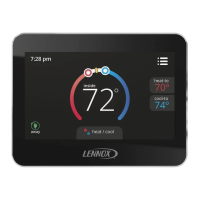
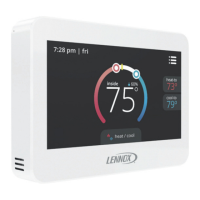
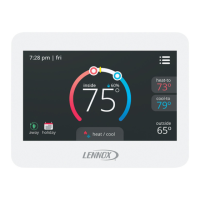
Details various elements displayed on the thermostat's home screen.
Describes how to choose between heating, cooling, and other operational modes.
Explains available fan modes (ON, AUTO, CIRCULATE) and their behavior.
Details how to access the main menu and its selectable options.
Explains system alerts, errors, and how to manage reminders.
Describes how to view system runtime hours for heating and cooling.
Guides users on how to customize heating and cooling schedules.
Covers fan, mode, emergency heat, and set point range configurations.
Details the selection and adjustment of dehumidification features.
Describes setting up custom reminders for maintenance and system checks.
Covers screen lock, date/time, language, and display settings.
Explains occupancy settings and customizable display options like screen saver.
The Lennox ComfortSense® 7500 Commercial Thermostat is an advanced, electronic 7-day programmable touchscreen thermostat designed for universal, multi-stage applications. It offers a comprehensive suite of features for precise climate control in commercial settings, focusing on efficiency, user convenience, and system maintenance.
The primary function of the ComfortSense® 7500 is to regulate heating and cooling in commercial spaces. It supports various operating modes, including Heat/Cool, Heat Only, Cool Only, Off, and Emergency Heat, allowing for flexible climate management based on specific needs. The thermostat can automatically switch between heating and cooling to maintain desired temperatures, or it can be set to operate in a single mode. It is compatible with commercial package rooftop units and can manage multi-stage heating and cooling systems.
A key feature is its ability to implement schedules, with options for up to three separate schedules (Schedule 1, Schedule 2, and Holiday). These schedules can be customized for individual days, week/weekend, or all seven days, with up to four time periods per day (Wake, Occupied, Unoccupied). Each time period allows for specific temperature setpoints (heat-to and cool-to) and fan operation settings. The thermostat also incorporates a "smooth set recovery" feature, which intelligently starts system operation early to achieve the setpoint at the beginning of a programmed period, optimizing energy use and comfort.
The thermostat includes advanced dehumidification measurement and control capabilities, which can be enabled in the installer settings. This allows for precise management of indoor humidity levels, contributing to a more comfortable and healthier environment. Economizer control is also supported, further enhancing energy efficiency by utilizing outside air for cooling when conditions are favorable.
For system protection and user awareness, the thermostat displays various system status icons indicating heating or cooling demand, compressor delays, and emergency heat operation. It also provides notifications for critical errors and reminders for equipment maintenance, ensuring timely attention to potential issues.
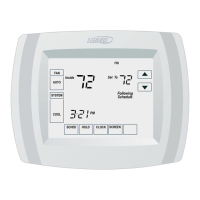
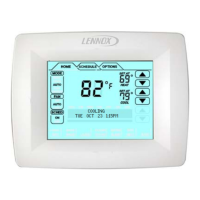
The ComfortSense® 7500 boasts a menu-driven touchscreen display, making it intuitive and easy to navigate. The home screen provides a clear overview of current conditions and settings, including indoor temperature, setpoints, outdoor temperature (if a sensor is installed), and indoor humidity percentage. Users can easily adjust setpoints by touching the heat-to or cool-to areas on the screen.
The "Operating Mode Selection" screen allows users to choose their desired system operation mode and fan settings (On, Auto, or Circulate). The "AWAY" function enables users to set specific heating and cooling temperatures when the building is unoccupied, promoting energy savings. The "Holiday Mode" offers a convenient way to override regular schedules for special days, with the option to set the override for up to four days.
The "User Menu Screen" provides access to a range of advanced settings and information. Here, users can view "Notifications" for critical errors and reminders, access a "Performance Report" to track system run-time hours, "Edit Schedules" for detailed programming, and adjust "User Settings" for various preferences.
User settings include options for fan operation (normal, comfort), heat/cool setpoint ranges, and dehumidification settings. The "screen lock" feature allows for partial or full locking of the thermostat interface with a three-digit code, preventing unauthorized changes. "Date & Time" settings cover 24-hour clock, daylight savings, and time/date adjustments. "Language" options include English, Spanish, Portuguese, and French.
The display settings offer control over what information is shown on the home screen, including outdoor temperature or discharged air temperature (depending on sensor configuration). A "screen saver" can be enabled to display only time and inside temperature, with the option for continuous or energy-saving backlight. Screen brightness is adjustable, and the temperature scale can be set to Fahrenheit or Celsius. A "clean screen" function temporarily disables the touchscreen for 30 seconds, facilitating cleaning without accidental input.
The ComfortSense® 7500 is designed with features to assist in system maintenance and ensure optimal performance. It includes "equipment maintenance reminders" that can be configured for various components such as media filters, humidity pads, UV lamps, and routine system check-ups. These reminders can be set for specific durations (e.g., 3, 6, 12, or 24 months) or custom dates, ensuring that maintenance tasks are not overlooked. When a reminder is due, a pop-up screen will appear, and the reminder will be listed under "notifications" in the user menu. Users can choose to clear the reminder or postpone it for a later date (1 day, 1 week, 1 month, 3 months, or a custom date).
The "Performance Report" provides valuable insights into system operation by displaying the total number of heating and cooling hours each month. This data can help identify trends in energy consumption and assist in troubleshooting or assessing system efficiency over time.
In the event of a system error, the thermostat will display "critical error notifications" with an error code. These pop-ups can be dismissed, but the error will remain listed under "notifications" in the user menu. This immediate feedback allows users to quickly identify issues and contact a dealer for resolution, minimizing downtime and potential damage. The thermostat also features "worry-free memory storage," ensuring that all settings and schedules are retained even during power outages.
The "User Settings Menu" provides access to "about" information, including the thermostat's model number, serial number, hardware, and software revisions. This information is crucial for technical support and ordering replacement parts. The ability to set specific "set point ranges" for heating and cooling helps prevent the system from operating outside of desired parameters, which can contribute to equipment longevity.
Overall, the ComfortSense® 7500 Commercial Thermostat combines advanced control capabilities with user-friendly features and robust maintenance support, making it an ideal solution for managing commercial HVAC systems efficiently and effectively.
 General
| Display | Color Touchscreen |
|---|---|
| Wi-Fi Connectivity | Yes |
| Energy Reports | Yes |
| Humidity Control | Yes |
| Filter Reminder | Yes |
| Geofencing | Yes |
| Dehumidification Control | Yes |
| Ventilation Control | Yes |
| Air Quality Monitoring | No |
| Compatibility | Compatible with most HVAC systems |
| Programmable | Yes |
| Smart Home Integration | Amazon Alexa, Google Assistant |
| Stages | Up to 4 heat/2 cool |
| Remote Access | Yes, via mobile app |
| Voice Control | Yes |
| Alerts | Yes |



 To Next Page