7.1 Audio configuration instructions
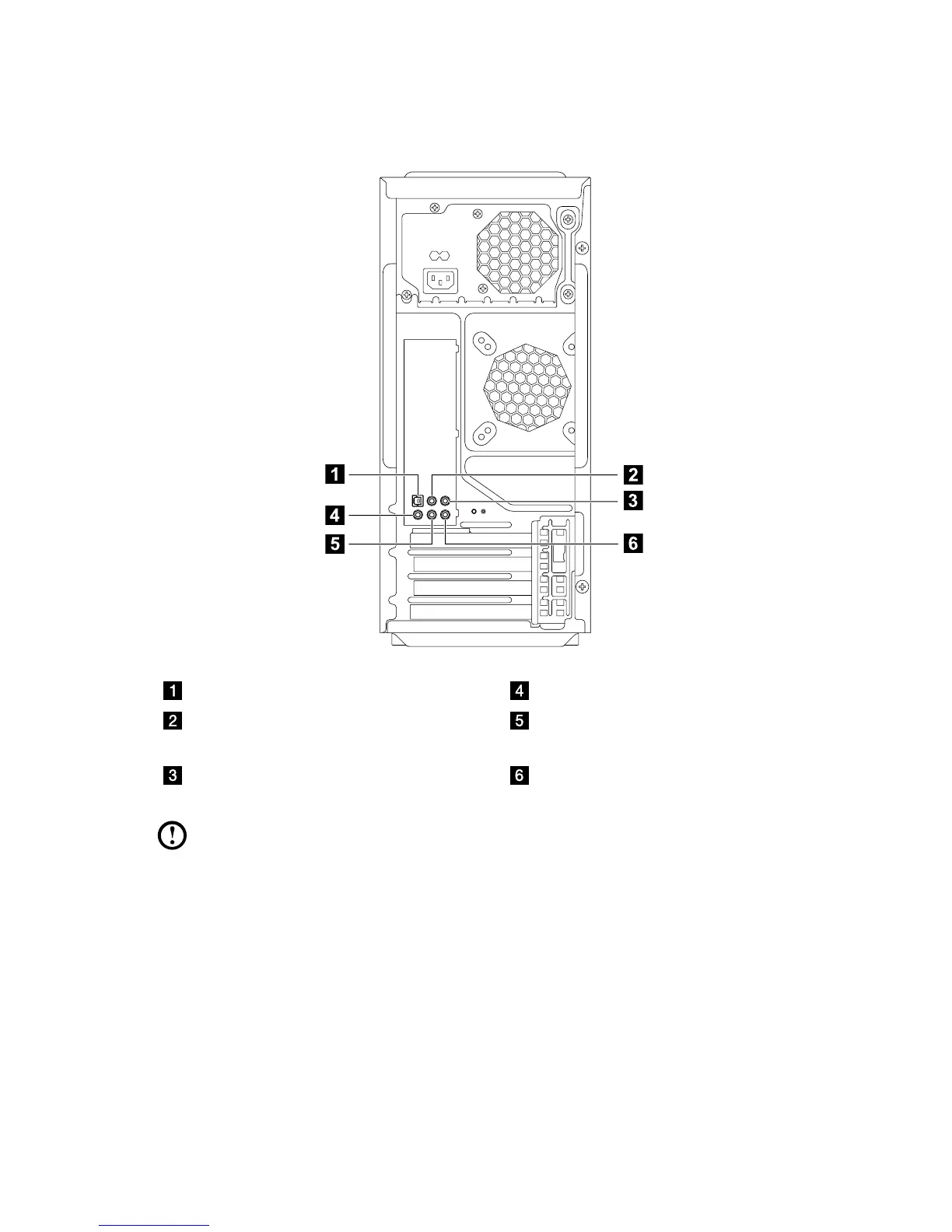
Use the following illustration when connecting a 7.1 surround sound audio system
S/PDIF out connector Microphone input Connector
Center / Low frequency output
connector
Audio line-out Connector
Surround out connector Audio line-in Connector
Note: For more detailed settings, from Control panel, select Hardware and
Sound
→
Lenovo HD Audio Manager. Follow the instructions to configure
advanced settings.
Sound configuration is as follows:
1. Right click the Sound icon in the system property bar and select the Sounds
option to set up sounds in the pop-up dialog box.
2. Select a playback device from the Playback dialog box, then click the
Configure button to configure it.
3. Select 7.1 surround from audio channels in the pop-up Speaker setup dialog
box and proceed with the speaker setup by following the prompts.









 To Next Page