Chapter 1. Getting to know your computer
7
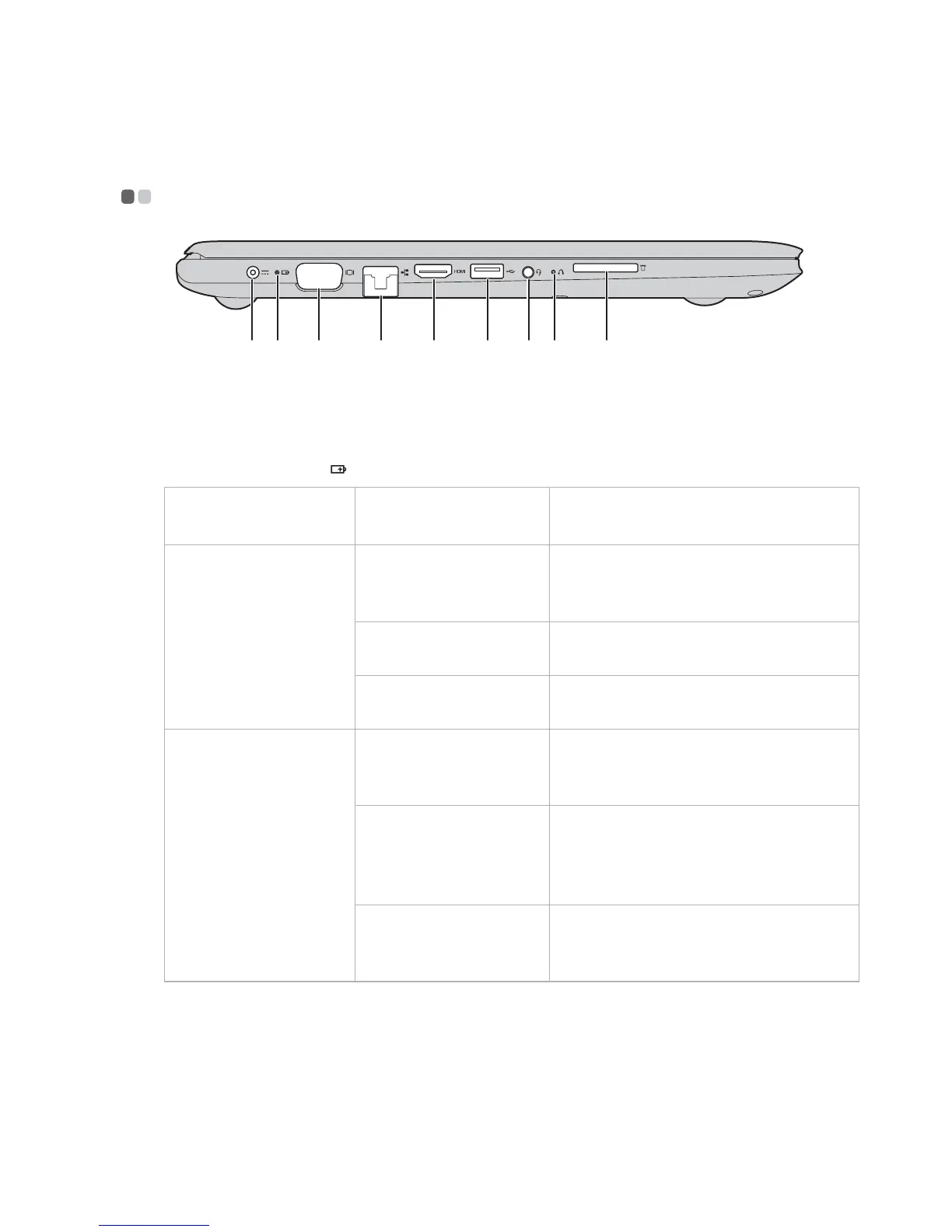
Left-side view - - - - - - - - - - - - - - - - - - - - - - - - - - - - - - - - - - - - - - - - - - - - - - - - - - - - - - - - - - - - - - - - - - - - - - - - - - - - - - - - - - - - - -
a AC power adapter
jack
Connects to the AC power adapter.
b Battery/Charging
status indicator
AC power
adapter status
Indicator status Meaning
Disconnected
Off The computer is in sleep mode or
turned off; The battery has more
than 20% charge.
Solid amber The battery has between 5% and
2
0% charge.
Fast blinking amber The battery has between 1% and 5%
charge.
Connected
Slow blinking amber The battery is being charged. When
battery charge reaches 20%, the
blinking color changes to white.
Slow blinking white The battery has between 20% and
80
% charge and is still charging.
When the battery reaches 80%
charge the light will stop blinking.
Solid white The battery has more than 80%
c
h
arge, charging will continue until
the battery is fully charged.
c VGA port
Connects to external display devices.
d RJ-45 port
Connects the computer to an Ethernet network.
e HDMI port
Connects to devices with HDMI input such as a TV or a
display.
a b c d e f g h i









 To Next Page