Appendix A. CRU instructions
37
Replacing the memory (on select models) - - - - - - - - - - - - - - - - - - - -
You can increase the amount of memory in your computer by installing
double data rate fourth generation synchronous dynamic random access
memory (DDR4)-available as an option-in the memory slot of your
computer. DDR4 modules are available in various capacities.
To install a DDR4 module, do the following:
1
Touch a metal table or a grounded metal object to reduce any static
electricity in your body, which could damage the DDR4. Do not touch the
co
ntact edge of the DDR4 module.
2
Turn off the computer. Disconnect the AC power adapter and all cables
from the computer.
3
Close the computer display and turn the computer over.
4
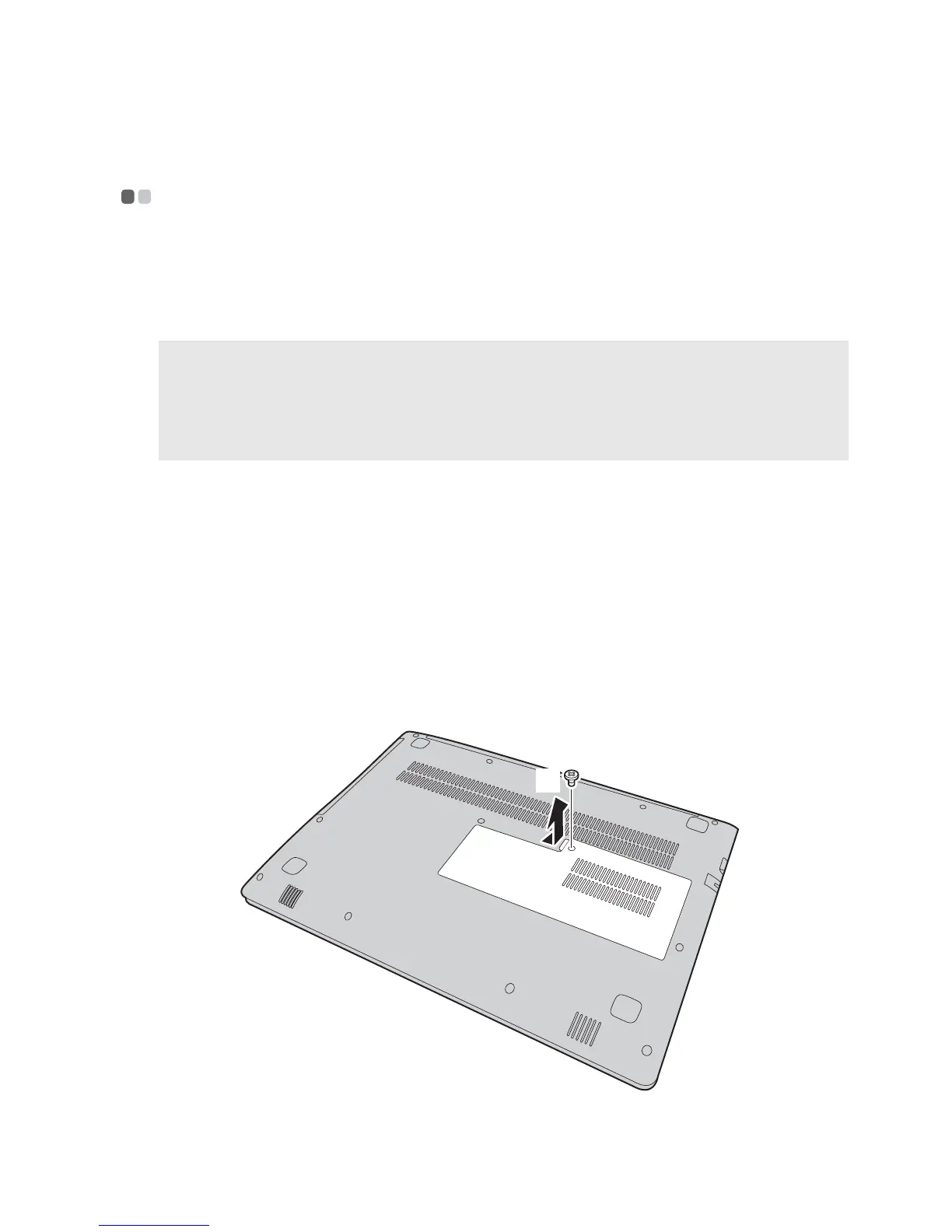
Remove the screw , and then remove the memory/Mini PCI Express
Card slot compartment cover .
Notes:
• Us
e only the memory types supported by your computer. If you incorrectly install
optional memory, or install an unsupported memory type, a warning beep will sound
when you try to start the computer.
• Sel
ect types of memory is not self-serviced, if necessary consult Lenovo service center.
a
b
a
b









 To Next Page