Chapter 1. Getting to know your computer
12
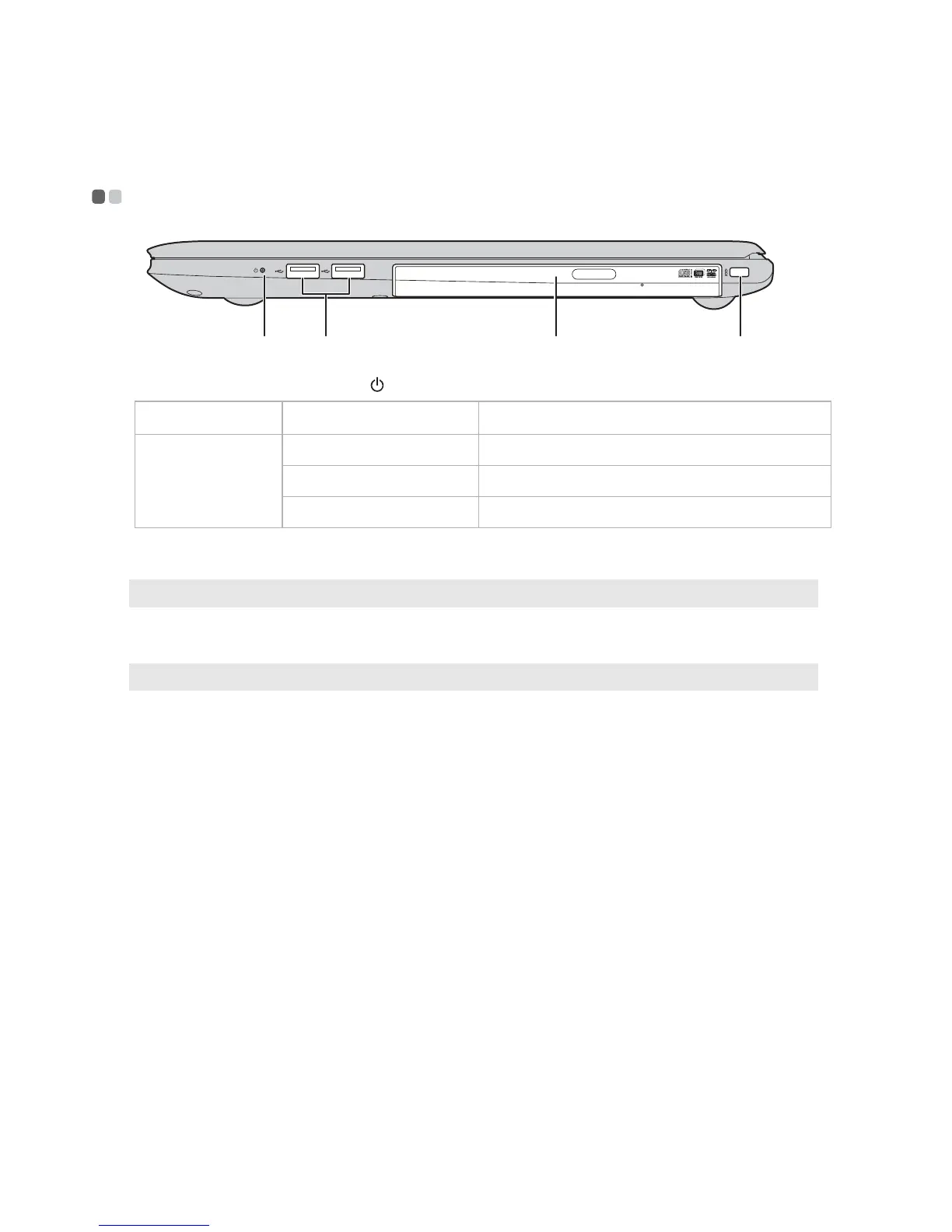
Right-side view - - - - - - - - - - - - - - - - - - - - - - - - - - - - - - - - - - - - - - - - - - - - - - - - - - - - - - - - - - - - - - - - - - - - - - - - - - - - - - - - - -
a Power status indicator
Indicator Indicator status Meaning
Power status
indica
tor
On (solid white) The computer is powered on.
Blinking The computer is in sleep mode.
Off The computer is powered off.
b USB port
Connects to USB devices.
Note: For details, see “Connecting USB devices” on page 10.
c Optical disc drive
Reads/Burns optical discs.
Note: Some models are supplied with a dummy optical disc drive.
d Kensington slot
Attach a security lock (not supplied) here to help protect
your computer from theft and unauthorized use.
You can attach a security lock to your computer to help
prevent it from being removed without your permission.
For details on installing the security lock, please refer to the
in
st
ructions shipped with the security lock that you have
purchased.
a b c d









 To Next Page