Lenovo IdeaPad U310/U410 Hardware Maintenance Manual
38
1030 Hard disk drive
For access, remove these FRUs in order:
• “1010 Battery pack” on page 34
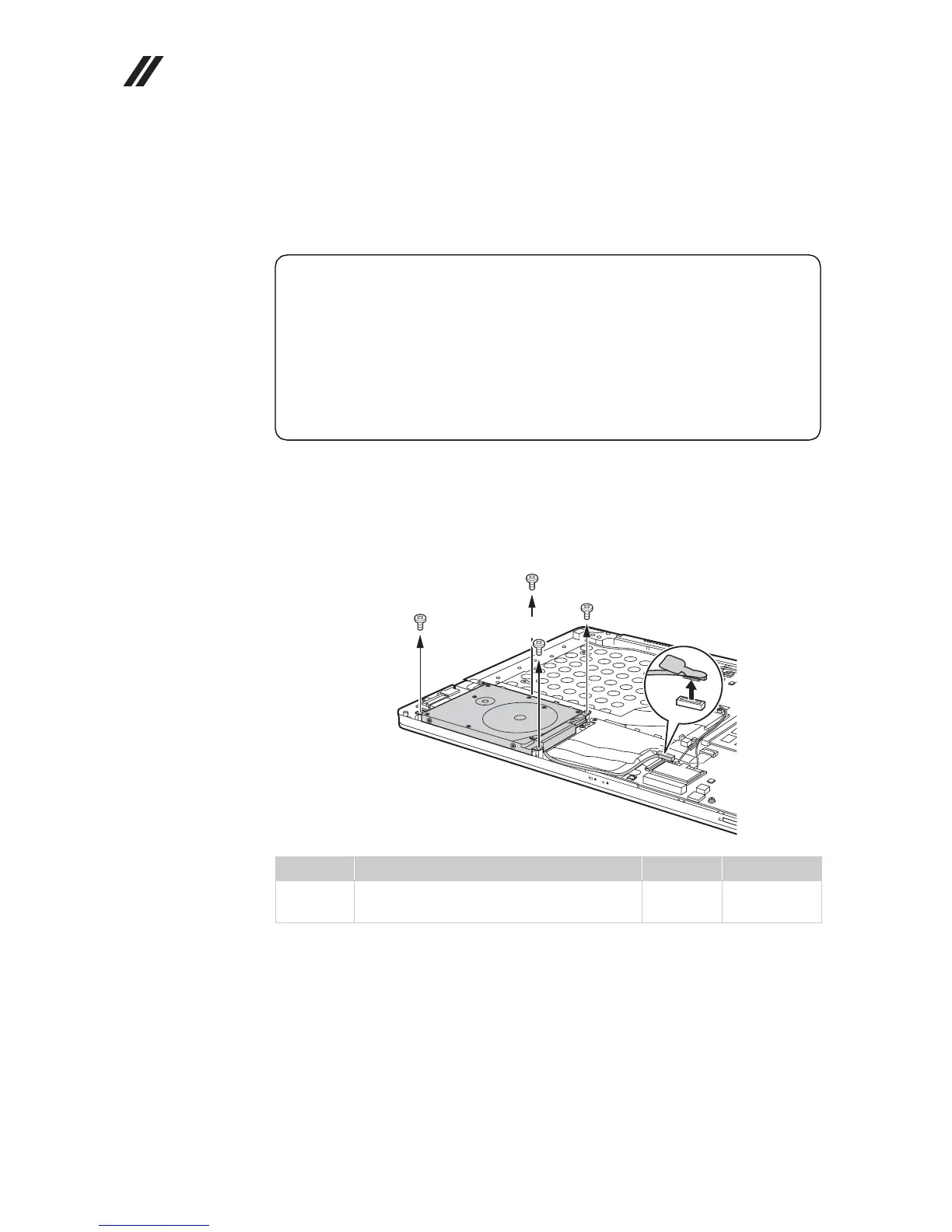
Figure 3. Removal steps of hard disk drive
U310: Remove the frame fixing screws . Pull the tab in the direction shown by
arrow .
Step Screw (quantity) Color Torque
M2.5 × 3.5 mm, flat-head, nylok-coated
(4)
Silver 2.5 kgfcm
Attention:
• Do not drop the hard disk drive or apply any physical shock to it.
The hard disk drive is sensitive to physical shock. Improper handling
can cause damages and permanent loss of data.
• Before removing the drive, suggest the customer to backup all the
information on it if possible.
• Never remove the drive while the system is operating or is in suspend
mode.
a
b
a
a
a
a









 To Next Page