Lenovo IdeaPad U310/U410
43
1050 PCI Express Mini Card for wireless LAN/WAN
For access, remove these FRUs in order:
• “1010 Battery pack” on page 34
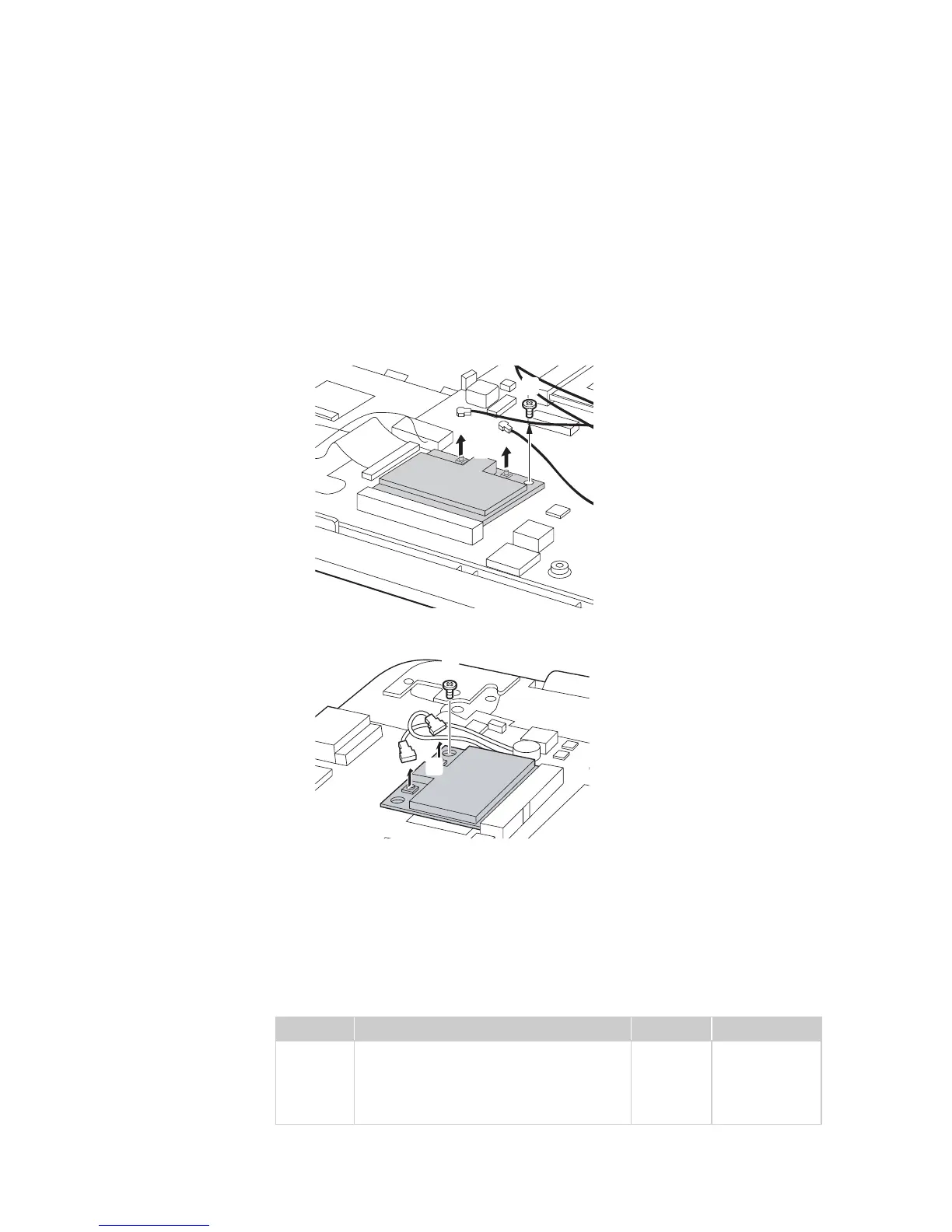
Figure 5. Removal steps of PCI Express Mini Card for wireless LAN/WAN
Disconnect the two wireless LAN cables (black,white) , and then remove the
screw .
U310:
U410:
In step , unplug the jacks by using the removal tool antenna RF connector
(P/N: 08K7159), or pick up the connectors with your fingers and gently unplug
them in the direction shown by arrows.
Notes: wireless LAN card has 2 cables in step .
wireless LAN card in some models may have 3 cables in step .
Step Screw (quantity) Color Torque
M2.0 × 3.0 mm, flat-head, nylok-coated
(1) (U310)
M2.0 × 3.0 mm, flat-head, nylok-coated
(1) (U410)
Black
Black
2.0 kgfcm
2.0 kgfcm
a
b
b
a
a
b
a
a
a
a









 To Next Page