Lenovo IdeaPad U310/U410
55
1090 LCD unit
For access, remove these FRUs in order:
• “1010 Battery pack” on page 34
• “1030 Hard disk drive” on page 38
• “1040 DIMM” on page 41
• “1050 PCI Express Mini Card for wireless LAN/WAN” on page 43
• “1060 Fan assembly and Heat Sink assembly” on page 45
• “1070 Keyboard” on page 48
• “1080 System board” on page 51
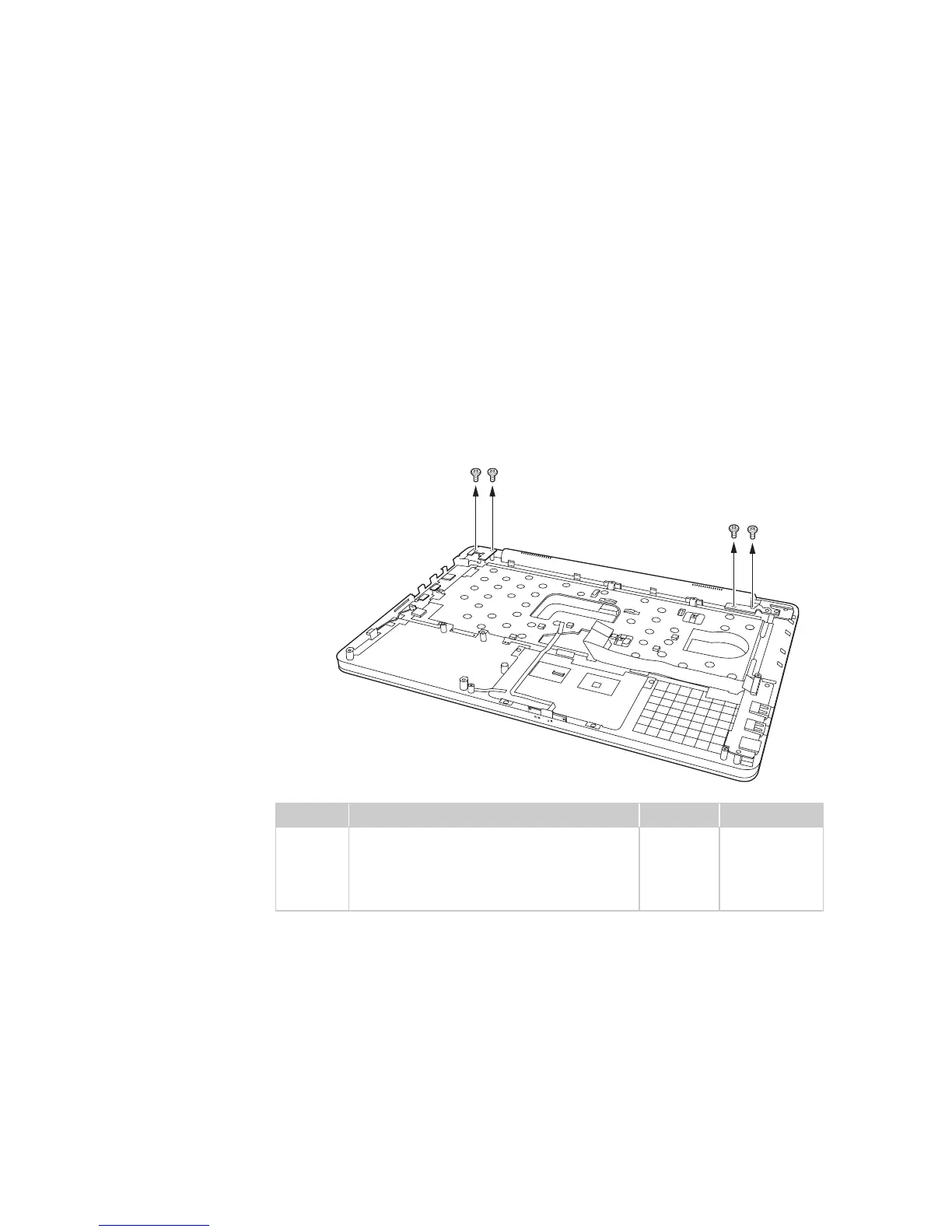
Figure 9. Removal steps of LCD unit
Remove four screws .
When installing:
• Route the antenna cables along the cable guides. As you route the cables,
make sure that they are not subjected to any tension. Tension could cause the
cables to be damaged by the cable guides, or a wire to be broken.
• Make sure that the LCD connector is attached firmly and make sure that you
do not pinch the antenna cables when you attach the LCD assembly. Route
the LCD cable along the cable guides.
Step Screw (quantity) Color Torque
M2.5 × 3.5 mm, flat-head, nylok-coated
(4) (U310)
M2.5 × 4.0 mm, flat-head, nylok-coated
(4) (U410)
Silver
Silver
2.5 kgfcm
2.5 kgfcm
a
a
a
aa
a









 To Next Page