EasyManua.ls Logo

Lenovo ThinkCentre M32 - User Manual

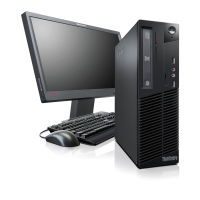
Lenovo ThinkCentre M32
96 pages
Print Icon
To Next Page IconTo Next Page
Loading...
ThinkCentreM32
UserGuide
MachineType:10BMand10BV

Table of Contents

Other manuals for Lenovo ThinkCentre M32

Questions and Answers

  • K
    Kent BarrettAug 12, 2025
    What to do if Lenovo ThinkCentre M32 computer does not start when I press the power switch?
    • D
      Darin HoltAug 12, 2025
      If your Lenovo Desktop computer doesn't start when you press the power switch, check the following: * Ensure the power cord is correctly connected to the rear of the computer and a working electrical outlet. * If a secondary power switch is on the rear, make sure it's switched on. * Verify the power indicator on the front of the computer is lit. * Confirm the computer voltage matches the voltage available at the electrical outlet.
  • A
    Adam HansenAug 16, 2025
    What to do if the keyboard does not work on Lenovo ThinkCentre M32?
    • F
      Francisco LarsenAug 16, 2025
      If the keyboard does not work on your Lenovo Desktop, check that: * The computer is turned on. * The keyboard is securely connected to a USB connector on the computer. * No keys are stuck.
  • A
    Amber SnyderAug 19, 2025
    What to do if Lenovo ThinkCentre M32 does not start?
    • K
      kwilsonAug 19, 2025
      If your Lenovo Desktop isn't starting when you press the power button, check these things: * Ensure the power cord is properly connected to both the back of the computer and a working electrical outlet. * If there's a secondary power switch at the rear, make sure it's on. * Confirm the power indicator on the computer's front is lit. * Verify that the computer's voltage matches the voltage available at your electrical outlet.
  • A
    alopezAug 23, 2025
    How to fix Lenovo ThinkCentre M32 Desktop keyboard that is not working?
    • E
      Elizabeth ConradAug 23, 2025
      If your Lenovo Desktop keyboard isn't working, make sure that: * The computer is turned on. * The keyboard is securely connected to a USB connector on the computer. * No keys are stuck.
  • M
    Ms. Sarah PerryAug 27, 2025
    Why is the monitor screen blank on my Lenovo Desktop?
    • I
      iewingAug 27, 2025
      If the monitor screen is blank on your Lenovo Desktop, verify the following: * The monitor signal cable is correctly connected to both the monitor and the appropriate connector on the computer. * The monitor power cord is correctly connected to the monitor and a working electrical outlet. * The monitor is turned on, and the brightness and contrast controls are properly set. * The computer voltage matches the voltage available at the electrical outlet. * If your computer has two monitor connectors, use the connector on the graphics card.
  • P
    pmitchellAug 31, 2025
    What to do if the mouse does not work on Lenovo ThinkCentre M32?
    • K
      Karen WilliamsAug 31, 2025
      If the mouse does not work on your Lenovo Desktop, check that: * The computer is turned on. * The mouse is securely connected to a USB connector on the computer. * The mouse is clean.
  • A
    Andrea HardySep 4, 2025
    Why is my Lenovo ThinkCentre M32 monitor screen blank?
    • J
      Jordan FosterSep 4, 2025
      If your Lenovo Desktop monitor screen is blank, check the following: * Ensure the monitor signal cable is correctly connected to both the monitor and the appropriate connector on the computer. * Verify the monitor's power cord is correctly connected to the monitor and a working electrical outlet. * Make sure the monitor is turned on, and the brightness and contrast are properly adjusted. * Confirm the computer's voltage matches the voltage available at your electrical outlet. * If your computer has two monitor connectors, use the one on the graphics card.
  • K
    kathleen93Sep 7, 2025
    Why is my Lenovo ThinkCentre M32 Desktop mouse not working?
    • X
      xingramSep 7, 2025
      If your Lenovo Desktop mouse isn't working, verify that: * The computer is turned on. * The mouse is securely connected to a USB connector on the computer. * The mouse is clean.

Summary

Safety and Precautions

General Safety Information

Essential safety guidelines for product use and handling.

Electrical and Environmental Safety

Guidelines for power, plugs, ventilation, and operating environment.

Security Features

Physical and Password Security

Cable lock, BIOS, and system password protection methods.

System Configuration and Updates

Setup Utility Program Guide

Navigating BIOS settings, device management, and startup sequences.

Troubleshooting and Maintenance

Diagnostic and Problem Resolution

Steps for diagnosing and resolving computer problems.

Lenovo ThinkCentre M32 Specifications

General IconGeneral
BrandLenovo
ModelThinkCentre M32
CategoryDesktop
LanguageEnglish

Related product manuals