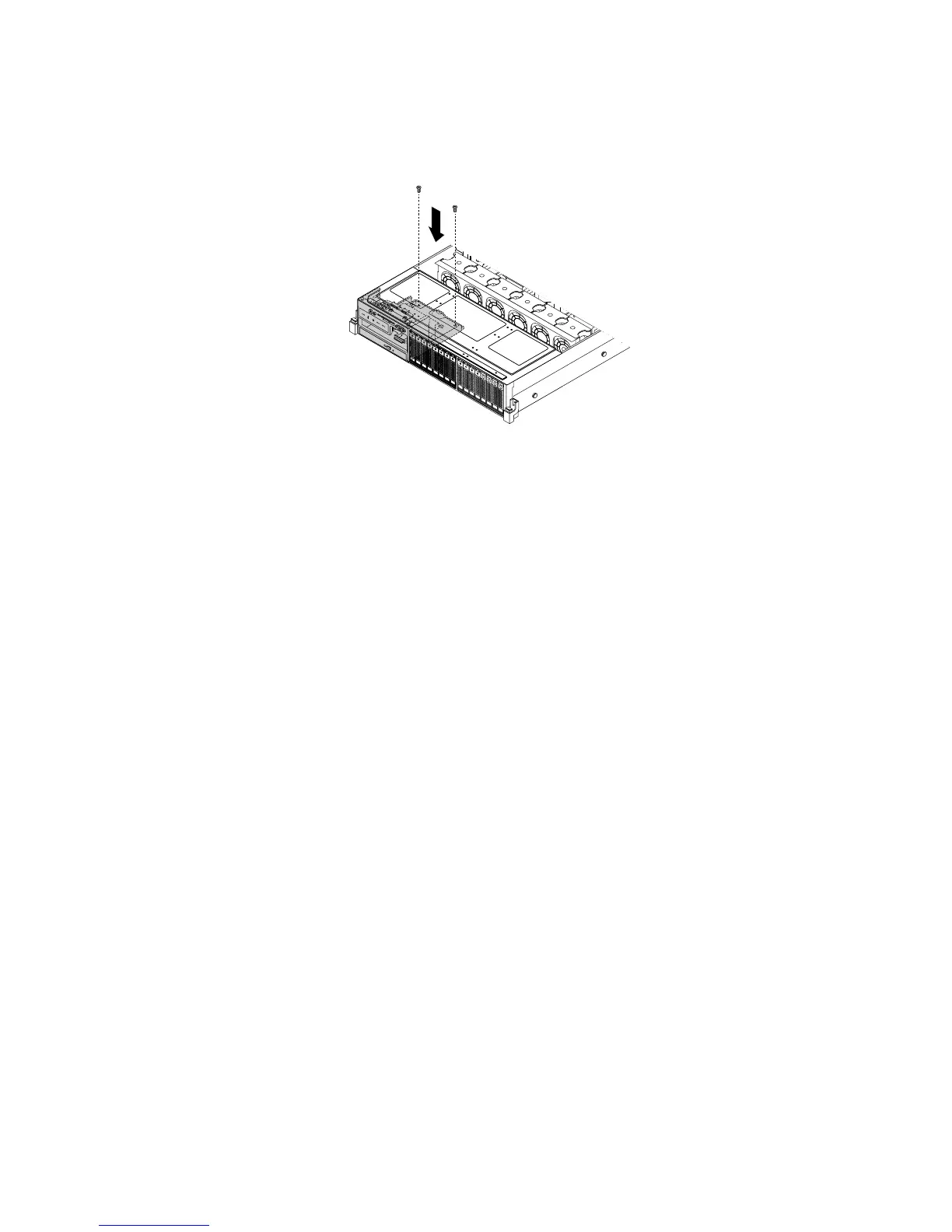
10.Ensurethatthetwoscrewholesintherearoftheleftcagearealignedwiththecorrespondingholesin
thechassis.Then,installthetwoscrewstosecuretheleftcageinposition.
Figure45.Installingthescrewstosecuretheleftcage
11.Ifyourserverhasaslimopticaldriveinstalled,reconnectthesignalcableandthepowercabletothe
rearoftheslimopticaldrive.
12.Refertoyournotetoreconnectothercablestothesystemboard.Youalsocanreferto“Systemboard
components”onpage42
tolocatetheconnectorsonthesystemboardandreconnectcables.
13.Goto“Completingthepartsreplacement”onpage162.
Installingorremovingamemorymodule
Thistopicprovidesinstructionsonhowtoinstallorremoveamemorymodule.
Note:ThememorymodulesareextremelysensitivetoESD.Ensurethatyoureadandunderstand“Handling
static-sensitivedevices”onpage72rstandcarefullyperformtheoperation.
Memorymoduleinstallationrules
Yourserverhas20memoryslotsandithasthefollowingfeatures:
•Supports4GB,8GB,and16GB1333MHzDDR3low-voltageregistereddualinlinememorymodules
(LVRDIMMs)
•Supports4GB,8GB,and16GB1333MHzDDR3RDIMMs
•Supportsupto12normalRDIMMswhenonemicroprocessorisinstalledandupto20RDIMMswhentwo
microprocessorsareinstalled
•Supportsupto8LVRDIMMswhenonemicroprocessorisinstalledandupto16LVRDIMMswhentwo
microprocessorsareinstalled
•Minimumsystemmemory:4GB(onlyonemicroprocessorinstalledandonlyone4GBmemorymodule
installedintheCPU1DIMMA1slot)
•MaximumsystemmemoryifyouareusingnormalRDIMMs:320GB(twomicroprocessorsinstalledand
one16GBRDIMMinstalledineachofthe20memoryslots)
•MaximumsystemmemoryifyouareusingLVRDIMMs:256GB(twomicroprocessorsinstalledandone
16GBLVRDIMMinstalledineachofthe16memoryslotsthatsupportsaLVRDIMM)
Formoreinformationaboutthememorymodulesinyourspecicservermodel,usetheSetupUtility
program.See“ViewinginformationintheSetupUtilityprogram”onpage55
.
82ThinkServerHardwareMaintenanceManual






 To Next Page