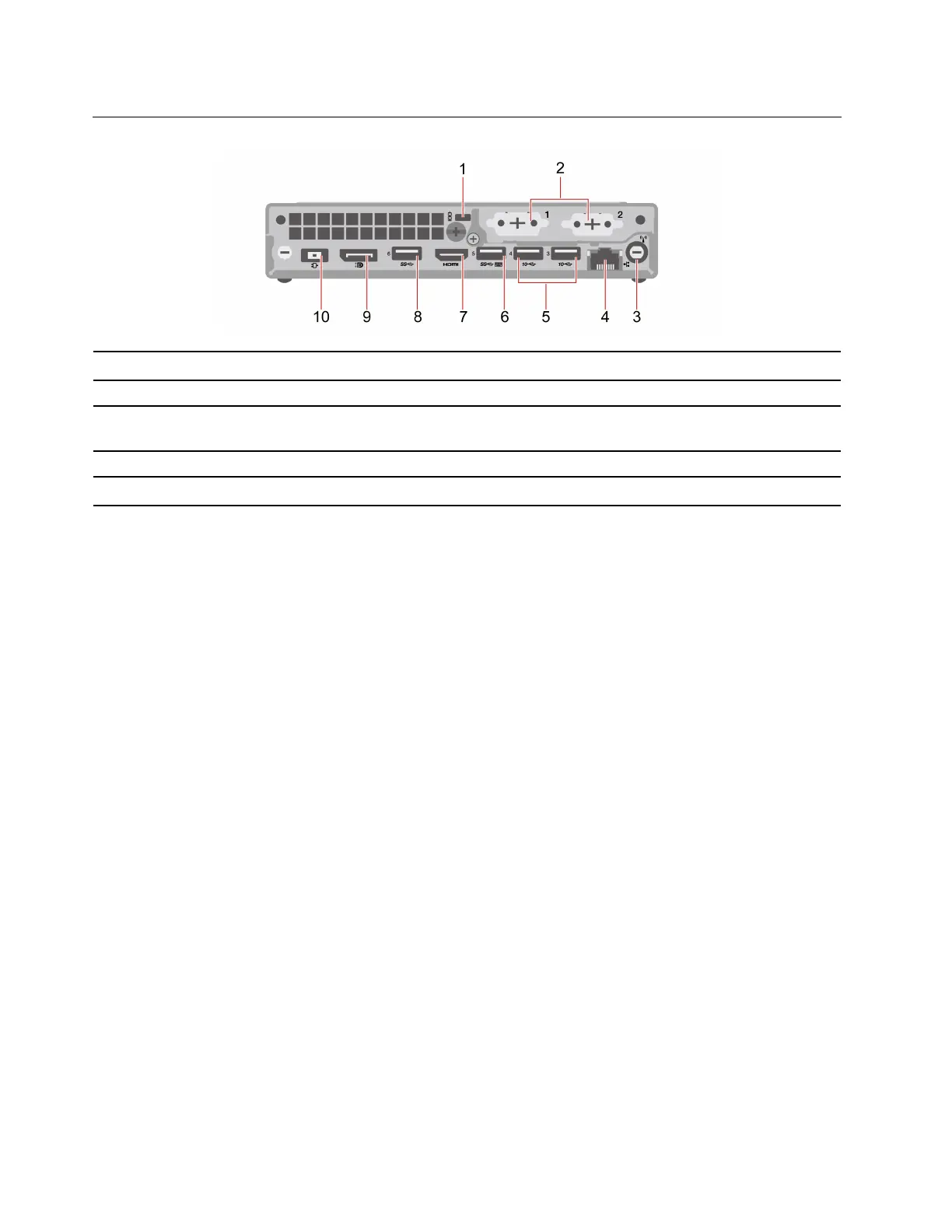
Rear
1. Security-lock slot 2. Optional connectors*
3. Wi-Fi
®
antenna slot* 4. Ethernet connector
5. USB 3.2 connectors Gen 2
6. USB 3.2 connector Gen 1 (with smart power-on
feature)
7. HDMI
™
out connector 8. USB 3.2 connector Gen 1
9. DisplayPort
™
out connector 10. Power adapter connector
* for selected models
Optional connectors
Depending on the computer model, the optional connector might be one of the following:
• DisplayPort out connector
• HDMI out connector
• Serial connector
• VGA-out connector
• USB 3.2 Gen 1 connector
• USB-C (3.2 Gen 1) connector (only for optional connector 1)
• Ethernet connector (only for optional connector 2)
Related topics
• “USB specifications” on page 4.
• “Connect an external display” on page 5.
• “Lock the computer” on page 11.
• “Enable or disable the smart power-on feature (for selected models)” on page 19.
2
P360 Tiny User Guide


 To Next Page