Chapter 2. 2-4
Using the On-Screen Display (OSD) controls
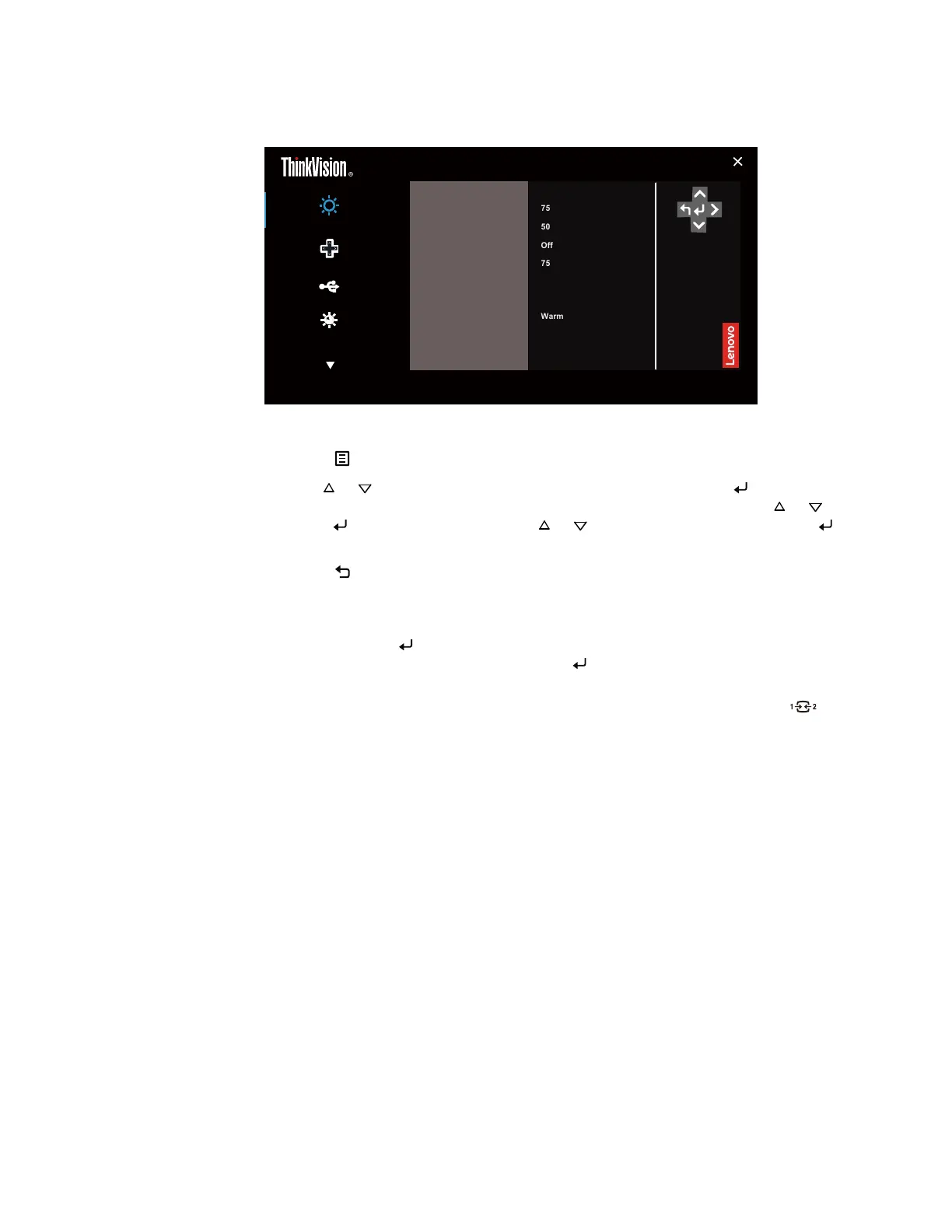
To adjust the settings, the user controls can be viewed through the OSD.
Monitor control
Input Signal: HDMI Resolution: 1920 x 1080 Refresh Rate: 60Hz
Brightness 75
Volume 50
Color mode
Warm
Contrast 75
Mute
Off
Quik settings
Port setting
Advanced settings
E22-30
Dynamic contrast
Off
Over Drive Off
To use the controls:
1. Press
to open the main OSD menu.
2. Use
or to move among the icons. Select an icon and press to access that
function. If there is a sub-menu, you can move between options using or , then
press to select that function. Use or to make adjustments then Press to
save.
3. Press
to move backwards through the sub-menus and exit from the OSD.
4. When VGA signal is connected, the Image position (H/V position), Clock and
Phase that Timing parameters of analog signal can store up to 16 sets of data.
5. Press and hold
for 10 seconds to lock the OSD. This will prevent accidental
adjustments to the OSD. Press and hold for 10 seconds to unlock the OSD and
allow adjustments to the OSD.
6. Enables DDC/CI by default. Use OSD Input Source Key, Press and hold
for 10
seconds to disable / enable DDC/CI function. The words “DDC/CI disable” shows
on the screen.






 To Next Page