Accessory decoder LS150 10
10
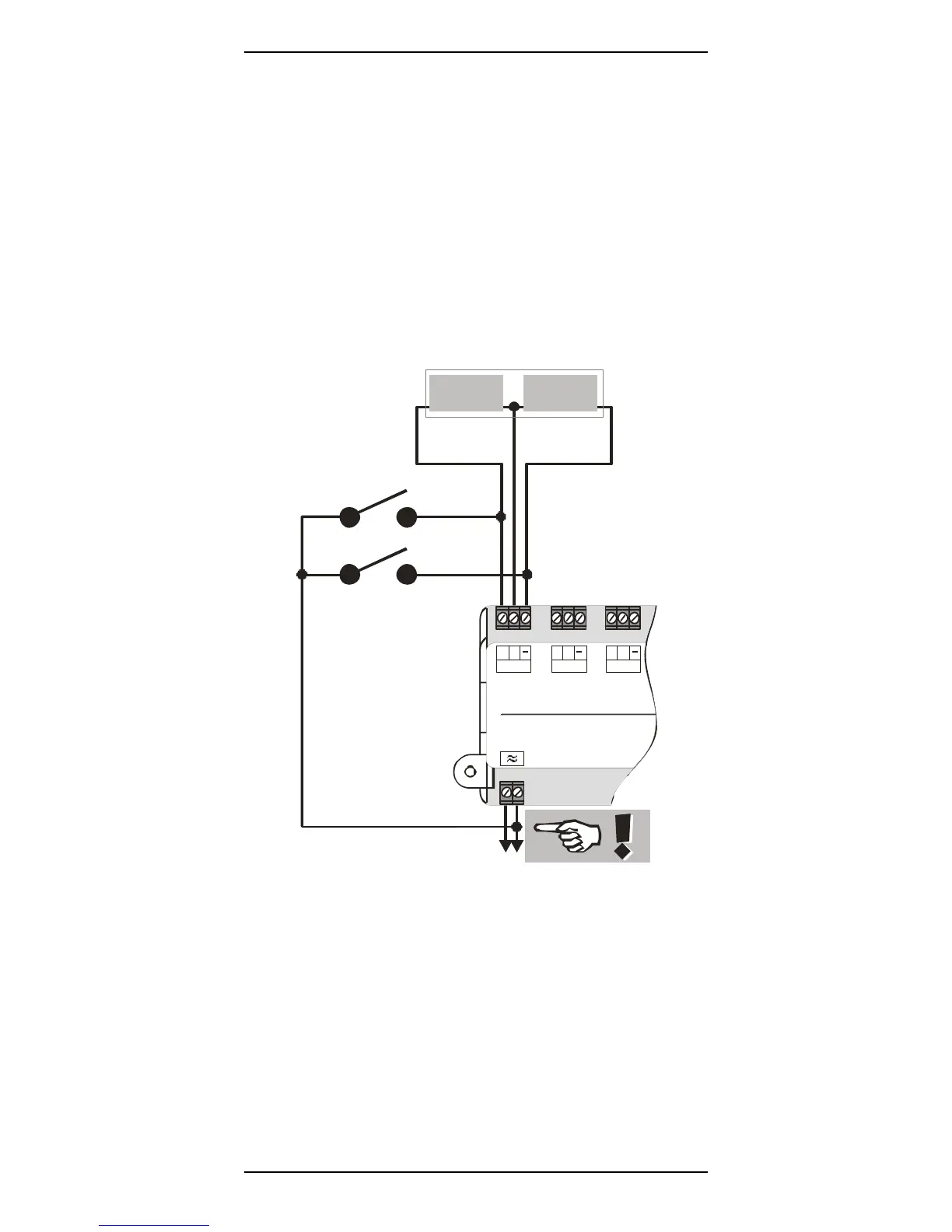
Connecting a separate push-button to the LS150
It is possible to control the turnouts connected to the LS150 via
separate push-buttons (or REED contacts). The point or signal
drive used should have auto-shutoff to avoid damage to the switch
machine should the push button be held down for two long a time.
Wire the push-buttons and/or Reed contacts in accordance with
Figure 2:
123
Coil 1 Coil 2
Twin-coil
switch
machine
AC
tr ansforme r
connection
+
C
1
+
C
2
+
C
3
LS150
Lenz Elektronik Gmb
K1
K2
Figure 2
The figure shows a typical twin-coil switch machine. The two coils
are connected to the terminals + and - of an output of the LS150.
Two push-buttons K1 and K2 are connected as shown. When
connecting the push-buttons, make sure that the common
connection of the push-buttons is connected to the AC terminal on


 To Next Page