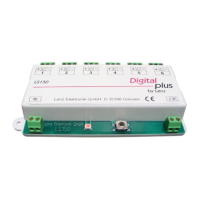
Accessory decoder LS150 12
12
Setting the address
The LS150 decoder is set at the factory for control of turnout
addresses 1 through 6.
There are two different ways of setting the addresses of the
outputs:
1. Set output 1 to the desired address; the remaining outputs are
automatically set to the 5 following addresses.
2. Set each output to an individual address; the addresses of the
outputs need not be sequential.
In order to be able to set addresses, the LS150 must be
connected to a power supply (AC voltage input ≈) and to the DCC
track signal (inputs J,K). You do not need switch machines
connected to the LS150 to set its addresses. You can also set the
addresses of the LS150 when the installation is completed. This is
helpful if you wish to change addresses later or wish to reuse the
LS150 on a different model railway.
Setting outputs with sequential addresses
Connect the LS150 to both the AC voltage supply and track output
as described in the Section "Connecting the LS150" (Page 7).
Then turnout on your DCC system (such as your
Digital plus by Lenz
®
system.)
1. Choose the turnout address which you wish to set the first
output of the LS150 to.
2. Press the push-button on the LS150 and keep it down until the
LED shines continuously (this will take approx. 3 sec.).
Release the push-button. The LED remains turned on and the
LS150 changes from the normal operating mode into the
setting mode. Output 1 of the LS150 will now assume the
address of the first turnout command it receives.
3. Proceed as if you wanted to activate the switch machine of the
selected turnout address by pressing the necessary keys on
your NMRA DCC system. It does not matter whether you
press the key to switch the turnout for "divergent" or "straight",
e.g. when using the LH100, use the keys '+' or '-'.
4. The point address received with the turnout command is now
allocated to output 1 of the LS150. Outputs 2 to 6 are
automatically set to the following turnout addresses.
You can tell that the setting was effected when the LED turns off
and the turnout command is carried out, i.e. the corresponding


 To Next Page