SLOW/F AST/STOP
FOOT SWITCH
FS-9H etc.
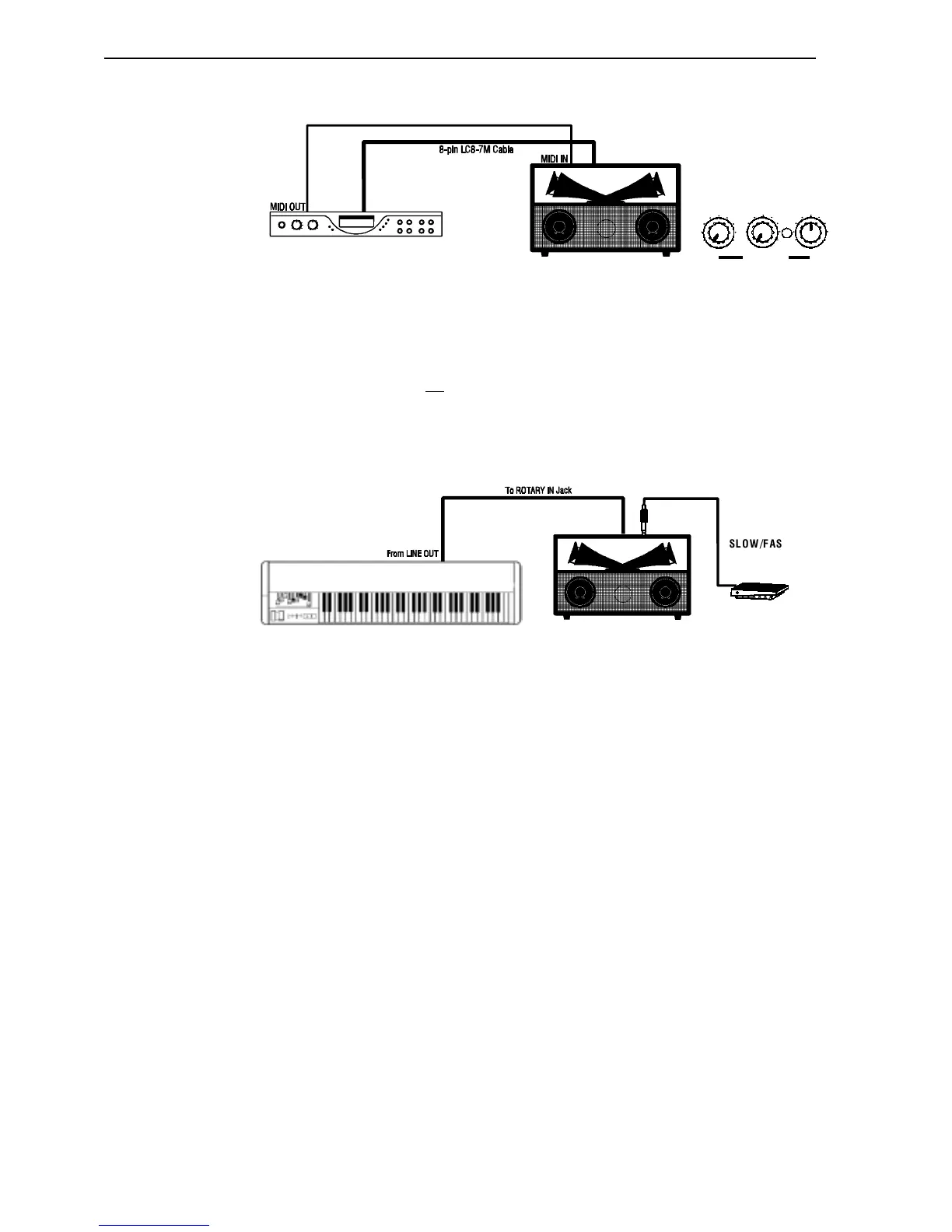
Ë Connecting using the 8-pin receptacle (XM-1, XB-1)
The above example shows a Hammond XM-1 connected to a Leslie Horn Unit. The audio
signal is connected via the special 8-pin cable. In addition, a MIDI cable can be connected from
the MIDI OUT of the XM-1 to the MIDI IN of the Leslie to allow the XM-1 to control the
Advanced Features of the Leslie.
NOTE: The Remote Turn-on feature is not available when using the 8-pin interface.
Ë Connecting using the ROTARY IN jack
The above example shows a hookup using the LINE OUT of another instrument. The audio
signal is connected via a patch cord from the LINE OUT jack( or the L/MONO jack if there is
more than one) to the ROTARY IN jack of the Leslie.
NOTE: You may also use the L/MONO jack of a Hammond instrument in this fashion; however, you will NOT
be able to control the rotor speed using the Touch Tabs. Use a Foot Switch for this purpose.



 To Next Page