- 15 -
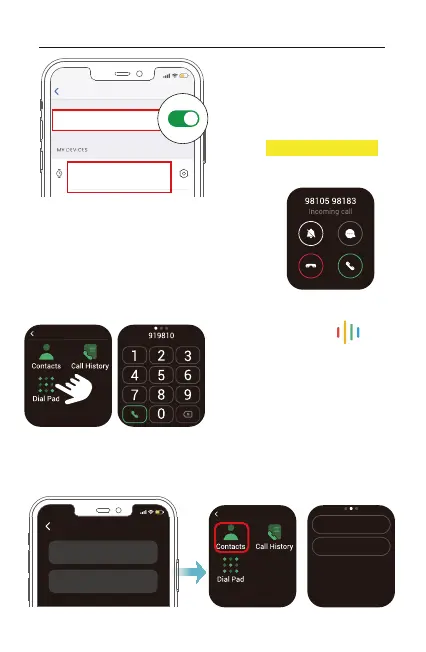
When a call comes in, you can answer the
call by tap the green phone icon, to ignore a
call, just tap the red phone icon the call will
be declined.
Settings
Bluetooth
Bluetooth
:
E22-CALL XXXX
Connected for calls
5. Bluetooth Phone Call
5.1 Answer incoming calls with your watch
5.2 Make a call from your watch
On your watch, select " Phone"
at the function list.
Tap the “Dial Pad” icon to dial a
number, or tap the “Contacts” icon
to select a specific contact.
When you're ready, tap the green
phone icon to make a call.
PHONE
12:30 PM
Go to the "Device" page in the Letsfit app, tap "Favorite Contacts"
to set favorite contacts.
5.3 Set Favorite Contacts
PHONE
12:30 PM
Helen
Mike
Favorite Contacts Add
:
Helen
1-532-456
Mike
1-561-006
You can make and answer calls
using the Watch! Just make sure
your watch is connected via
Bluetooth(Connected for calls).



 To Next Page