22
7. VLAN ID: Supports mapping of SSIDs to VLANs to separate workgroups across
wireless and wired domains.
8. Max Supported Stations: Support Max Stations to associated related SSID.
9. Channel: The radio channel number. The permissible channels depend on the
Regulatory Domain. The factory default setting is auto channel selection.
10. Wireless Mode: RF1 Module can choose “N only”, “G/N mixed” or “B/G/N
mixed” and the factory default setting is “B/G/N mixed”.RF2 Module can choose
“A only”, ”A/N mixed”, “N only”, “G/N mixed” or “B/G/N mixed” and the factory
default setting is “A/N mixed”.
11. Authentication & Encryption: You may select one of the following
authentications to secure your wireless network: Open, Shared, Auto, WPA-PSK,
WPA, WPA2-PSK, WPA2, WPA-PSK/WPA2-PSK, WPA /WPA2, or 802.1x.
Afterwards, click on “Save” to store your settings or click “Undo” to give up the
changes.
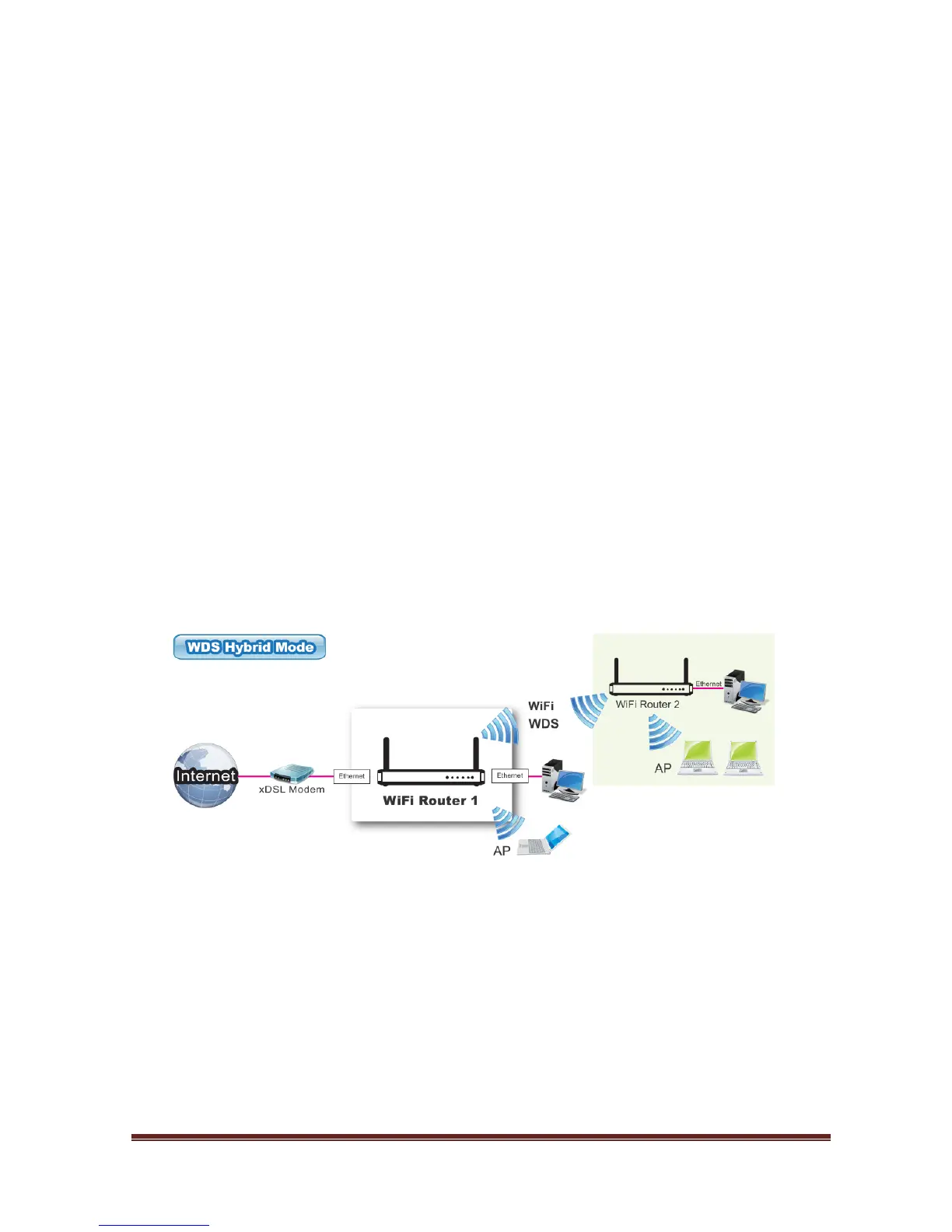
3.1.3.1.2 WDS Hybrid Mode
While acting as a wireless Bridge, Wireless Router 1 and Wireless Router 2 can
communicate with each other through wireless interface (with WDS). Thus All
Stations can communicate each other and are able to access Internet if Wireless
Router 1 has the Internet connection
.















 To Next Page