26
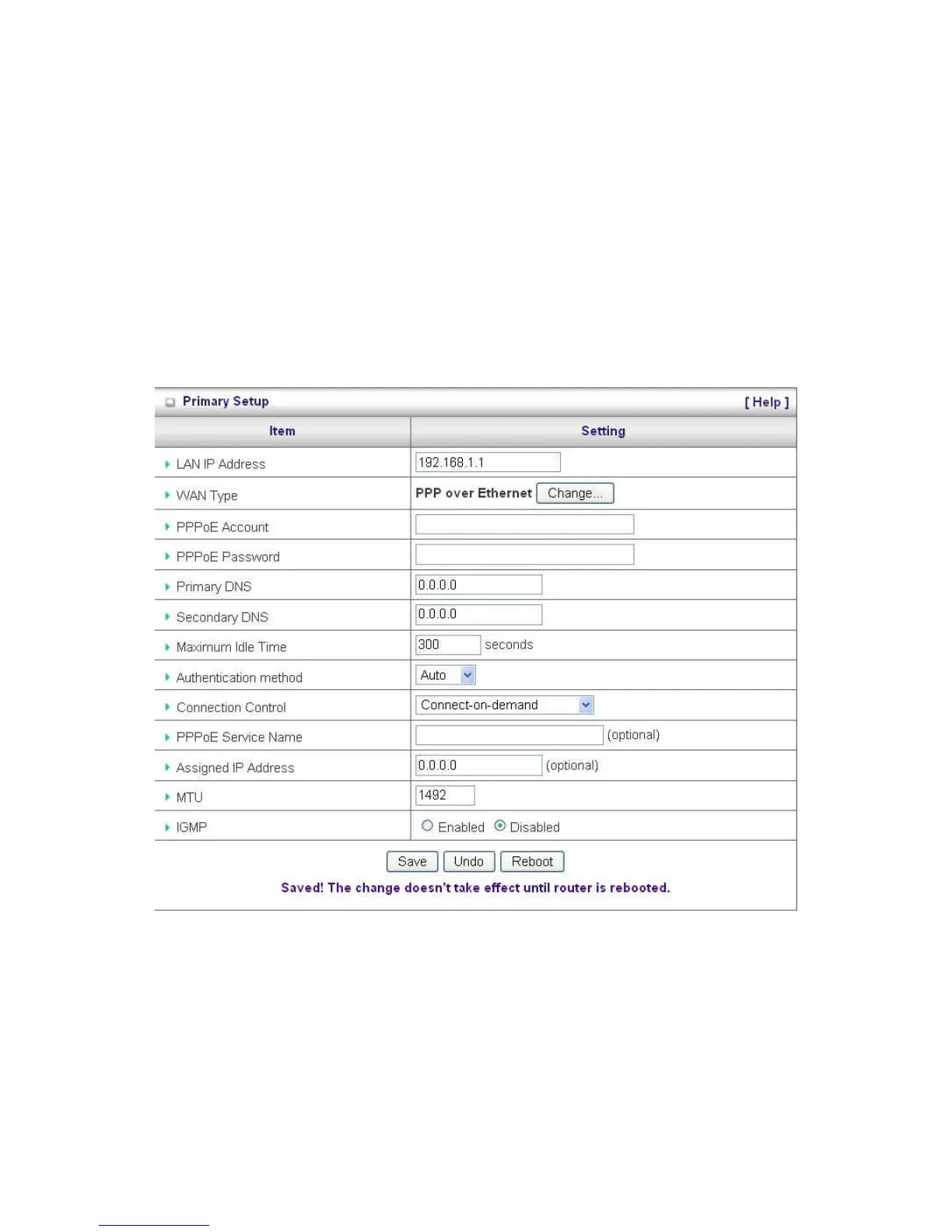
PPP over Ethernet
1. PPPoE Account and Password: the account and password your ISP assigned to you. For security,
this field appears blank. If you don't want to change the password, leave it empty.
2. PPPoE Service Name: Optional. Input the service name if your ISP requires it. Otherwise, leave it
blank.
3. Maximum Idle Time: the amount of time of inactivity before disconnecting your PPPoE session.
Set it to zero or enable Auto-reconnect to disable this feature.
4. Maximum Transmission Unit (MTU): Most ISP offers MTU value to users. The most common MTU
value is 1492.
5. Connection Control: There are 3 modes to select:
6. Connect-on-demand: The device will link up with ISP when the clients send outgoing packets.
7. Auto-Reconnect (Always-on): The device will link with ISP until the connection is established.
8. Manually: The device will not make the link until someone clicks the connect-button in the Staus-
page.















 To Next Page