Items Information
Select SSID
Please choose a SSID you have set for this router in the
Wireless >
Basic Settings from the drop-down list. The SSID will be shown on the
wireless network for recognizing.
Encryption
Select a security encryption mode for this router.
Authentication
There provide three options for selecting: Open System, Shared Key,
Auto.
Key Length
Select “64-bit” or “128-bit” as the key encryption length.
Key Format
Select “ASCII
1
” or “Hex
2
Encryption Key
” to setup the key value.
Enter the key according to the key format you select.
Show Password
Select to show the password or not.
* Please click on the Apply Changes button or the Reset button to save/reset the configurations.
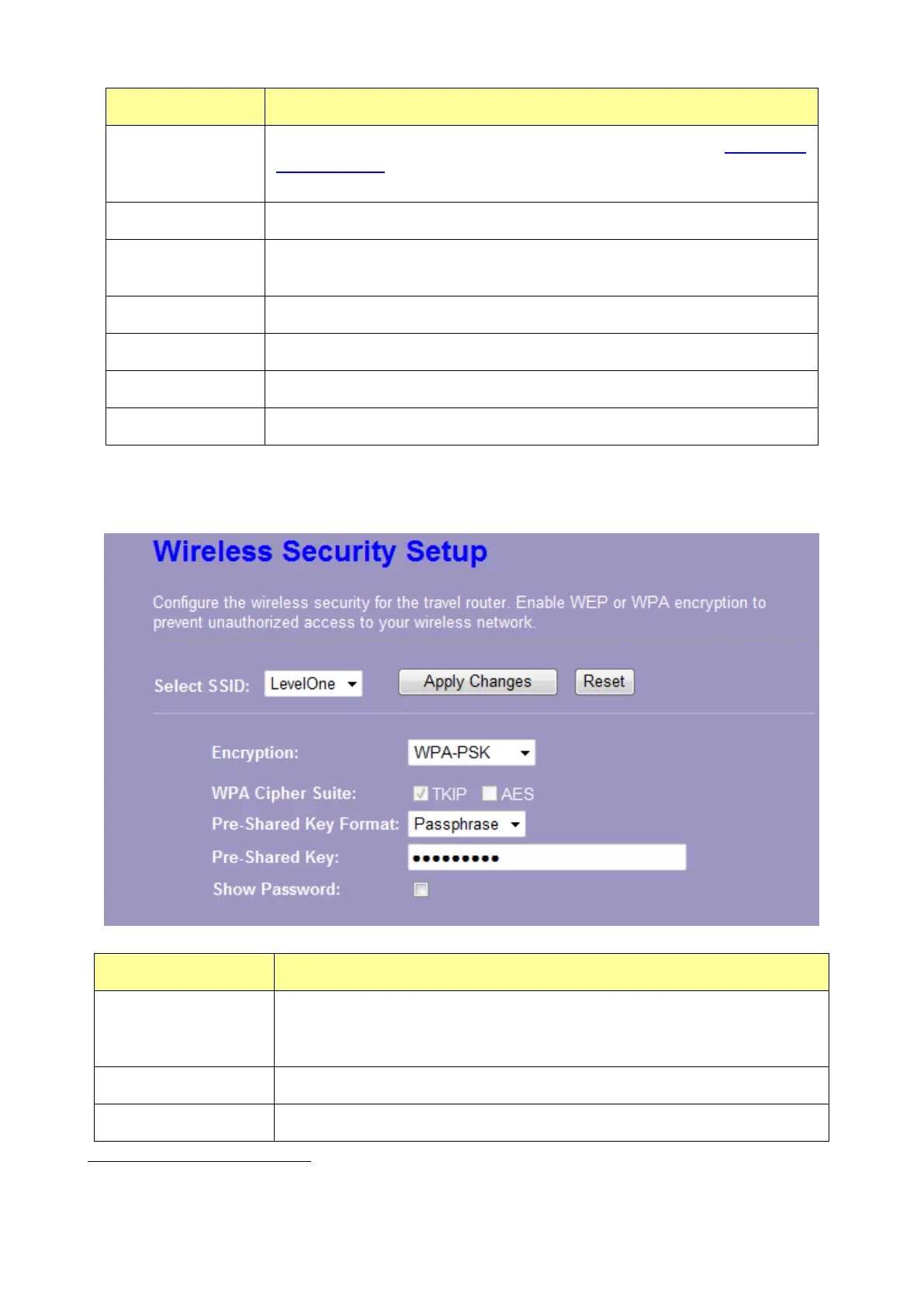
3. Security Mode – WPA / WPA 2
Items Information
Select SSID
Please choose a SSID you have set for this router by clicking
“Wireless > Basic Settings” from the drop-down list. The SSID will be
shown on the wireless network for your recognition.
Encryption
Select a security encryption mode for this router.
WPA/WPA2 Cipher
WPA Cipher Suite: the default setting is TKIP.
1
ASCII (American Standard Code for Information Interchange) is a code for representing English letters as numbers
from 0-127.
2
Hexadecimal digits consist of the numbers 0-9 and the letters A-F.















 To Next Page