118
2-1. Instrument cluster
Touchpad
The energy monitor can be used to
check the vehicle drive status, hybrid
system operation status and energy
regeneration status.
Q Display procedure
Multi-information display
Press or of the meter control
switches and select , and then press
or to select the energy monitor
display.
Center Display
Press the “MENU” button on the
Remote Touch, then select on the
menu screen.
If the “Trip information” or “History” screen
is displayed, select “Energy”.
Q Reading the display
The arrows will appear in accordance
with the energy flow.
When there is no energy flow, arrows
will not be displayed.
The color of the arrows will change as fol-
lows
Blue: When the hybrid battery (traction
battery) is regenerated or charged.
Yellow: When the hybrid battery (traction
battery) is in use.
Red: When the gasoline engine is in use.
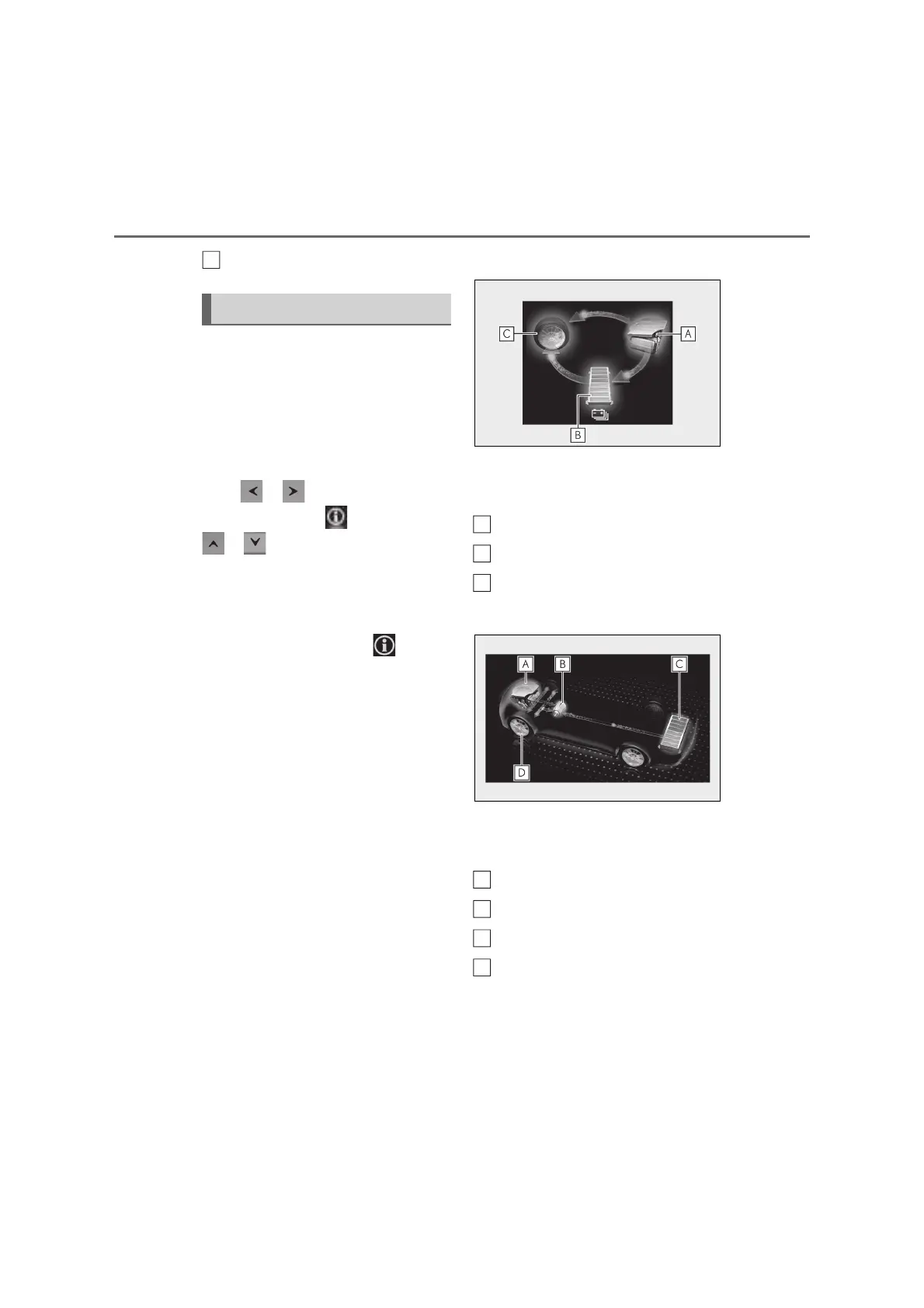
Multi-information display
The image shows all the arrows as an
example. The actual display will vary
depending on conditions.
Gasoline engine
Hybrid battery (traction battery)
Tires
Center Display
The image shows all the arrows as an
example. The actual display will vary
depending on conditions.
Gasoline engine
Electric motor (traction motor)
Hybrid battery (traction battery)
Tires
Energy monitor
F
A
B
C
D



 To Next Page