498
ES350_300h_OM_OM33A60U_(U)
5-3. Using the Lexus Display Audio system
You can confirm and change the detailed Bluetooth
®
settings.
Display the “Bluetooth* Settings” screen. (P. 491)
Select “Detailed Bluetooth* Settings” on the “Bluetooth* Settings”
screen.
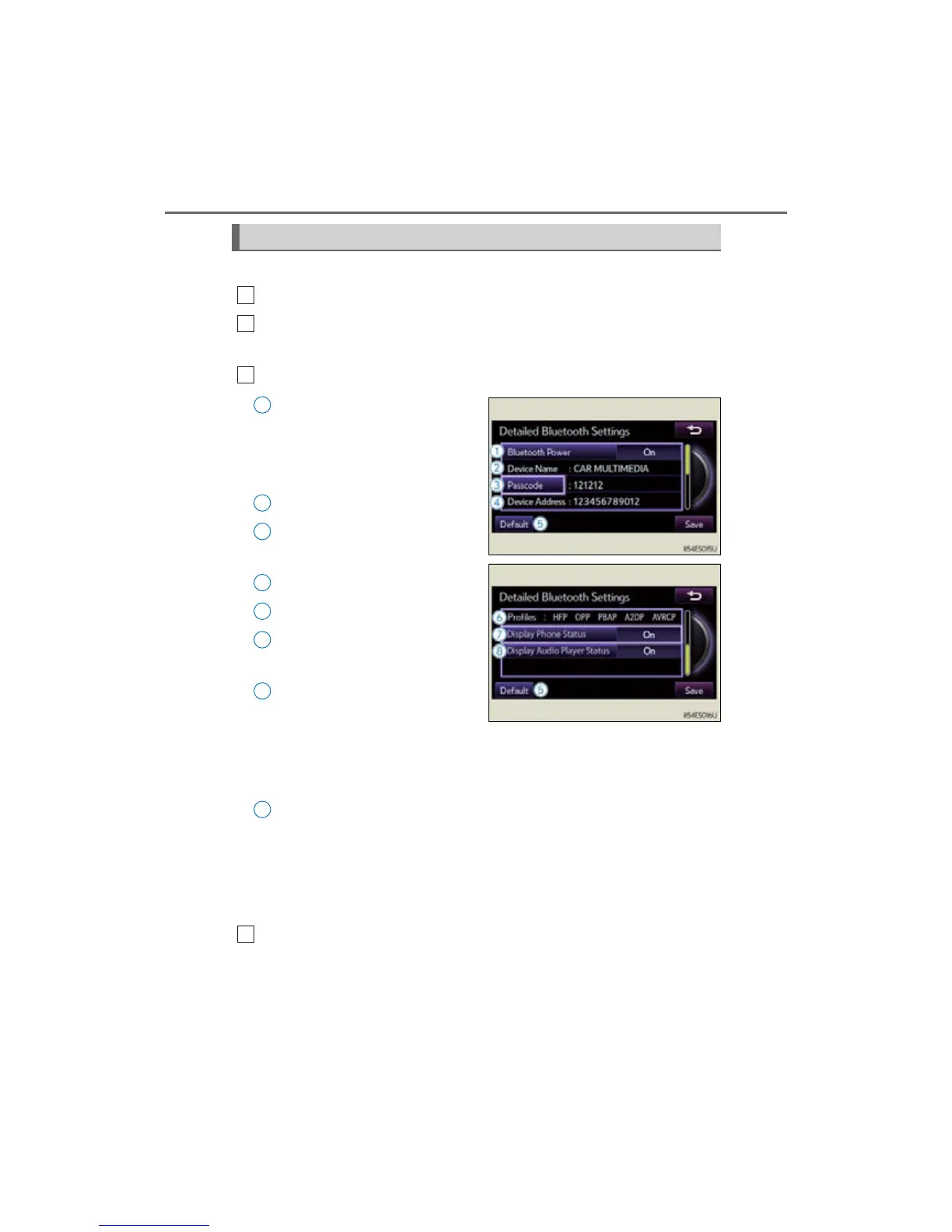
Following screen is displayed:
Change Bluetooth
®
power
on/off
You can change Bluetooth
®
func-
tion to “On” or “Off”
Display device name
Change passcode
(P. 499)
Display device address
Restore default settings
Display compatibility profile of
the system
Change displaying telephone
status on/off
You can set the system to show the
status confirmation display when
connecting telephone
Change displaying audio
player status on/off
You can set the system to show the
status confirmation display when
connecting audio player
When you complete settings, select “Save”.
*: Bluetooth is a registered trademark of Bluetooth SIG, Inc.
Detailed Bluetooth
®
settings
1
2



 To Next Page