ES350_300h_OM_OM33A60U_(U)
555
5-4. Using the audio system
5
Interior features
Input the passkey into the portable player.
Refer to the manual that comes with the portable player for the operation of the
portable player.
Guidance for registration completion is heard.
If the portable player has a Bluetooth
®
phone, the phone can be regis-
tered at the same time. A voice guidance instruction to register a
Bluetooth
®
phone is heard.
Select “Yes” or “No” using a voice command or .
(Bluetooth
®
phone P. 577)
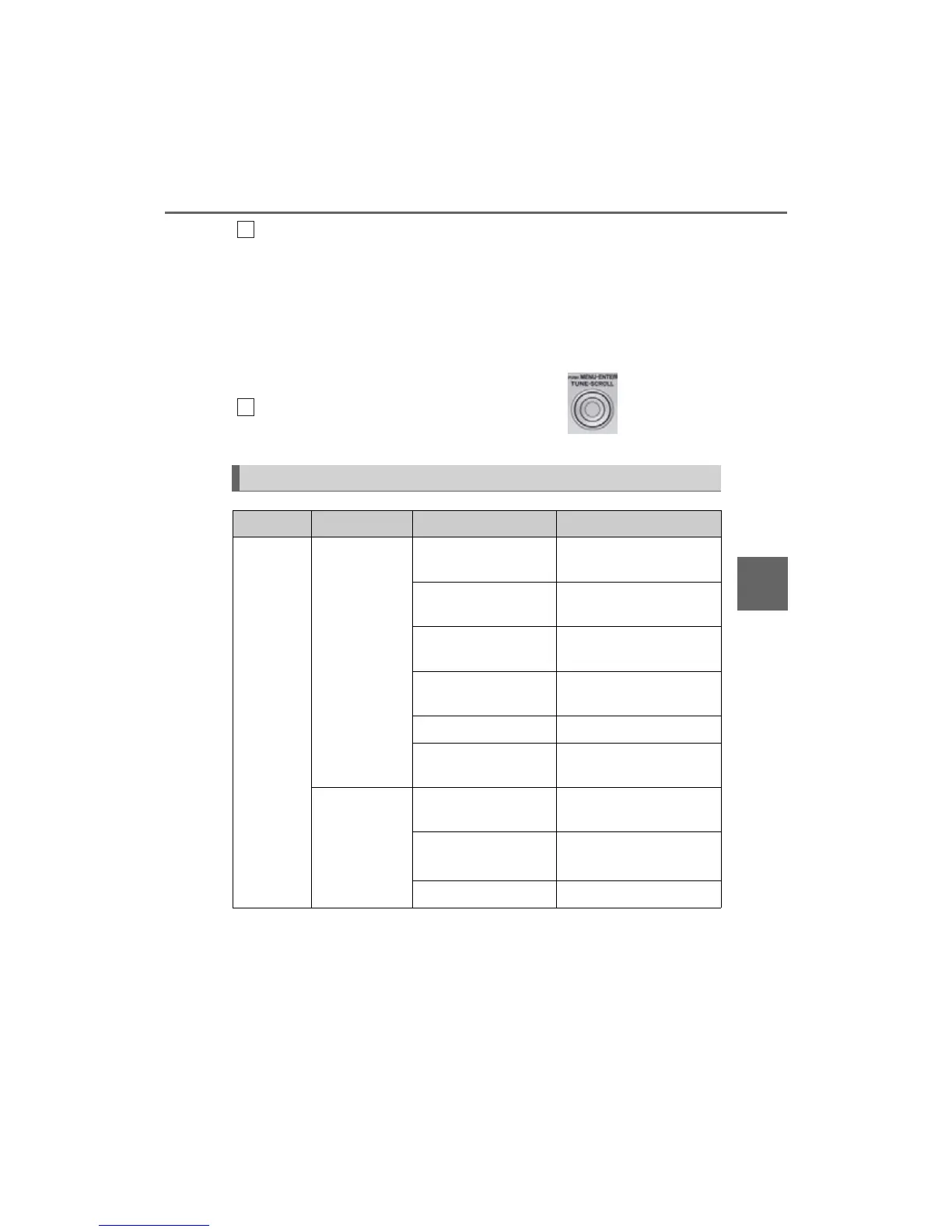
Menu list of the Bluetooth
®
audio system
First menu Second menu Third menu Operation detail
“Setup”
“BT•A Setup”
“Pair Audio”
Registering a portable
player
“Connect”
Selecting a portable player
to be used
“Change Name”
Changing the registered
name of a portable player
“List Audios”
Listing the registered por-
table players
“Set Passkey” Changing the passkey
“Delete Audio”
Deleting a registered por-
table player
“System Setup”
“Guidance Vol”
Setting voice guidance
volume
“Device Name”
Displaying the Bluetooth
®
device address and name
“Initialize” Initializing the system
6
7



 To Next Page