WATCHING TV / CHANNEL CONTROL
29
■
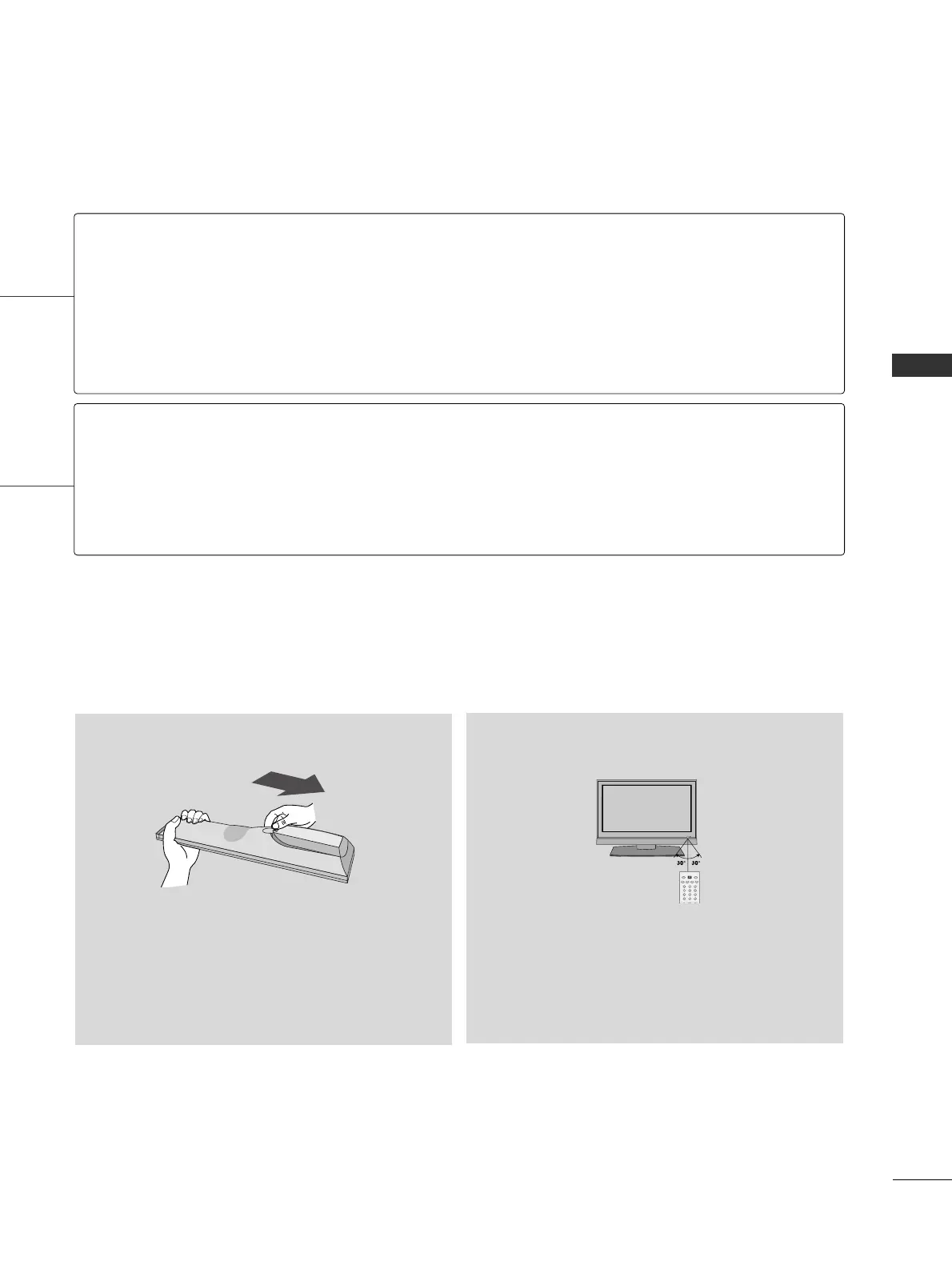
Open the battery compartment cover on the back
side and install the batteries matching correct
polarity
(
+ with +, - with -
)
.
■
Install two 1.5V AAA batteries. Don’t mix old or
used batteries with new ones.
■
Close cover.
■
Use a remote control up to 7 meters distance
and 30 degree (left/right) within the receiving
unit scope.
■
Dispose of used batteries in a recycle bin to
preserve environment.
Installing Batteries
Remote control effective range
NUMBER button
Turns your TV or any other programmed equipment on or off, depending on the mode.
In AV, Component, RGB-PC, and HDMI input sources, screen returns to the last TV channel.
External input modes rotate in regular sequence: TV, AV, Component, RGB-PC, and HDMI.
(AV, Component, RGB-PC, and HDMI input sources are linked automatically, only if a device
is connected.)
Used to enter a program number for multiple program channels such as 2-1, 2-2, etc.
Scroll through the programmed Favorite channels.
GG
pp..3344
POWER
TV
INPUT
— (DASH)
FAV



 To Next Page