24
ENG
ENGLISH
CUSTOMIZING SETTINGS
Eachoptionisexplainedbelow.
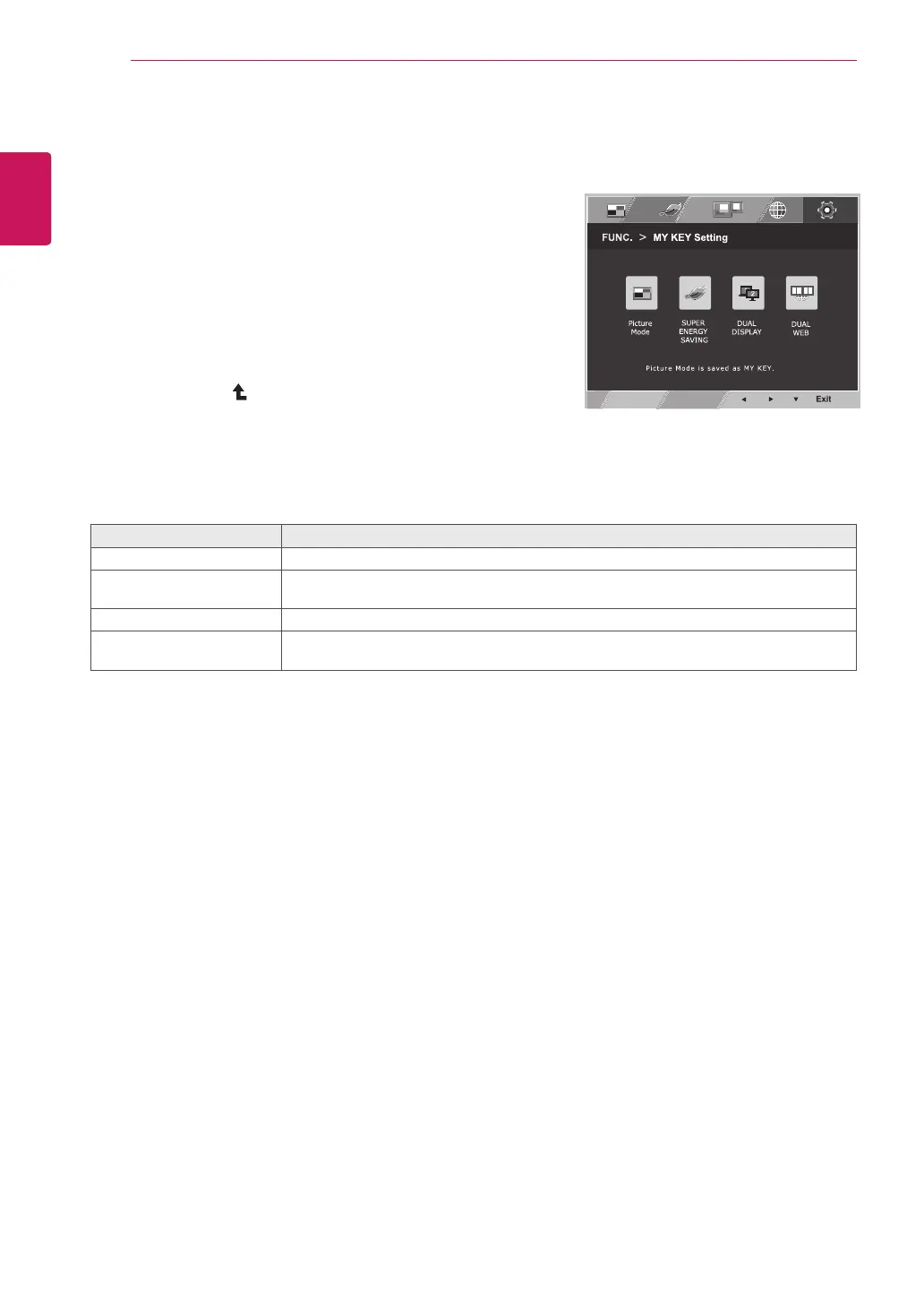
MYKEYSetting
1
Press
FUNC.
buttononthebottomoftheMonitor
settodisplaythe
FUNC.
OSD.
2
Select
MYKEYSetting
bypressingthe►button.
3
Enterto
MYKEYSetting
bypressingthe▼button.
4
Settheoptionsbypressingthe◄or►buttons.
5
Select
Exit
to leavetheOSDmenu.Toreturnto
theuppermenuorsetothermenuitems,use
theuparrow ( )button.
MYKEYSetting Description
PictureMode
PictureModeadjusttheMonitorsetforthebestpictureappearance.
SUPERENERGYSAVING
EnablesSUPERENERGYSAVINGyoucansaveenergywiththisenergy-effcient
function.
DUALDISPLAY
UsercanuseCloneorExtendedinanothermonitor.
DUALWEB
Helpusertobrowsewebefficientlybydividinginhalfandsomeotherconveniencein
browsingdualpages.


 To Next Page