8
ENG
ENGLISH
ASSEMBLING AND PREPARING
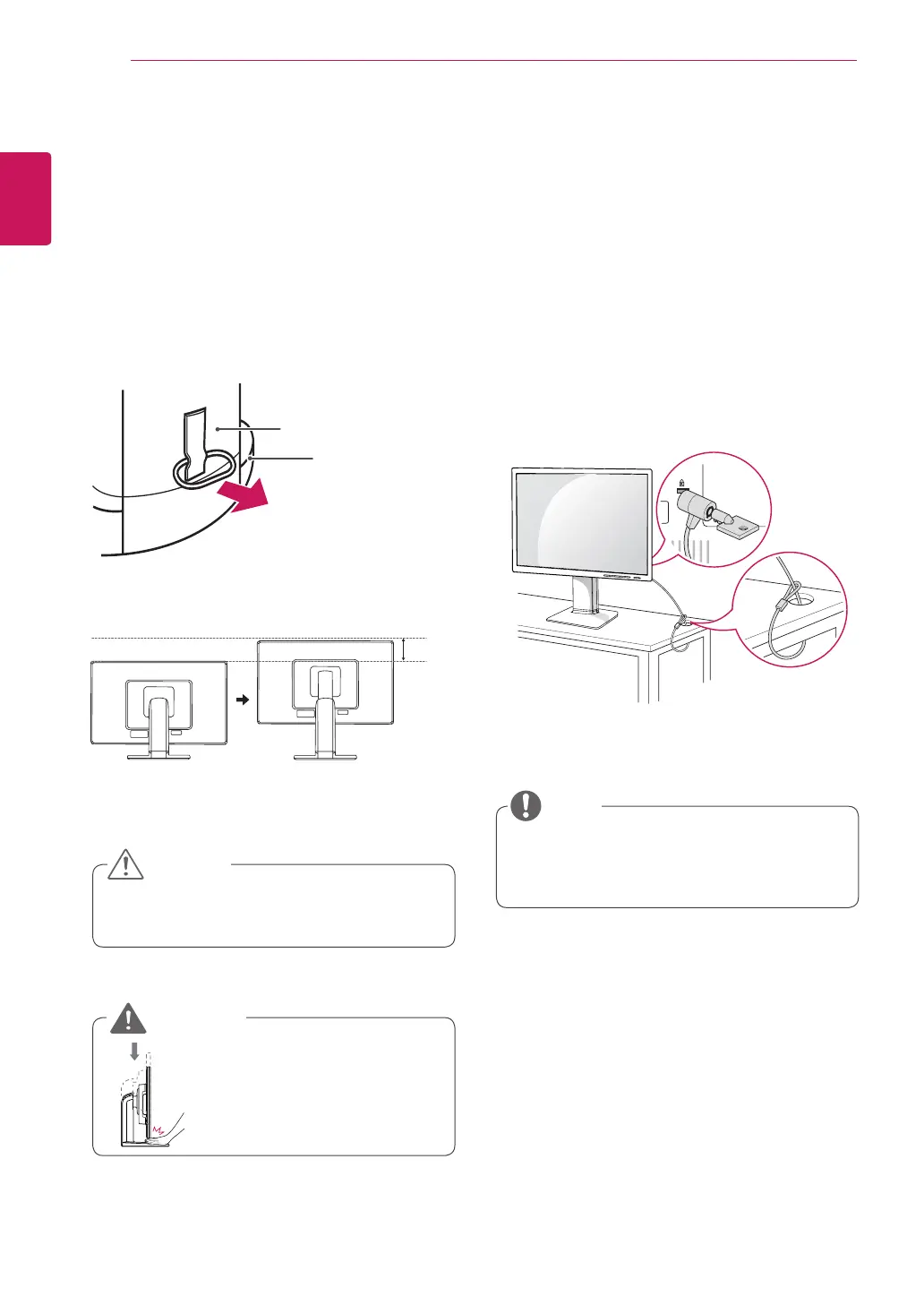
Using the Kensington locking
device
TheconnectorfortheKensingtonlockislocated
ontherearofthemonitor.
Formoreinformationoninstallationandusage,
refertotheKensingtonlockusermanualorvisit
thewebsiteathttp://www.kensington.com.
ConnectthemonitortothetablewiththeKensing-
tonlockcable.
UsingtheKensingtonlockisoptional.The
accessoriescanbepurchasedatyourlocal
electronicsstore.
NOTE
Oncethepinisremoved,itisnotnecessary
tore-insertittoadjusttheheight.
Adjustingthestandheight
1
Placethemonitormountedonthestandbase
inanuprightposition.
2
Removethe
tape
attachedatthebottomrear
ofthe
standbody,
thenpulloutthe
locking
pin
.
3
Theheightcanbeadjustedupto
120mm
.
Donotputyourfingerbe-
tweenthescreenandthe
base(chassis)whenadjust-
ingthescreen'sheight.
Tape
LockingPin
StandBody
CAUTION
WARNING
120.0mm



 To Next Page