23
ENGLISH
Connecting AV Devices
HDMI Connection
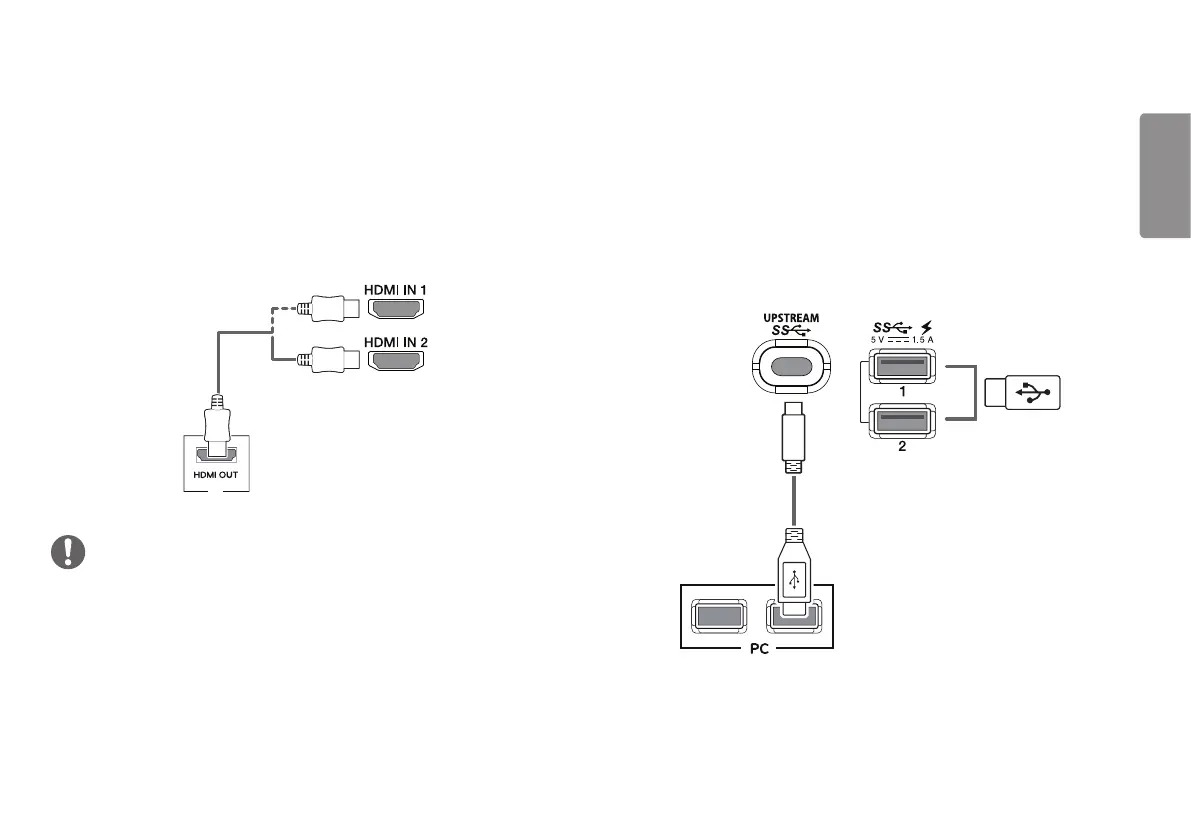
HDMI transmits digital video and audio signals from your AV device to the monitor.
Connect your AV device to the monitor using the HDMI cable as shown in the
illustration below.
AV
NOTE
Make sure to use the supplied HDMI cable of the product. Otherwise, this may
cause the device to malfunction.
Using a DVI to HDMI / DP (DisplayPort) to HDMI cable may cause compatibility
issues.
Use a certified cable with the HDMI logo attached. If you do not use a certified
HDMI cable, the screen may not display or a connection error may occur.
Recommended HDMI cable types
- High-Speed HDMI
®
/
TM
cable
- High-Speed HDMI
®
/
TM
cable with Ethernet
Connecting Peripherals
USB Cable connection
The USB port on the product functions as a USB hub.
Please connect the USB C-C cable or USB C-C cable + USB C-A gender to the PC.
To use USB 3.0, connect the USB C-C cable + USB C-A gender of the product to the PC.
Peripheral devices connected to the USB IN port can be controlled from the PC.
(sold separately)
(sold separately)


 To Next Page