EasyManua.ls Logo

LG 42PC3RV - Advanced-Cinema

LG 42PC3RV
89 pages
Print Icon
To Next Page IconTo Next Page
To Previous Page IconTo Previous Page
Loading...
TV MENU
/
PICTURE ADJUSTMENT
43
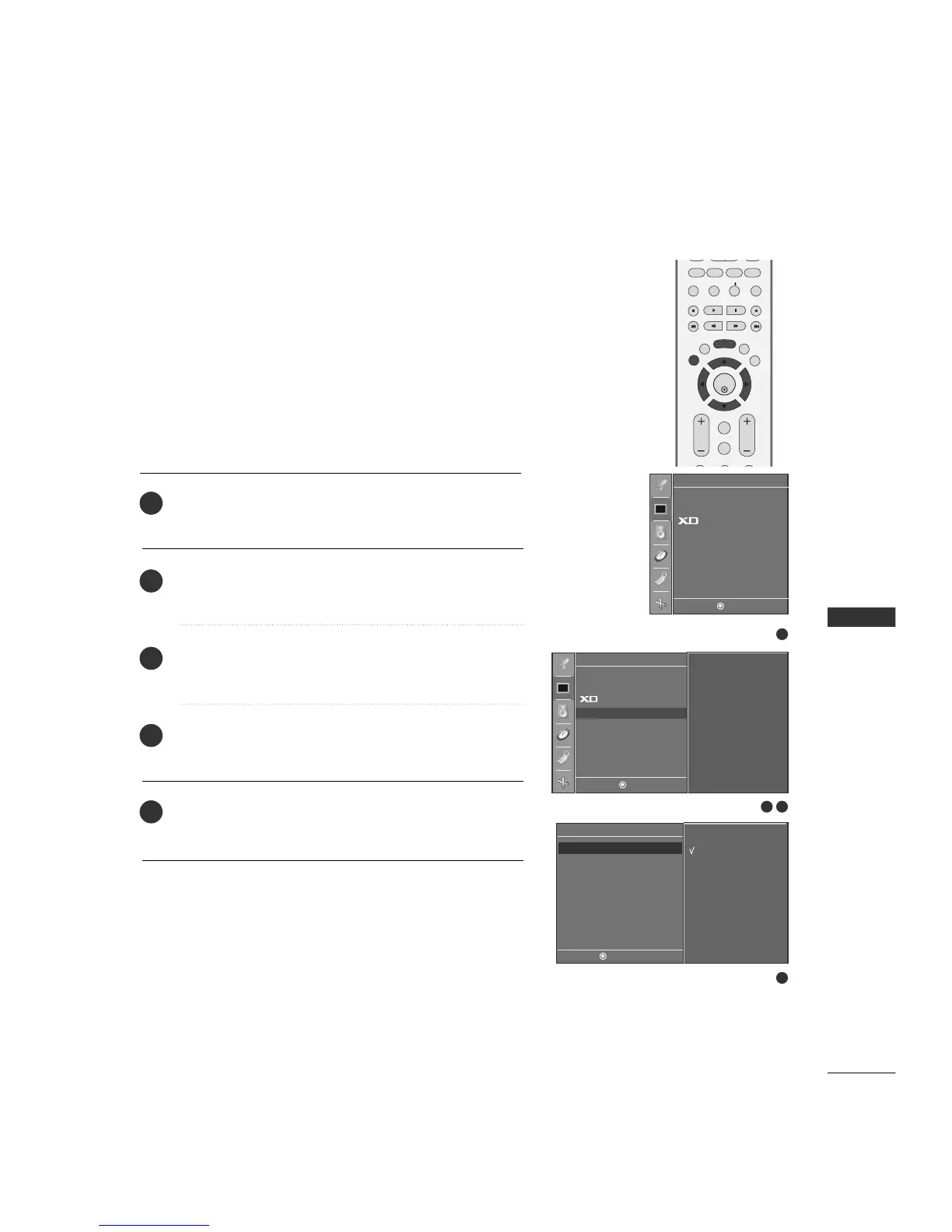
ADVANCED-CINEMA MODE SETUP
Set up the TV for the best picture appearance for viewing
movies.
When you operate Cinema (3:2 Pull-Down Mode or Cinema
Correction Mode), the TV will adjust 24 fps video from movies
to 30 fps video for display.
This feature operates only in Analog TV, Video and Component
480i mode.

PIP PR- PIP PR+
PIP INPUT
EXIT
VOL
MUTE
CH
SLEEP
MENU
PIP SIZE
POSTION
ENTER
REVIEW
MEMORY/ERASE
CAPTION
MTS
Press the
MMEENNUU
button and then
DD
or
EE
button to select
the
PPiiccttuurree
menu.
Press the
GG
button and then
DD
//
EE
button to select
AAddvvaanncceedd
.
Press the
GG
button and then
DD
//
EE
button to select
CCiinneemmaa
.
Press the
GG
button and then
DD
//
EE
button to select
OO nn
or
OOffff..
Press the
EEXXIITT
button to return to TV viewing or press the
MMEENNUU
button to return to the previous menu.
1
2
3
4
5
4
1
2 3
Picture
DE F G
MENU
To set
APC
ACC
Advanced G
Reset
Advanced
DE F G
MENU
On
Off
Cinema G
Black Level
APC
ACC
Advanced
Reset
Picture
DE F G
MENU

Table of Contents