Adjusting the contrast and the brightness of the screen using
the black level of the screen.
This feature operates only in Video (NTSC-M) or HDMI mode.
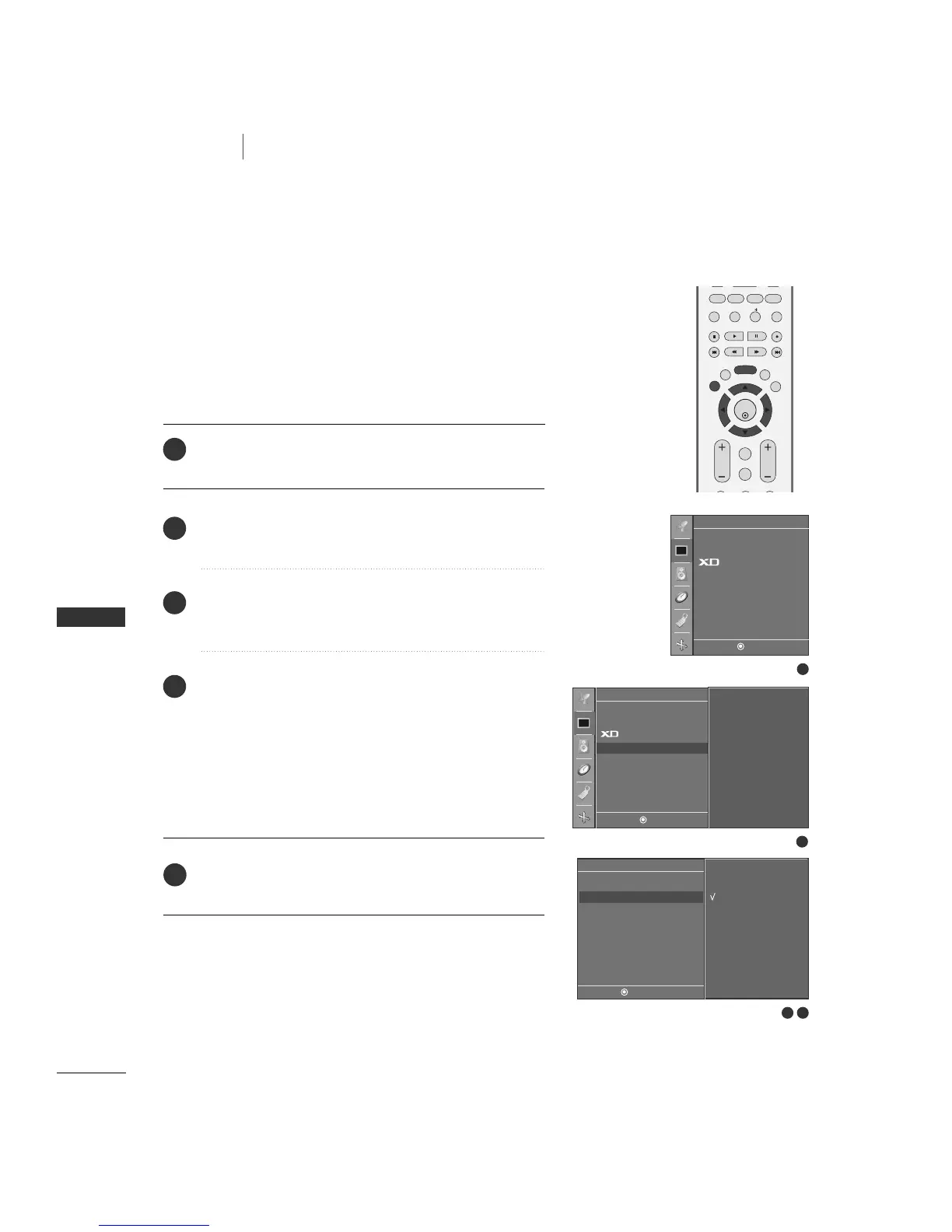
Press the
MMEENNUU
button and then
DD
or
EE
button to select
the
PPiiccttuurree
menu.
Press the
GG
button and then
DD
//
EE
button to select
AAddvvaanncceedd
.
Press the
GG
button and then
DD
//
EE
button to select
BBllaacckk LLeevveell
.
Press the
GG
button and then
DD
//
EE
button to select
LL ooww
or
HHiigghh..
■
LL ooww
The screen gets darker.
■
HHiigghh
The screen gets brighter.
Press the
EEXXIITT
button to return to TV viewing or press the
MMEENNUU
button to return to the previous menu.
1
2
3
4
5
3 4
1
2
Picture
DE F G
MENU
To set
APC
ACC
Advanced G
Reset
Advanced
DE F G
MENU
Low
High
Cinema
Black Level
G
APC
ACC
Advanced
Reset
Picture
DE F G
MENU


 To Next Page